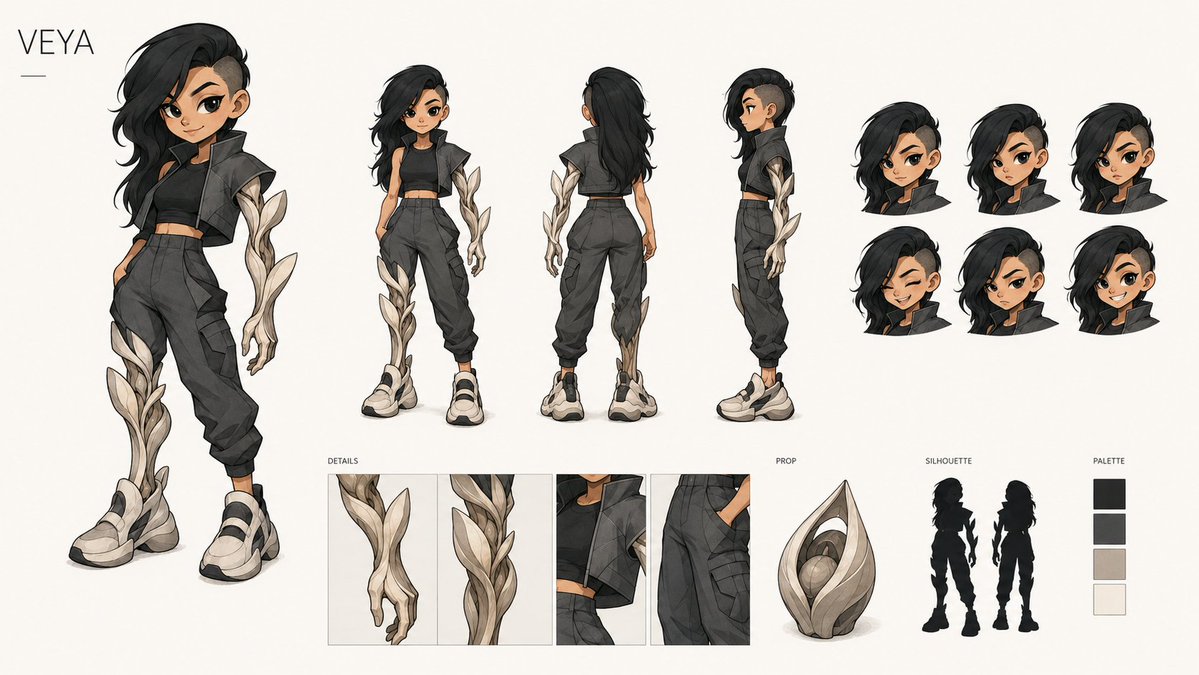
VEYA Character Design Sheet
Prompt
Goal: Create a polished anime-style character design sheet for VEYA, a futuristic streetwear heroine with organic ivory armor growths.

Canvas: Wide horizontal concept art board, 16:9 aspect ratio, warm off-white background, clean margins, premium game/animation production sheet presentation. Put the name “VEYA” in thin uppercase letters at the top left with a short horizontal line beneath it.

Layout: Show exactly 4 full-body character views across the upper and left area: 1 large dynamic hero pose on the far left, 1 smaller front view, 1 smaller back view, and 1 smaller side view. On the upper right, include exactly 6 cropped head bust studies arranged in a 3-by-2 grid, all showing the same hairstyle from slightly varied angles/expressions. Along the bottom, include exactly 4 labeled detail panels under the label “DETAILS”: close-up of the organic armored hand, close-up of the vine-like leg armor, close-up of the cropped jacket and neck area, and close-up of cargo pants pocket construction. To the lower middle-right, include exactly 1 object under the label “PROP”: a seed-pod-shaped ivory sculptural artifact with layered leaf forms and a glowing round core. To its right, include the label “SILHOUETTE” with exactly 2 black character silhouettes, one front-facing and one back-facing. On the far lower right, include the label “PALETTE” with exactly 4 vertical color swatches: near-black, charcoal gray, warm beige ivory, and off-white.

Subject details: The character is a young adult woman with tan skin, athletic slim build, asymmetrical long black hair swept dramatically over one side, shaved/undercut on the opposite side, and a confident urban attitude. She wears a cropped black sleeveless top, a short oversized dark cropped jacket or vest with angular shoulders, high-waisted charcoal cargo jogger pants with seams and pockets, a slim belt, and chunky cream-and-black sneakers. Add distinctive organic ivory armor shaped like twisting leaves or branches on one arm and one lower leg, with layered petal-like plates, subtle gray shadows, and elegant botanical curves.

Visual style: High-end 2D concept art, clean ink lines, soft cel shading, subtle watercolor texture, muted charcoal and ivory palette, fashionable sci-fi fantasy streetwear, crisp production-design sheet, no photorealism. Faces should be simplified or softly obscured rather than highly detailed, while clothing, hair, armor, and props remain sharp and readable.

Constraints: Keep the composition uncluttered and balanced; preserve all visible labels in English: “VEYA”, “DETAILS”, “PROP”, “SILHOUETTE”, and “PALETTE”. Use exactly 4 full-body views, 6 head busts, 4 detail panels, 1 prop, 2 silhouettes, and 4 palette swatches. Do not add extra characters, weapons, logos, watermarks, or background scenery.
- Category
- Scenes & Storytelling
- Model
- GPT Image 2
- Creator
- noise2pix
- Source ID
- youmind-24203
Views3