15

Wes anderson palette king: GPT Image 2 prompt
Enlarge

Wes anderson palette king: GPT Image 2 prompt

Prompt
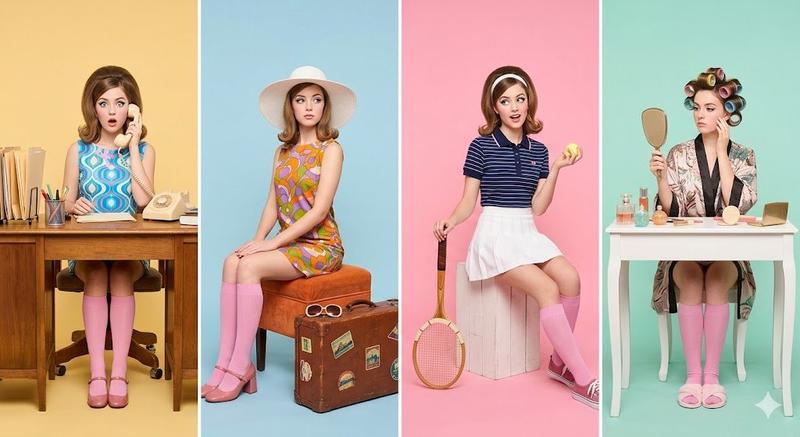
A retro-inspired studio photoshoot featuring a young woman styled in four different personas, arranged in a horizontal split-panel composition. Each panel has a bold pastel background in contrasting colors (yellow, blue, pink, mint). The same woman appears in each panel wearing vintage 1960s fashion with bright patterns, pink knee-high socks, and expressive makeup.
Panel 1 (Office theme): She sits behind a desk with office props like folders, a rotary phone, and stationery, wearing a patterned dress and looking surprised while holding the phone.
Panel 2 (Travel theme): She wears a wide-brim hat and colorful outfit, sitting with a vintage suitcase and travel accessories, posing elegantly.
Panel 3 (Sports theme): She wears a sporty retro outfit, holding a tennis racket and ball, sitting casually with playful energy.
Panel 4 (Home theme): She wears a robe with hair rollers, holding a hand mirror, sitting at a vanity table with beauty items.
Each panel is cleanly divided, perfectly symmetrical, with consistent lighting and camera angle. Bright, soft studio lighting, high fashion editorial style, ultra-sharp, vibrant colors, minimal shadows, no text, no logos, no labels, no watermarks.
Style: vintage pop art, Wes Anderson symmetry, fashion editorial photography, pastel color blocking, high resolution, 8k, clean composition.
Category
Photography & Realism
Model
GPT Image 2
Creator
Cherry 2.O
Views0
Source ID
2043539455131459957
Published
Apr 13, 2026

Guide

About "Wes anderson palette king: GPT Image 2 prompt"

What is this prompt for?

"Wes anderson palette king: GPT Image 2 prompt" AI image prompt for GPT Image 2 (Photography & Realism). A retro-inspired studio photoshoot featuring a young w…

The full copyable prompt and example visuals above are ready for AI image generation or one-click recreate in Picva.

How to use this prompt

  1. Step 1

    Open the prompt detail

    Review the example visuals, category, and full prompt text for "Wes anderson palette king: GPT Image 2 prompt".

  2. Step 2

    Copy the prompt

    Copy the prompt body from this page, or load it directly in Studio.

  3. Step 3

    Pick a model (GPT Image 2)

    Prefer GPT Image 2. If you switch models, keep subject and composition and tweak style terms.

  4. Step 4

    Generate and export

    Recreate the look in Picva, or export into your workflow for editing and publishing.

FAQ

What is the "Wes anderson palette king: GPT Image 2 prompt" prompt?
It is an AI image-generation prompt for GPT Image 2 in the Photography & Realism category. This page includes the full prompt text, example visuals, and a one-click recreate path in Picva.
How do I use this prompt to generate an image?
Copy the prompt from this page, or use Generate / Studio. Paste it into a compatible image model, or recreate the look in Picva with optional reference images.
Which model is this prompt for?
This page lists GPT Image 2. Most descriptive prompts also transfer to nearby image models such as GPT Image, Flux, or Midjourney with light style tweaks.
Can I use the result commercially?
You can usually copy the prompt for creation, but commercial use of the final image depends on the model terms, reference-image rights, and the generated content. Follow the source author and platform rules.