Three-panel character reference sheet: GPT Image 2 prompt
Prompt
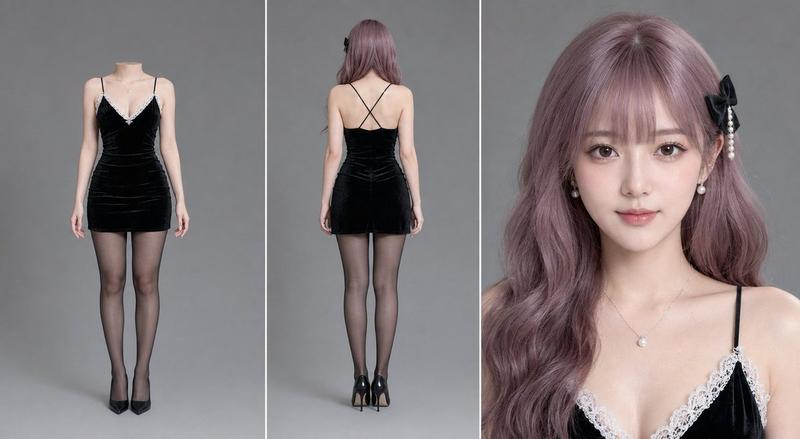
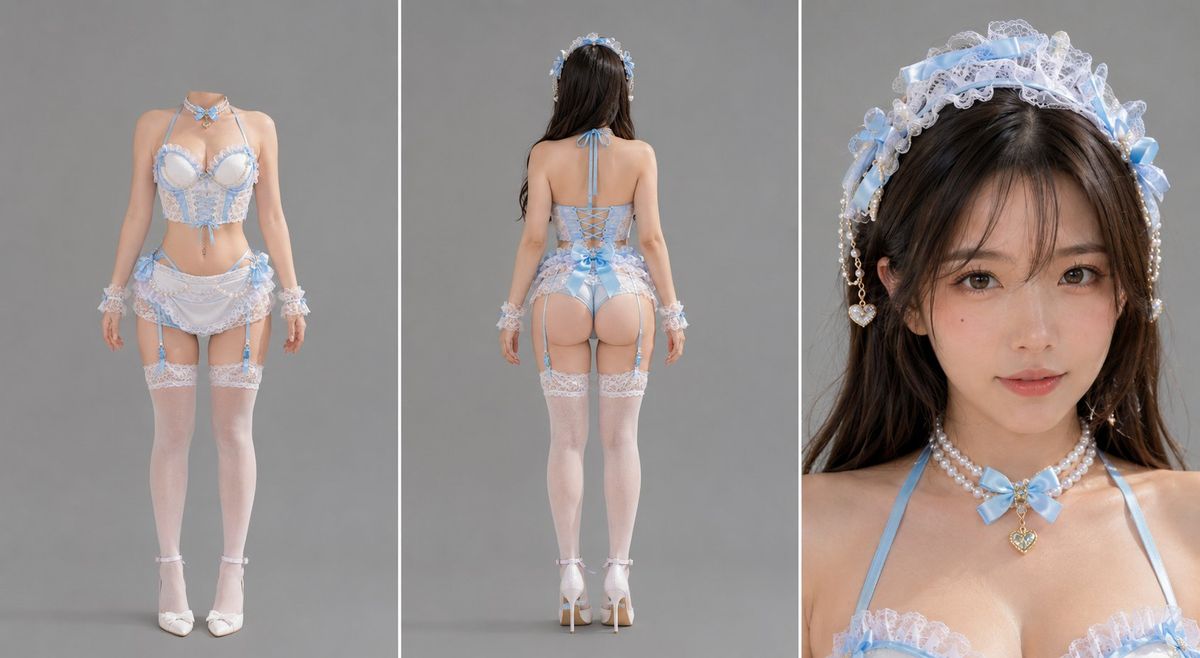
Based on the attached reference image, generate a three-panel character reference sheet. The composition is a horizontal image divided equally into three vertical panels with clean, thin divider lines. Strictly keep the character's face, hairstyle, hair color, body proportions, clothing, styling, and accessories exactly consistent with the reference image; all three panels show the same person in the same outfit.

Left panel - front full-body view, headless. The body faces the camera from below the shoulders down to the feet. Both arms hang naturally at the sides, hands relaxed and open, weight evenly placed on both feet. No head, no hair, nothing above the shoulder line, and no hair falling over the chest or shoulders. The neck ends at the base of the throat with a clean, flat, sharply defined horizontal cut, like a headless mannequin with a crisp sculptural edge. It is not blurred, faded, smoky, transparent, ghosted, bloody, or anatomical; above the cut is only blank background. Preserve normal full-body spacing with enough empty space above the shoulders so the figure's scale and placement match a normal full-body portrait.

Middle panel - back full-body view with head. The same person is photographed from directly behind, standing straight. Hair falls naturally down the back. The back structure of the clothing, hemline or trouser shape, and shoes are clearly visible. Both arms hang naturally at the sides, hands relaxed, weight evenly placed on both feet, with the full figure visible from the top of the head to the shoes.

Right panel - tight chest-up close-up for identity locking. The same person is framed tightly from slightly above the head to the collarbone, showing only the upper edge of the clothing. The face occupies most of the frame in a true close-up. The body faces the camera, head level, eyes looking directly into the lens, lips closed and relaxed, with a neutral restrained expression. The eyes, eyebrows, lashes, lip texture, and key identity markers are clear at close range.

Unified background across all three panels: flat, even 18% middle-gray seamless background with one solid color value, no gradients or falloff. Shadowless frontal illumination with even fill from all sides, no key-light side, no shadow side, no rim light or edge light. The background has no projected shadow and there is zero cast shadow under the feet. Lighting is completely consistent across all three panels.

Photorealistic quality, with fine even pores and subsurface scattering visible in the skin, individually defined hair strands, clear fabric weave, and subtle film grain. Real human, real camera photography, never plastic-looking, never rendered, never CGI, no AI skin smoothing, and no excessive smoothing.
- Category
- Characters & People
- Model
- GPT Image 2
- Creator
- John
- Source ID
- 2078089955247632740
- Published
- Jul 17, 2026
Views8