11

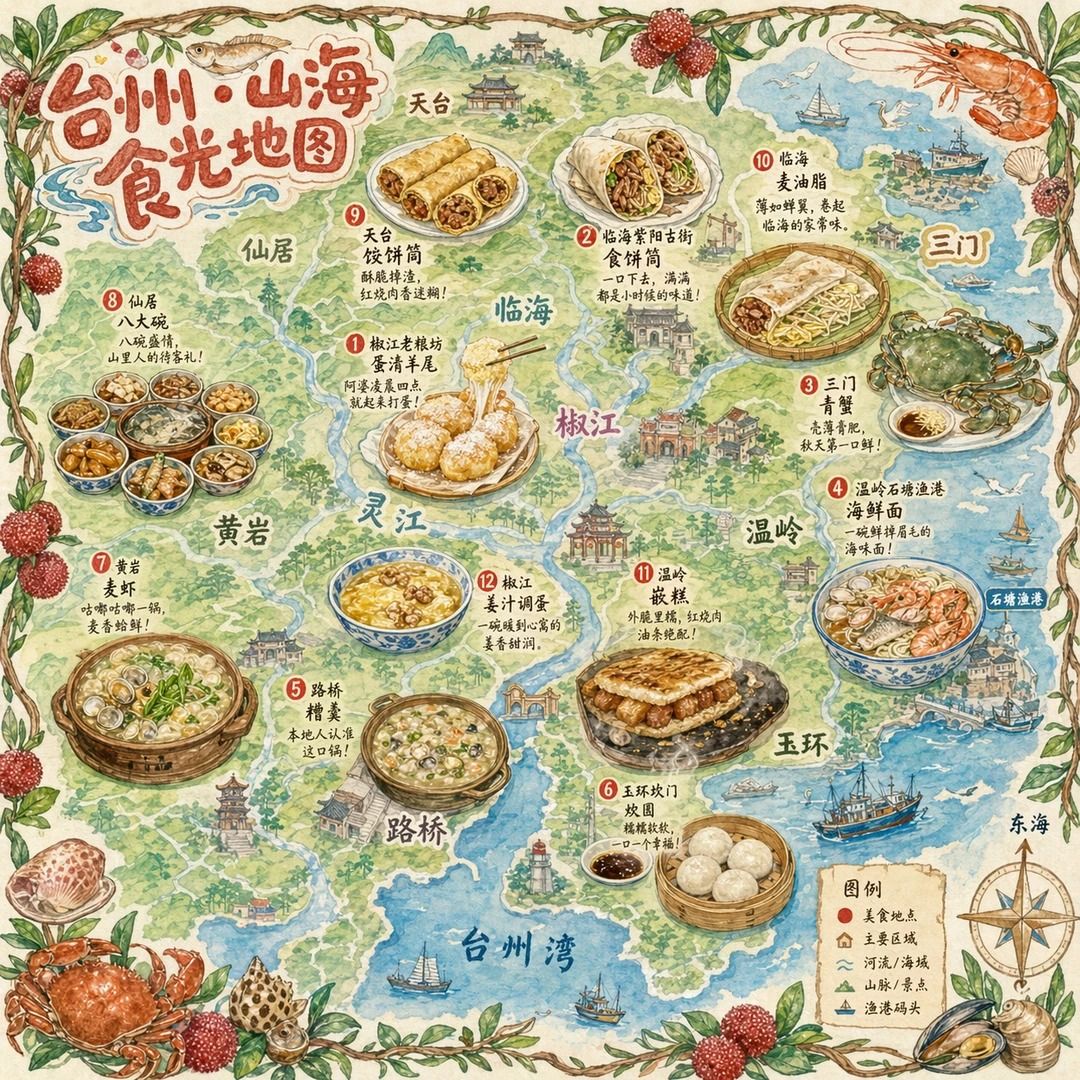
一张手绘风格的城市美食地图,以台州为主题
Enlarge

一张手绘风格的城市美食地图,以台州为主题

Prompt
一张手绘风格的城市美食地图,以台州为主题。画面以鸟瞰视角的手绘简化城市地图为底,标注椒江、路桥、黄岩等区域和灵江、台州湾等水系地标,不追求精确比例而是追求可爱的水彩手绘感。地图上分布着12个美食地点的精致手绘小插画:1. 椒江老粮坊的蛋清羊尾(金黄蓬松的蛋泡甜点撒着糖粉,筷子夹起拉丝)2. 临海紫阳古街的食饼筒(一个饱满的麦饼卷切开露出肉丝、蛋皮、米面等丰富馅料)3. 三门的青蟹(一只肥硕的青壳大蟹张着大钳子,旁边一小碟姜醋)4. 温岭石塘渔港的海鲜面(粗瓷大碗浓白鱼汤面铺满虾、蛏子、小黄鱼)5. 路桥的糟羹(一锅稠厚的五彩羹,芥菜、冬笋、香干、牡蛎粒粒可见)6. 玉环坎门的炊圆(三四个白胖糯米团子卧在笼屉里,旁边酱油碟滴着麻油)7. 黄岩的麦虾(陶锅里面疙瘩配蛤蜊、青菜翻滚冒泡)8. 仙居的八大碗(八只粗陶小碗围成一圈——土鸡、溪鱼、豆腐皮俱全)9. 天台的饺饼筒(几卷金黄酥脆的薄饼整齐码放,露出红烧肉和豆面馅)10. 临海的麦油脂(竹盘上摊着薄如蝉翼的饼皮卷着肉末、豆芽、鸡蛋丝)11. 温岭的嵌糕(厚实的年糕饼中间嵌着红烧肉和油条,正在铁板上滋滋作响)12. 椒江的姜汁调蛋(一只青花碗里琥珀色姜汤卧着嫩滑蛋花,撒几粒核桃碎)。每个插画约占地图5%面积,旁边用手写体标注店名和一句推荐语如“阿婆凌晨四点就起来和面”“本地人认准这口锅”。地图边缘用手绘藤蔓、杨梅枝和小海鲜(虾、蟹、贝壳)装饰形成边框。右下角有一个手绘指南针(标注“东海”方向)和图例说明。左上角标题“台州·山海食光地图”使用胖圆的手绘美术字,用杨梅和小黄鱼点缀装饰。整体画风为水彩+彩铅混合的手绘质感,颜色以杨梅红、姜黄、海蓝、翠绿为主,图片比例1:1。
Category
Architecture & Spaces
Model
GPT Image 2
Views7
Source ID
11

Guide

About "一张手绘风格的城市美食地图,以台州为主题"

What is this prompt for?

"一张手绘风格的城市美食地图,以台州为主题" AI image prompt for GPT Image 2 (Architecture & Spaces). 一张手绘风格的城市美食地图,以台州为主题。画面以鸟瞰视角的手绘简化城市地图为底,标注椒江、路桥、黄岩等区域和灵江、台州湾等水系地标,不追求精确比例而是追求可爱…

The full copyable prompt and example visuals above are ready for AI image generation or one-click recreate in Picva.

How to use this prompt

  1. Step 1

    Open the prompt detail

    Review the example visuals, category, and full prompt text for "一张手绘风格的城市美食地图,以台州为主题".

  2. Step 2

    Copy the prompt

    Copy the prompt body from this page, or load it directly in Studio.

  3. Step 3

    Pick a model (GPT Image 2)

    Prefer GPT Image 2. If you switch models, keep subject and composition and tweak style terms.

  4. Step 4

    Generate and export

    Recreate the look in Picva, or export into your workflow for editing and publishing.

FAQ

What is the "一张手绘风格的城市美食地图,以台州为主题" prompt?
It is an AI image-generation prompt for GPT Image 2 in the Architecture & Spaces category. This page includes the full prompt text, example visuals, and a one-click recreate path in Picva.
How do I use this prompt to generate an image?
Copy the prompt from this page, or use Generate / Studio. Paste it into a compatible image model, or recreate the look in Picva with optional reference images.
Which model is this prompt for?
This page lists GPT Image 2. Most descriptive prompts also transfer to nearby image models such as GPT Image, Flux, or Midjourney with light style tweaks.
Can I use the result commercially?
You can usually copy the prompt for creation, but commercial use of the final image depends on the model terms, reference-image rights, and the generated content. Follow the source author and platform rules.