16

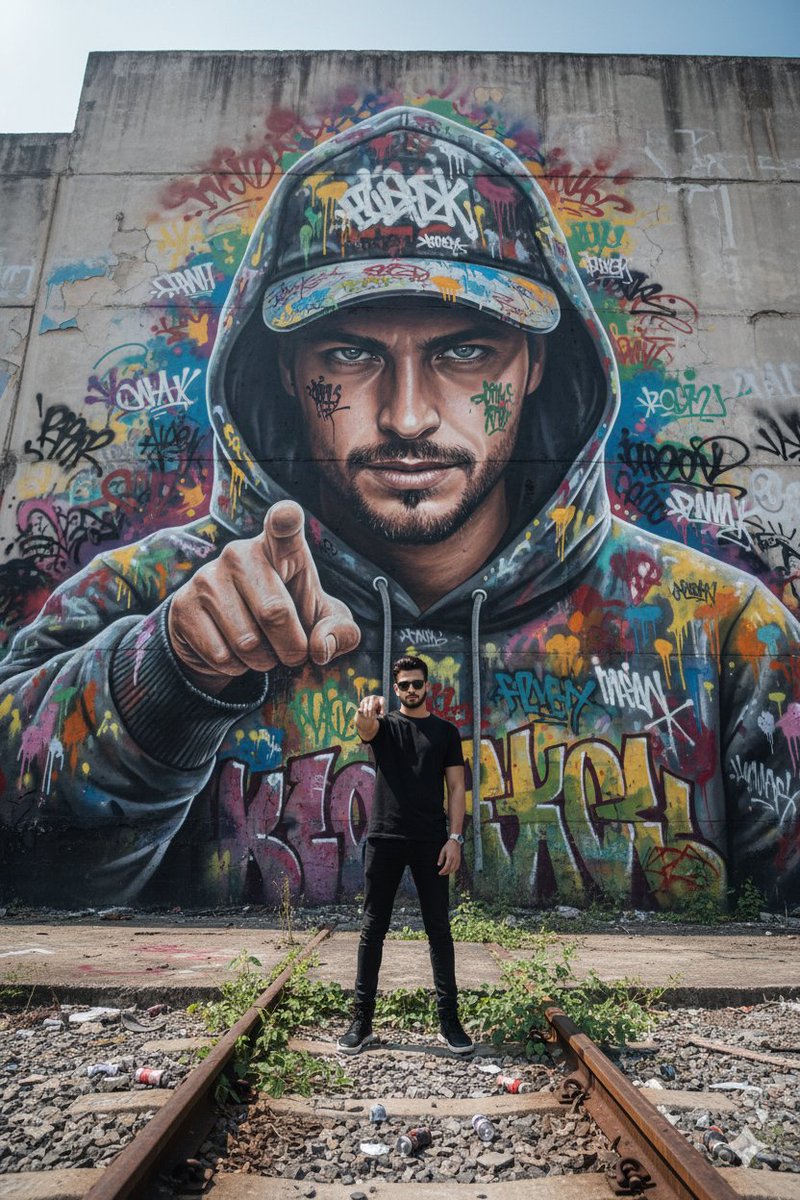
破次元壁!涂鸦人像从废墟中跃出
Enlarge

破次元壁!涂鸦人像从废墟中跃出

Prompt
A hyper-realistic, 8k, low-angle shot using a wide lens, looking up at a massive concrete graffiti wall in a derelict train yard. The subject, uploaded face as reference, appears painted as part of a giant, photorealistic street art mural covering the entire wall, but their upper body and head seem to be breaking out of the 2D wall into 3D reality. The "painted" portion of them wears a colorful spray-paint stained hoodie and cap. Their real, 3D face looks down with a rebellious smirk. The surrounding wall is covered in layers of vibrant tags and murals. In the foreground are real rusted train tracks and discarded spray cans. The scene is lit by harsh, direct sunlight creating strong shadows, highlighting the texture of peeling paint and concrete
Category
Posters & Typography
Model
Nano Banana Pro
Views5
Source ID
9004
Published
Jun 2, 2026

Guide

About "破次元壁!涂鸦人像从废墟中跃出"

What is this prompt for?

"破次元壁!涂鸦人像从废墟中跃出" AI image prompt for Nano Banana Pro (Posters & Typography). 一个超现实的 8k 低角度广角镜头,仰视着废弃火车场中一面巨大的混凝土涂鸦墙。主体(以上传的面部作为参考)似乎被绘制成覆盖整面墙的巨幅超写实街头艺术壁画的一部分,…

The full copyable prompt and example visuals above are ready for AI image generation or one-click recreate in Picva.

How to use this prompt

  1. Step 1

    Open the prompt detail

    Review the example visuals, category, and full prompt text for "破次元壁!涂鸦人像从废墟中跃出".

  2. Step 2

    Copy the prompt

    Copy the prompt body from this page, or load it directly in Studio.

  3. Step 3

    Pick a model (Nano Banana Pro)

    Prefer Nano Banana Pro. If you switch models, keep subject and composition and tweak style terms.

  4. Step 4

    Generate and export

    Recreate the look in Picva, or export into your workflow for editing and publishing.

FAQ

What is the "破次元壁!涂鸦人像从废墟中跃出" prompt?
It is an AI image-generation prompt for Nano Banana Pro in the Posters & Typography category. This page includes the full prompt text, example visuals, and a one-click recreate path in Picva.
How do I use this prompt to generate an image?
Copy the prompt from this page, or use Generate / Studio. Paste it into a compatible image model, or recreate the look in Picva with optional reference images.
Which model is this prompt for?
This page lists Nano Banana Pro. Most descriptive prompts also transfer to nearby image models such as GPT Image, Flux, or Midjourney with light style tweaks.
Can I use the result commercially?
You can usually copy the prompt for creation, but commercial use of the final image depends on the model terms, reference-image rights, and the generated content. Follow the source author and platform rules.