19

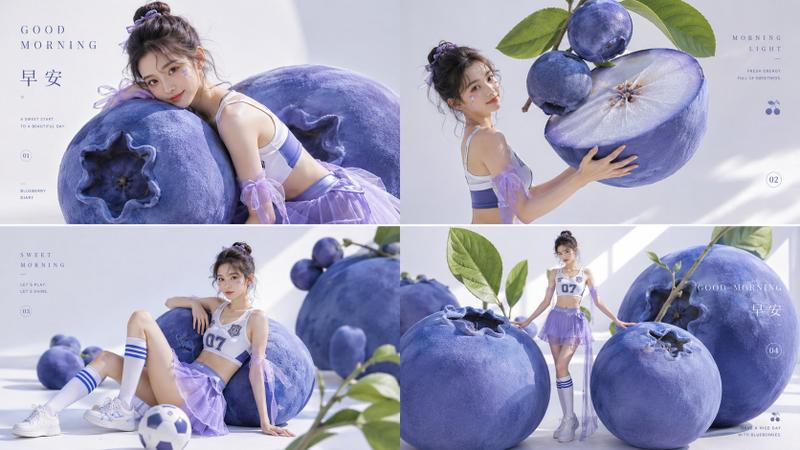
蓝莓主题可爱风人物海报
Enlarge

蓝莓主题可爱风人物海报

Prompt
Use the uploaded portrait only as a face reference. Keep the person’s facial identity, features, skin tone, and overall recognizable look. Remove the original background and unrelated objects.

Create a cute blueberry-themed poster portrait. The subject wears a large blue bow headband and a white dress with blueberry prints. She tilts her head, smiles, winks, and slightly opens her mouth.

Place her sitting on a large blueberry plush chair, hugging a blueberry plush toy. Surround her with blueberry plush toys and blueberry cake plushies labeled “BABY”. Use a clean blue-and-white split background with white doodle elements, stars, hearts, and cute graphic decorations.

Add the text: “!wish you happy everyay!”, “Sweet Blueberry”, and “SHINNING”. Keep the subject centered, with natural proportions, soft bright lighting, clean composition, high detail, and a cute premium poster style. 3:4 ratio.

Negative Prompt:
wrong face, changed identity, deformed face, bad eyes, bad mouth, bad teeth, bad hands, extra fingers, missing fingers, bad anatomy, oversized head, tiny body, awkward pose, cluttered background, random objects, unreadable text, misspelled text, watermark, logo, blurry, low resolution, overexposed, harsh shadows, plastic skin, cartoon, anime, uncanny, AI-looking.
Category
Posters & Typography
Model
ChatGPT
Views161
Source ID
14046
Published
May 8, 2026

Guide

About "蓝莓主题可爱风人物海报"

What is this prompt for?

"蓝莓主题可爱风人物海报" AI image prompt for ChatGPT (Posters & Typography). 仅使用上传的肖像作为面部参考。保留人物的面部身份、特征、肤色和整体可识别的外观。移除原始背景和无关物体。 创建一张可爱的蓝莓主题海报肖像。主体戴着大蓝色蝴蝶结发带,穿着带有蓝莓印花的白色…

The full copyable prompt and example visuals above are ready for AI image generation or one-click recreate in Picva.

How to use this prompt

  1. Step 1

    Open the prompt detail

    Review the example visuals, category, and full prompt text for "蓝莓主题可爱风人物海报".

  2. Step 2

    Copy the prompt

    Copy the prompt body from this page, or load it directly in Studio.

  3. Step 3

    Pick a model (ChatGPT)

    Prefer ChatGPT. If you switch models, keep subject and composition and tweak style terms.

  4. Step 4

    Generate and export

    Recreate the look in Picva, or export into your workflow for editing and publishing.

FAQ

What is the "蓝莓主题可爱风人物海报" prompt?
It is an AI image-generation prompt for ChatGPT in the Posters & Typography category. This page includes the full prompt text, example visuals, and a one-click recreate path in Picva.
How do I use this prompt to generate an image?
Copy the prompt from this page, or use Generate / Studio. Paste it into a compatible image model, or recreate the look in Picva with optional reference images.
Which model is this prompt for?
This page lists ChatGPT. Most descriptive prompts also transfer to nearby image models such as GPT Image, Flux, or Midjourney with light style tweaks.
Can I use the result commercially?
You can usually copy the prompt for creation, but commercial use of the final image depends on the model terms, reference-image rights, and the generated content. Follow the source author and platform rules.