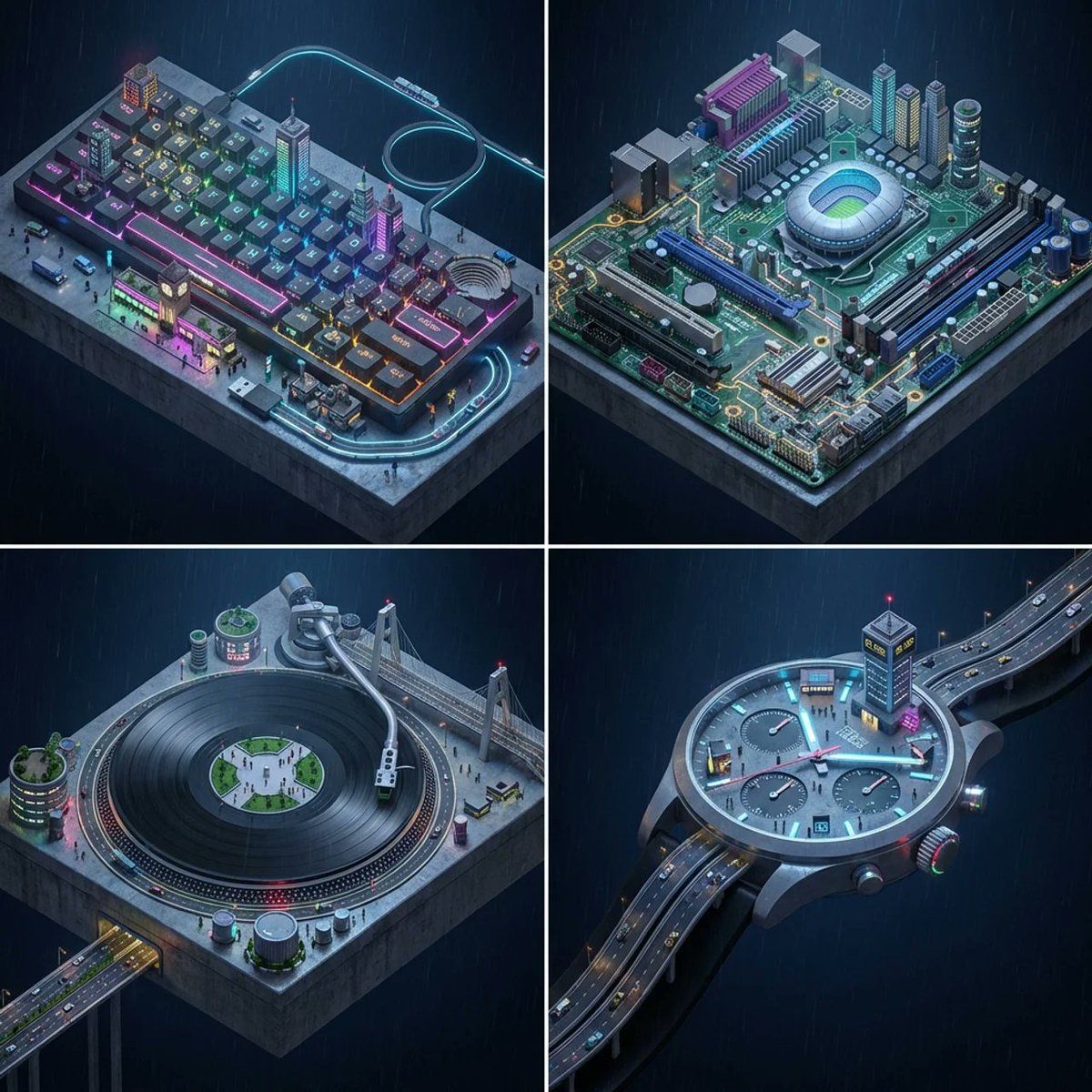
赛博朋克风格的物品微缩城市景观
Prompt
2x2 grid, do this for 4 everyday objects {<instruction>
  1. Urban Topography:
Input A is an Everyday Object or Gadget (e.g., A Keyboard, A Motherboard, A Vinyl Record Player, A Wristwatch).
Deconstruct the object into   4 Urban Zones  :
     The Main Surface (The Grid/Plaza):  Identify the primary repeating texture or largest flat area.
         (e.g., Keyboard -> Grid of keys becomes city blocks. Record Player -> The spinning disc becomes a central park or arena. Watch Face -> A grand public square).
     The Prominent Feature (The Hub):  Identify the largest distinct component.
         (e.g., Spacebar -> A central boulevard/market. Turntable Tonearm -> A massive suspension bridge. Watch Crown -> A control tower).
     The Details (The Special Zoning):  Identify secondary buttons, dials, or odd shapes.
         (e.g., Enter Key -> Grand Staircase. Arrow Keys -> Industrial zone. Camera Lenses -> Domed stadiums).
     The Wiring/Casing (The Transit):  Identify cables, straps, or the outer rim.
         (e.g., Coiled Cable -> A monorail loop. Watch Strap -> A sweeping highway).

  2. Container
Goal: "Macro-City" Isometric Photography.
     The Base:  The entire object (Input A) acts as a massive, floating, or elevated concrete platform in the middle of a dark environment.
     The Perspective:  A strict   Isometric (45-degree high-angle) View  . The camera looks down like a city-building video game (e.g., SimCity, Cyberpunk).
     The Scale:  The original object is magnified 200x. The "buttons" are the size of buildings.

  3. The Diorama (The Micro-Life):
     The Transformation:  The components identified in Step 1 are hollowed out, lit up, and populated. They are no longer plastic or metal; they are made of concrete, neon, and glass.
     The Inhabitants:  Tiny 1:500 scale figures (citizens, shoppers, workers) swarm the "streets" between the components.
     The Transit:  Miniature trains, hover-cars, or trams zip along the "Wiring" (Step 1).

  4. Visual
     Detail Density:    Extreme Greebling.   Every flat surface is covered in tiny details—neon signs, rooftop gardens, air conditioning units, tiny market stalls with awnings.
     Legibility:  Despite the transformation, the original silhouette and layout of the object (e.g., the QWERTY layout) must remain instantly recognizable from afar.

  5. Lighting
     Atmosphere:    Midnight Cyberpunk Rain.   A dark, moody background with visible, fine rain falling. The ground around the object is wet and highly reflective.
     Lighting:    Diegetic Neon Glow.   The scene is illuminated entirely by the tiny lights of the city itself—cyan, magenta, and amber neon signs, streetlights, and glowing windows emanating from the "components."

  Output:   ONE image, 1:1 Aspect Ratio, 3D Architectural Render (Unreal Engine 5 style), Isometric, Hyper-Detailed.
</instruction>}- Category
- Posters & Typography
- Model
- Nano Banana 2
- Creator
- @Gdgtify
- Source ID
- 2937
- Published
- Mar 6, 2026
Views157