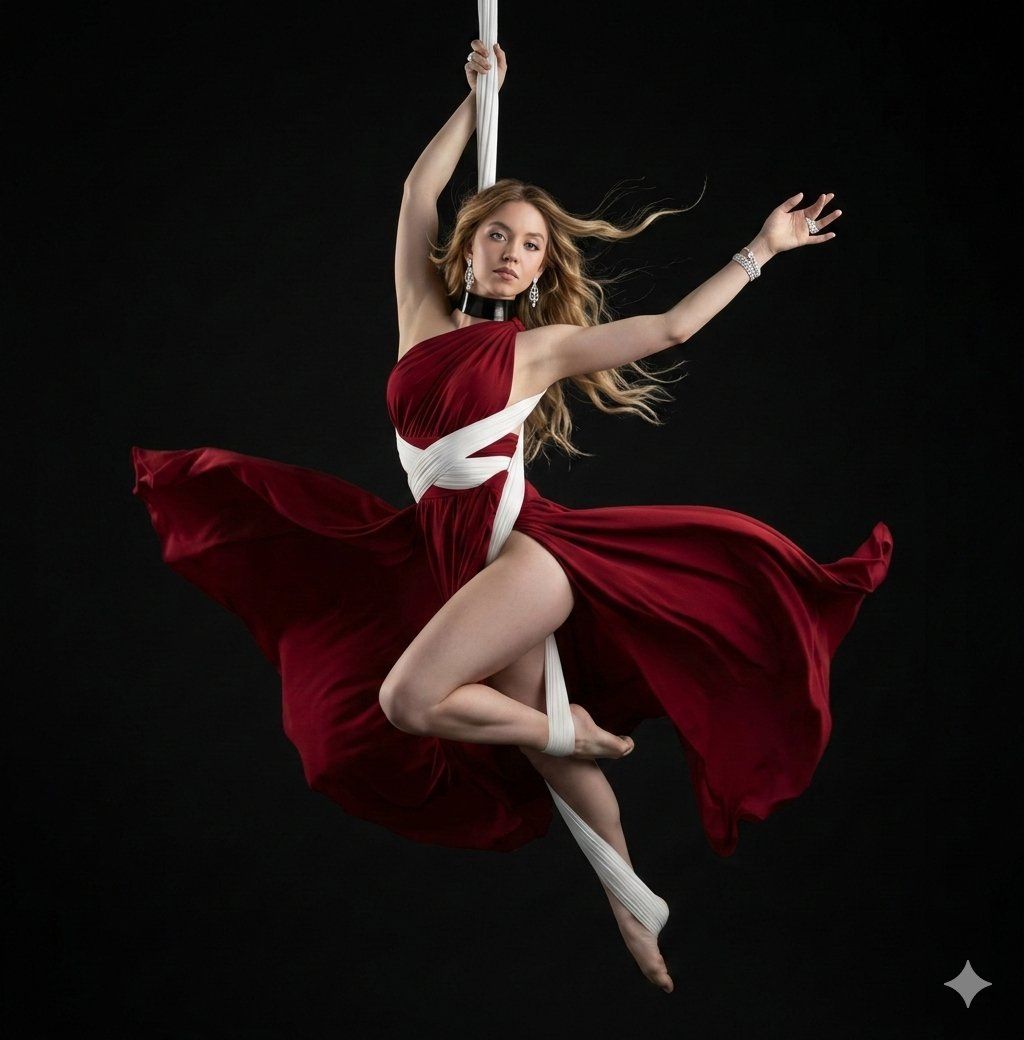
暗夜红绸悬空舞者
Prompt
[ { "id": "aerial-artist-red-dress", "prompt": "A detailed, professional studio photograph, centered against a dark matte black void background, captures an aerial silk artist in a dynamic, suspended pose. The subject is a female artist with flowing, platinum-silver hair, looking slightly upwards and to the left with a focused, serene expression. She is suspended in mid-air by a single, vertical white aerial silk which she holds firmly with her right hand above her head. Her body is in an open, near-split pose. She is wearing a deep burgundy-red silk or satin flowing dress with a high side slit, which is dramatically billowed outwards by an unseen force, creating a large, dynamic field of color around her lower body. The dress is layered over and accented by intricate white aerial silk fabric wraps that encircle her waist, torso, and are wrapped around her left ankle and foot. She has a thick black choker necklace. Her left arm is extended gracefully upwards and outwards. Her bare feet are pointed, one extended and one with the silk wrap. The dramatic, directional studio lighting (chiaroscuro) creates strong highlights on her skin and the folds of the fabrics, emphasizing the texture of the silk and the definition of her muscles, casting soft shadows. The overall composition is elegant, dramatic, and poetic, focusing on the beauty and control of the pose.", "weight": 1.0, "group_id": "image_content" }, { "id": "composition_details", "prompt": "The composition is a medium full shot, framed to show the entire pose and the dramatic flow of the dress within the dark space. The central white silk hangs straight down, creating a strong vertical line that contrasts with the curved, flowing red fabric. The lighting is focused, like a theatrical spotlight, creating a dramatic halo effect around the edges of her hair and limbs against the deep black background. Every fold and ripple in the burgundy dress is visible, conveying motion and texture. The focus is sharp on her face and core body.", "weight": 0.8, "group_id": "style_and_lighting" }, { "id": "fabric_motion", "prompt": "A close attention to detail is paid to the motion and texture of the fabrics. The red silk dress is shown in high-speed capture, suspended in mid-billow, forming a large, fan-like arc that mirrors the curve of her body. The folds are complex and deep, creating a play of light and shadow. The white wraps are taut against her body, contrasting with the free-flowing red dress, showing the dual nature of aerial silks.", "weight": 0.7, "group_id": "details" }, { "id": "pose_detail", "prompt": "Specific description of the pose: The artist's right hand grips the vertical white silk, her arm taut. Her left arm is free, fingers spread delicately. Her torso is twisted slightly. Her right leg is bent and wrapped, with the white silk coiling down to her foot. Her left leg is st- Category
- Posters & Typography
- Model
- Nano Banana Pro
- Creator
- @Shreyayadav
- Source ID
- 12894
- Published
- Apr 8, 2026
Views91