17

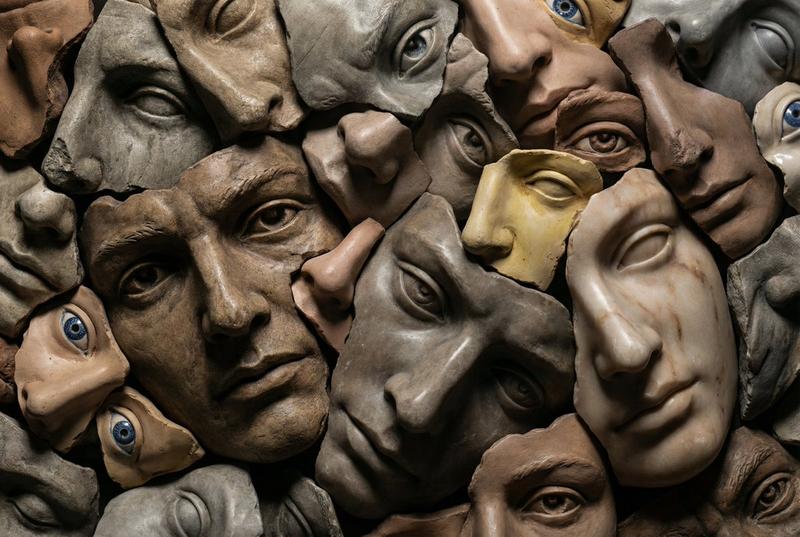
超写实破碎面孔雕塑拼贴
Enlarge

超写实破碎面孔雕塑拼贴

Prompt
A close-up, high-angle shot showcases a collage of fragmented human faces, rendered in a hyperrealistic, sculptural style. The faces are pieced together like a mosaic, with some appearing smooth and polished, while others are rough and textured, resembling aged stone or clay. The composition is dense, with eyes, noses, and mouths overlapping and interlocking, creating a sense of disarray and intensity. The lighting is dramatic, casting deep shadows and highlighting the intricate details of each facial feature. The color palette is earthy, dominated by browns, grays, and muted skin tones, with occasional pops of color from blue eyes or a hint of yellow in some skin. The overall effect is surreal and slightly unsettling, evoking a feeling of fragmented identity or a collective consciousness.
Category
Brand & Logos
Model
Nano Banana Pro
Views28
Source ID
11031
Published
May 11, 2026

Guide

About "超写实破碎面孔雕塑拼贴"

What is this prompt for?

"超写实破碎面孔雕塑拼贴" AI image prompt for Nano Banana Pro (Brand & Logos). 一个特写、高角度镜头展示了一组碎片化的人脸拼贴画,以超现实的雕塑风格呈现。这些面孔像马赛克一样拼接在一起,有些看起来光滑而精致,而另一些则粗糙有质感,类似于老化的石头或粘土。构图密集,…

The full copyable prompt and example visuals above are ready for AI image generation or one-click recreate in Picva.

How to use this prompt

  1. Step 1

    Open the prompt detail

    Review the example visuals, category, and full prompt text for "超写实破碎面孔雕塑拼贴".

  2. Step 2

    Copy the prompt

    Copy the prompt body from this page, or load it directly in Studio.

  3. Step 3

    Pick a model (Nano Banana Pro)

    Prefer Nano Banana Pro. If you switch models, keep subject and composition and tweak style terms.

  4. Step 4

    Generate and export

    Recreate the look in Picva, or export into your workflow for editing and publishing.

FAQ

What is the "超写实破碎面孔雕塑拼贴" prompt?
It is an AI image-generation prompt for Nano Banana Pro in the Brand & Logos category. This page includes the full prompt text, example visuals, and a one-click recreate path in Picva.
How do I use this prompt to generate an image?
Copy the prompt from this page, or use Generate / Studio. Paste it into a compatible image model, or recreate the look in Picva with optional reference images.
Which model is this prompt for?
This page lists Nano Banana Pro. Most descriptive prompts also transfer to nearby image models such as GPT Image, Flux, or Midjourney with light style tweaks.
Can I use the result commercially?
You can usually copy the prompt for creation, but commercial use of the final image depends on the model terms, reference-image rights, and the generated content. Follow the source author and platform rules.