20

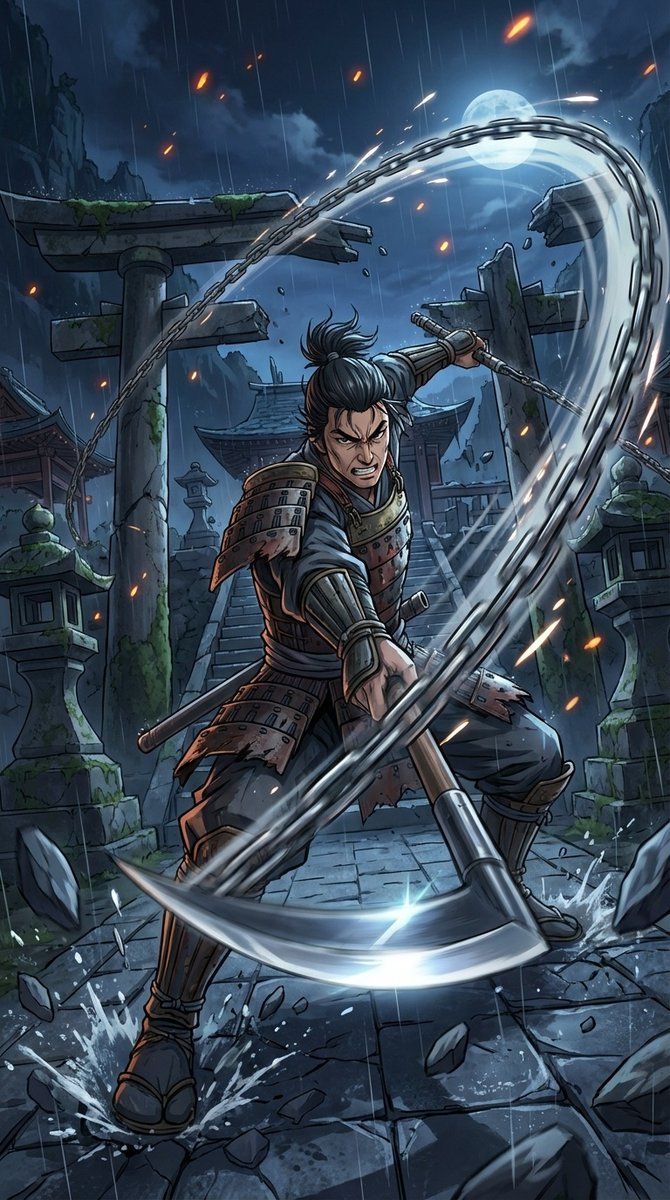
夜袭古刹锁镰破屏而出
Enlarge

夜袭古刹锁镰破屏而出

Prompt
Masterpiece quality, theatrical anime-scale dynamic battle scene. A Japanese-style warrior is the main subject. Intense low-angle perspective with exaggerated depth; extreme perspective and bold framing with the weapon thrusting forward as if breaking through the screen. Weapon: a kusarigama. The sickle blade gleams sharply; the chain whips in a wide arc, and the weighted end rushes toward the camera with heavy motion blur. Captured at the exact instant of launching the attack—piercing gaze, taut determined expression. The chain’s movement slices the air, leaving a pale platinum spark-like luminous trail as an afterimage. Setting: a collapsing old shrine deep in the mountains at night. Wet stone steps, a fallen torii gate, cracked stone lanterns. The impact shatters the stone pavement; fragments and splashing water burst upward. Violent wind sends talismans and paper scraps swirling; clothing and hair whip wildly. High-contrast dramatic lighting: cold moonlight crossing with warm red lantern light, deep shadows. Background filled with thick mist and dark storm clouds, tree branches bending and flying in the gale. Wide-angle lens, dynamic motion blur, cinematic. Vertical cinematic poster composition, 9:16 aspect ratio, no text.
Category
Posters & Typography
Model
Nano Banana Pro
Views29
Source ID
12000
Published
Apr 21, 2026

Guide

About "夜袭古刹锁镰破屏而出"

What is this prompt for?

"夜袭古刹锁镰破屏而出" AI image prompt for Nano Banana Pro (Posters & Typography). 大师级品质,影院级动画规模的动态战斗场景。一名日式武士是主体。强烈的低角度透视,景深夸张;极端的透视和大胆的构图,武器向前突刺,仿佛要冲破屏幕。 武器:一把锁镰。镰刀刀刃闪…

The full copyable prompt and example visuals above are ready for AI image generation or one-click recreate in Picva.

How to use this prompt

  1. Step 1

    Open the prompt detail

    Review the example visuals, category, and full prompt text for "夜袭古刹锁镰破屏而出".

  2. Step 2

    Copy the prompt

    Copy the prompt body from this page, or load it directly in Studio.

  3. Step 3

    Pick a model (Nano Banana Pro)

    Prefer Nano Banana Pro. If you switch models, keep subject and composition and tweak style terms.

  4. Step 4

    Generate and export

    Recreate the look in Picva, or export into your workflow for editing and publishing.

FAQ

What is the "夜袭古刹锁镰破屏而出" prompt?
It is an AI image-generation prompt for Nano Banana Pro in the Posters & Typography category. This page includes the full prompt text, example visuals, and a one-click recreate path in Picva.
How do I use this prompt to generate an image?
Copy the prompt from this page, or use Generate / Studio. Paste it into a compatible image model, or recreate the look in Picva with optional reference images.
Which model is this prompt for?
This page lists Nano Banana Pro. Most descriptive prompts also transfer to nearby image models such as GPT Image, Flux, or Midjourney with light style tweaks.
Can I use the result commercially?
You can usually copy the prompt for creation, but commercial use of the final image depends on the model terms, reference-image rights, and the generated content. Follow the source author and platform rules.