12

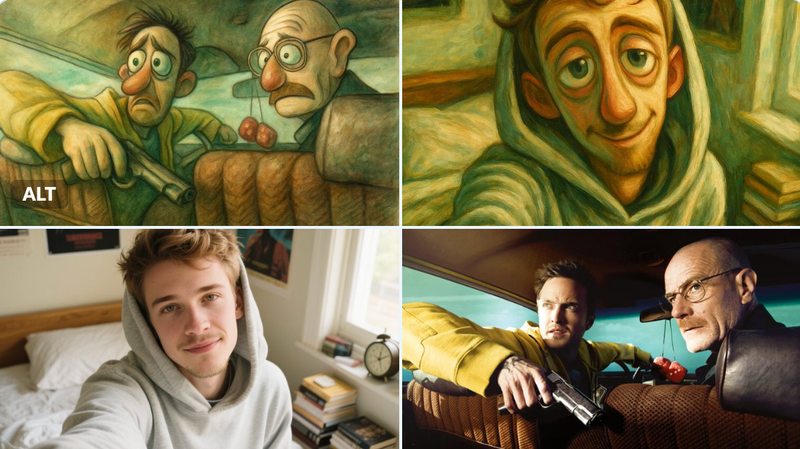
怪诞又梦幻的超现实插画
Enlarge

Example images

怪诞又梦幻的超现实插画

Prompt
Transform the uploaded image into a surreal illustration with a whimsical, dream‑like vibe.
• Color palette: muted tones (soft greens, browns, greys) with occasional gentle pops of green.
• Lighting: soft, diffused, almost ethereal light that blends gradients and subtle highlights.
• Texture & medium feel: oil‑painting‑like brushstrokes, faint watercolor washes, or loose hand‑drawn linework, with a slight grainy texture.
• Mood & composition: exaggerated, expressive features (e.g., elongated faces or emotive eyes) characteristic of cartoonish or Muppet‑style illustrations, but applied in a surreal, slightly fantastical context.
• Overall aesthetic: blend realistic attention to detail with a touch of surreal whimsy—think serene, slightly uncanny atmosphere.
Category
UI & Interfaces
Model
GPT Image 2
Creator
@fy360593
Views50
Source ID
1022
Published
Jan 8, 2026

Guide

About "怪诞又梦幻的超现实插画"

What is this prompt for?

"怪诞又梦幻的超现实插画" AI image prompt for GPT Image 2 (UI & Interfaces). 将上传的图片转换为一幅超现实插画,营造出怪诞又梦幻的氛围。 色彩搭配:采用柔和色调(浅绿、棕色、灰色),偶尔点缀一抹淡雅的绿色。 光线效果:柔和、弥漫的近乎空灵的光线,融合渐变色与细微的高…

The full copyable prompt and example visuals above are ready for AI image generation or one-click recreate in Picva.

How to use this prompt

  1. Step 1

    Open the prompt detail

    Review the example visuals, category, and full prompt text for "怪诞又梦幻的超现实插画".

  2. Step 2

    Copy the prompt

    Copy the prompt body from this page, or load it directly in Studio.

  3. Step 3

    Pick a model (GPT Image 2)

    Prefer GPT Image 2. If you switch models, keep subject and composition and tweak style terms.

  4. Step 4

    Generate and export

    Recreate the look in Picva, or export into your workflow for editing and publishing.

FAQ

What is the "怪诞又梦幻的超现实插画" prompt?
It is an AI image-generation prompt for GPT Image 2 in the UI & Interfaces category. This page includes the full prompt text, example visuals, and a one-click recreate path in Picva.
How do I use this prompt to generate an image?
Copy the prompt from this page, or use Generate / Studio. Paste it into a compatible image model, or recreate the look in Picva with optional reference images.
Which model is this prompt for?
This page lists GPT Image 2. Most descriptive prompts also transfer to nearby image models such as GPT Image, Flux, or Midjourney with light style tweaks.
Can I use the result commercially?
You can usually copy the prompt for creation, but commercial use of the final image depends on the model terms, reference-image rights, and the generated content. Follow the source author and platform rules.