8

益智玩具角色
Enlarge

益智玩具角色

Prompt
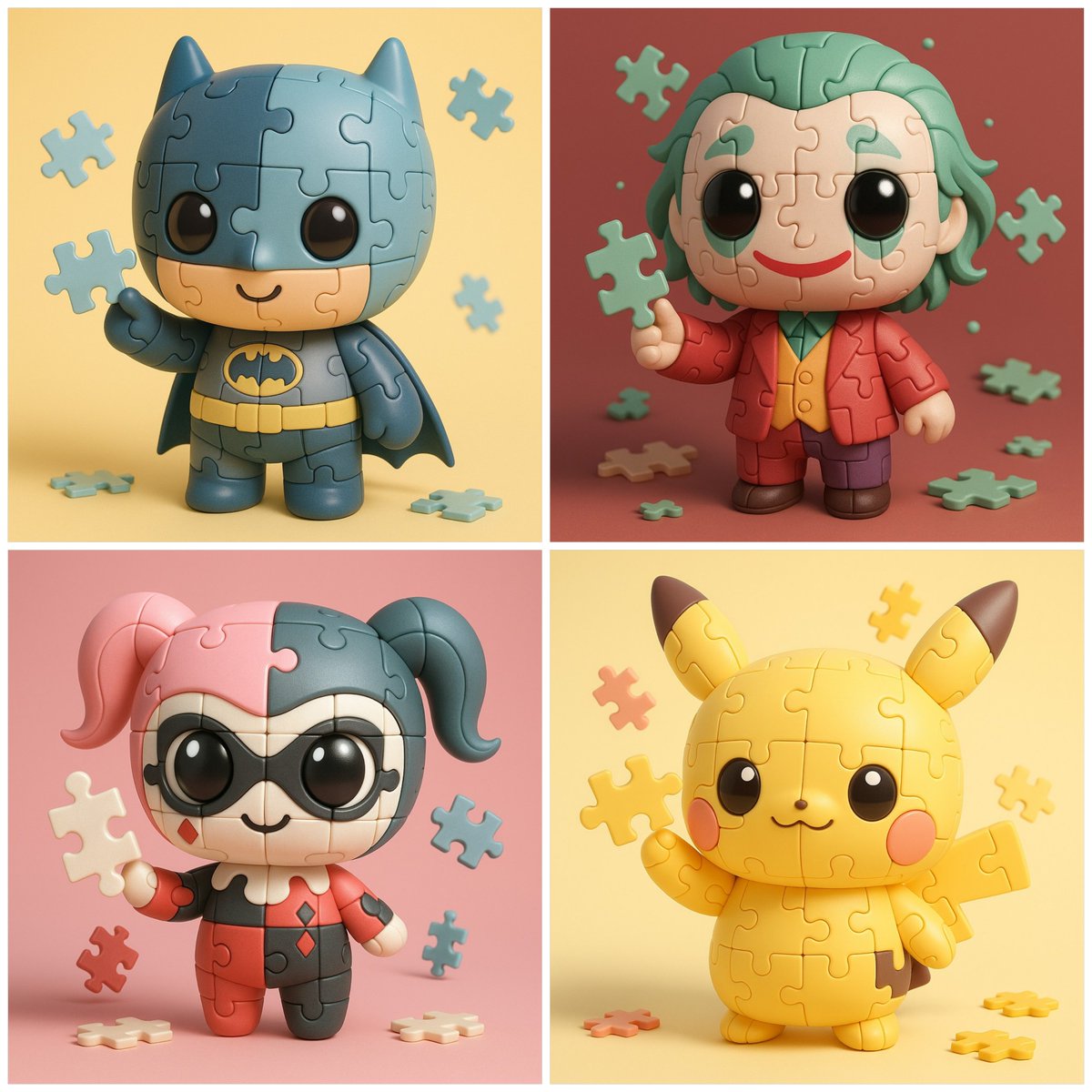
SUBJECT: Chibi-style [CHARACTER NAME] reimagined as a Puzzle Toy character, ultra-cute proportions with oversized head and tiny stubby body.

MATERIALS:
Body and head formed entirely from interlocking jigsaw puzzle pieces
Matte pastel plastic surface with soft specular highlights
Visible puzzle cuts and notches defining the structure
Each piece slightly separated by thin seams, but tightly fitted together

DETAILS:
Large glossy chibi eyes placed across puzzle pieces, seamlessly integrated
Cute simple mouth outlined on puzzle surface
Costume colors of [CHARACTER NAME] applied piece-by-piece across the puzzle body, Character is holding a single loose puzzle piece in one hand, lifted playfully, as if showing it to the viewer, Some extra puzzle pieces floating gently around for added fun

STYLE:
Bright, educational, playful toy aesthetic, Minimal wear, no dirt, no scratches

LIGHTING:
Soft studio HDRI lighting with gentle shadows, Subtle contact shadows under puzzle seams, High contrast to show piece outlines clearly

CAMERA:
Centered, front-facing or 3/4 isometric angle, 1:1 aspect ratio, 8K render, Focus sharp on character’s face, emblem, and puzzle piece in hand

BACKGROUND:
Clean seamless pastel gradient backdrop (COLOR)
Optional scattered puzzle pieces on the floor for extra context

OUTPUT STYLE: Cute chibi proportions, Puzzle-based
Category
Charts & Infographics
Model
GPT Image 2
Creator
@Arminn_Ai
Views48
Source ID
1088
Published
Jan 8, 2026

Guide

About "益智玩具角色"

What is this prompt for?

"益智玩具角色" AI image prompt for GPT Image 2 (Charts & Infographics). 主题:将Chibi风格的 [角色名称] 重新想象成一个益智玩具角色,具有超大头部和小巧粗短身体的超可爱比例。 材料: 身体和头部完全由相互锁在一起的拼图碎片组成 哑光塑料表面,具有柔和的…

The full copyable prompt and example visuals above are ready for AI image generation or one-click recreate in Picva.

How to use this prompt

  1. Step 1

    Open the prompt detail

    Review the example visuals, category, and full prompt text for "益智玩具角色".

  2. Step 2

    Copy the prompt

    Copy the prompt body from this page, or load it directly in Studio.

  3. Step 3

    Pick a model (GPT Image 2)

    Prefer GPT Image 2. If you switch models, keep subject and composition and tweak style terms.

  4. Step 4

    Generate and export

    Recreate the look in Picva, or export into your workflow for editing and publishing.

FAQ

What is the "益智玩具角色" prompt?
It is an AI image-generation prompt for GPT Image 2 in the Charts & Infographics category. This page includes the full prompt text, example visuals, and a one-click recreate path in Picva.
How do I use this prompt to generate an image?
Copy the prompt from this page, or use Generate / Studio. Paste it into a compatible image model, or recreate the look in Picva with optional reference images.
Which model is this prompt for?
This page lists GPT Image 2. Most descriptive prompts also transfer to nearby image models such as GPT Image, Flux, or Midjourney with light style tweaks.
Can I use the result commercially?
You can usually copy the prompt for creation, but commercial use of the final image depends on the model terms, reference-image rights, and the generated content. Follow the source author and platform rules.