15

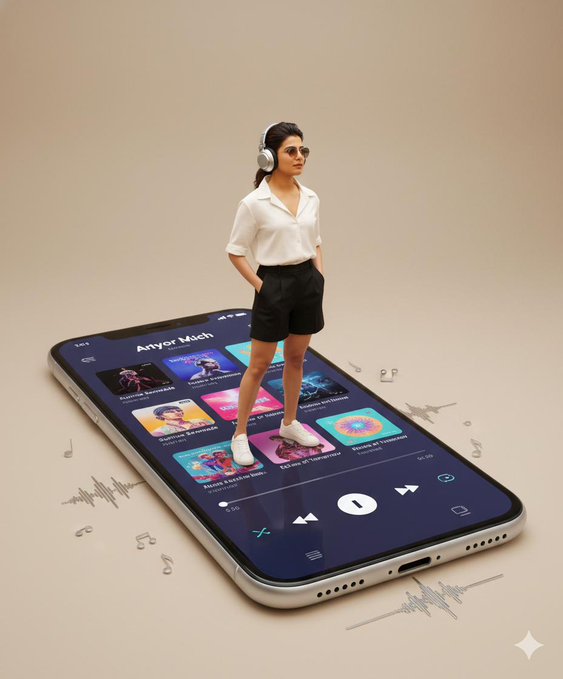
人物站在一部超大的智能手机上
Enlarge

人物站在一部超大的智能手机上

Prompt
Using the uploaded image for accurate facial likeness, create a surreal, modern digital artwork featuring the same person standing on top of an oversized smartphone displaying a music-player interface. Do not change the face. The person wears a white short-sleeve button-up shirt, black shorts, white sneakers, and large over-ear headphones, with sunglasses, standing casually with hands in pockets. The smartphone beneath appears massive, making the person look miniaturized, and shows a playlist screen with album covers and playback controls. The overall aesthetic is minimal, clean, and softly lit with a beige background. The style is cinematic, high-resolution, polished, and resembles a professional poster design. Face and body must 100% match the uploaded reference image
Category
UI & Interfaces
Model
Nano Banana Pro
Creator
@r4jjesh
Views55
Source ID
1655
Published
Jan 8, 2026

Guide

About "人物站在一部超大的智能手机上"

What is this prompt for?

"人物站在一部超大的智能手机上" AI image prompt for Nano Banana Pro (UI & Interfaces). 请使用上传的图片作为参考,创作一幅超现实主义的现代数字艺术作品。作品中,人物站在一部超大的智能手机上,屏幕上显示着音乐播放器界面。请勿更改人物面部。人物身穿白色短袖衬衫、黑色…

The full copyable prompt and example visuals above are ready for AI image generation or one-click recreate in Picva.

How to use this prompt

  1. Step 1

    Open the prompt detail

    Review the example visuals, category, and full prompt text for "人物站在一部超大的智能手机上".

  2. Step 2

    Copy the prompt

    Copy the prompt body from this page, or load it directly in Studio.

  3. Step 3

    Pick a model (Nano Banana Pro)

    Prefer Nano Banana Pro. If you switch models, keep subject and composition and tweak style terms.

  4. Step 4

    Generate and export

    Recreate the look in Picva, or export into your workflow for editing and publishing.

FAQ

What is the "人物站在一部超大的智能手机上" prompt?
It is an AI image-generation prompt for Nano Banana Pro in the UI & Interfaces category. This page includes the full prompt text, example visuals, and a one-click recreate path in Picva.
How do I use this prompt to generate an image?
Copy the prompt from this page, or use Generate / Studio. Paste it into a compatible image model, or recreate the look in Picva with optional reference images.
Which model is this prompt for?
This page lists Nano Banana Pro. Most descriptive prompts also transfer to nearby image models such as GPT Image, Flux, or Midjourney with light style tweaks.
Can I use the result commercially?
You can usually copy the prompt for creation, but commercial use of the final image depends on the model terms, reference-image rights, and the generated content. Follow the source author and platform rules.