20

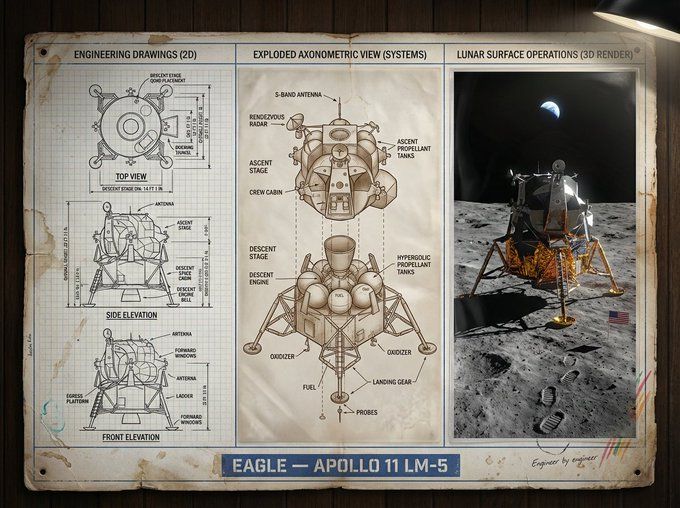
技术图纸展示板
Enlarge

技术图纸展示板

Prompt
An expert [DISCIPLINE] designer’s presentation board for [SUBJECT] — [ICONIC FEATURES / ERA], featuring black-and-white 2D technical drawings with annotations and dimensions on the left, an exploded axonometric diagram revealing [KEY INTERNAL COMPONENTS / MATERIALS] in the center, and a photorealistic 3D render of [SUBJECT] in [ICONIC ENVIRONMENT / SCENE] on the right, with [LIGHTING / ATMOSPHERE / MOTION DETAILS]; visual style transitions from [TECHNICAL / ARCHIVAL TONES] to [EMOTIONAL / ATMOSPHERIC COLOR PALETTE], clean grid layout, museum-grade industrial design presentation, ultra-detailed cinematic realism, title block reading “[TITLE] — [YEAR / VARIANT / TAGLINE]”.
Category
Charts & Infographics
Model
Nano Banana Pro
Views83
Source ID
1752
Published
Jan 8, 2026

Guide

About "技术图纸展示板"

What is this prompt for?

"技术图纸展示板" AI image prompt for Nano Banana Pro (Charts & Infographics). 一位[学科]专家设计师为[主题] — [标志性特征/时代]制作的展示板,左侧为带有注释和尺寸的黑白二维技术图纸,中间为揭示[关键内部组件/材料]的爆炸轴测图,右侧为[主题]在[…

The full copyable prompt and example visuals above are ready for AI image generation or one-click recreate in Picva.

How to use this prompt

  1. Step 1

    Open the prompt detail

    Review the example visuals, category, and full prompt text for "技术图纸展示板".

  2. Step 2

    Copy the prompt

    Copy the prompt body from this page, or load it directly in Studio.

  3. Step 3

    Pick a model (Nano Banana Pro)

    Prefer Nano Banana Pro. If you switch models, keep subject and composition and tweak style terms.

  4. Step 4

    Generate and export

    Recreate the look in Picva, or export into your workflow for editing and publishing.

FAQ

What is the "技术图纸展示板" prompt?
It is an AI image-generation prompt for Nano Banana Pro in the Charts & Infographics category. This page includes the full prompt text, example visuals, and a one-click recreate path in Picva.
How do I use this prompt to generate an image?
Copy the prompt from this page, or use Generate / Studio. Paste it into a compatible image model, or recreate the look in Picva with optional reference images.
Which model is this prompt for?
This page lists Nano Banana Pro. Most descriptive prompts also transfer to nearby image models such as GPT Image, Flux, or Midjourney with light style tweaks.
Can I use the result commercially?
You can usually copy the prompt for creation, but commercial use of the final image depends on the model terms, reference-image rights, and the generated content. Follow the source author and platform rules.