20

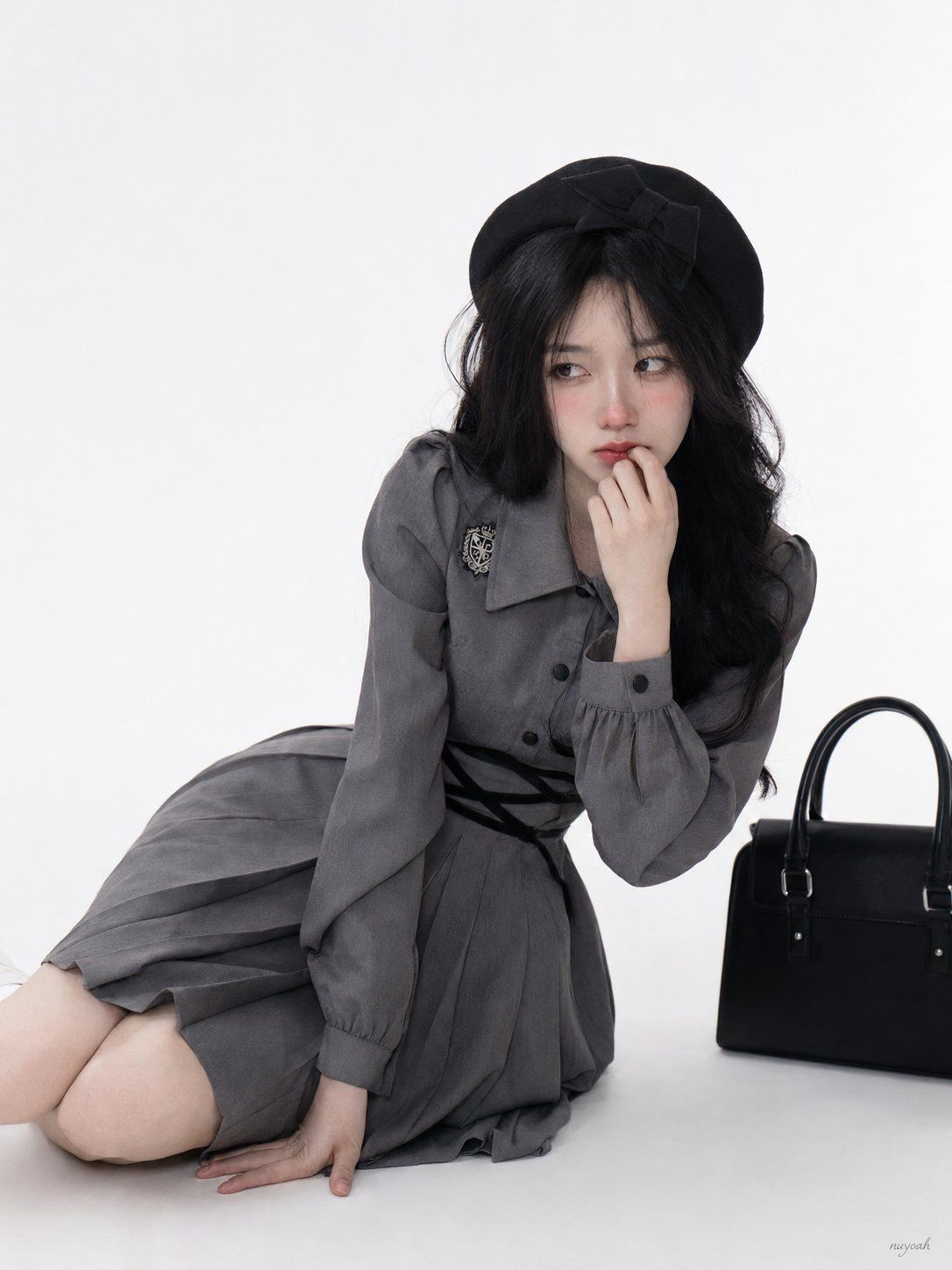
羞怯犹豫少女侧向撑地神态
Enlarge

羞怯犹豫少女侧向撑地神态

Prompt
Right hand supporting the ground, the body leaning forward slightly and tilting toward the left side of the frame; the expression is not a calm daze, but a micro-expression with shyness, hesitation, and a bit of alertness, the eyes are looking diagonally toward the left side of the frame, the irises are biased to one side of the eye slit, the upper eyelids are slightly pressed down, the lower eyelids have a slight sense of tension, the eyes retain small and clear highlights, the tip of the nose and both cheeks have obvious pink flushing, like a local blush after being shy, the lips are slightly pouted and tightened, the lip gap is very narrow, fingers are vertically close to the front of the lips, fingertips are lightly pressing near the lip line, the thumb supports the chin, forming a 'wanting to speak but stopping' lip-hand relationship.
Category
Scenes & Storytelling
Model
ChatGPT
Views72
Source ID
17097
Published
Jun 30, 2026

Guide

About "羞怯犹豫少女侧向撑地神态"

What is this prompt for?

"羞怯犹豫少女侧向撑地神态" AI image prompt for ChatGPT (Scenes & Storytelling). 右手撑地,身体微微前倾并向画面左侧倾斜;表情不是平静发呆,而是带羞怯、犹豫和一点警觉的微表情,眼睛斜向画面左侧,虹膜偏在眼裂一侧,上眼睑微微压下,下眼睑有轻微紧张感,眼里保留小而清晰…

The full copyable prompt and example visuals above are ready for AI image generation or one-click recreate in Picva.

How to use this prompt

  1. Step 1

    Open the prompt detail

    Review the example visuals, category, and full prompt text for "羞怯犹豫少女侧向撑地神态".

  2. Step 2

    Copy the prompt

    Copy the prompt body from this page, or load it directly in Studio.

  3. Step 3

    Pick a model (ChatGPT)

    Prefer ChatGPT. If you switch models, keep subject and composition and tweak style terms.

  4. Step 4

    Generate and export

    Recreate the look in Picva, or export into your workflow for editing and publishing.

FAQ

What is the "羞怯犹豫少女侧向撑地神态" prompt?
It is an AI image-generation prompt for ChatGPT in the Scenes & Storytelling category. This page includes the full prompt text, example visuals, and a one-click recreate path in Picva.
How do I use this prompt to generate an image?
Copy the prompt from this page, or use Generate / Studio. Paste it into a compatible image model, or recreate the look in Picva with optional reference images.
Which model is this prompt for?
This page lists ChatGPT. Most descriptive prompts also transfer to nearby image models such as GPT Image, Flux, or Midjourney with light style tweaks.
Can I use the result commercially?
You can usually copy the prompt for creation, but commercial use of the final image depends on the model terms, reference-image rights, and the generated content. Follow the source author and platform rules.