12

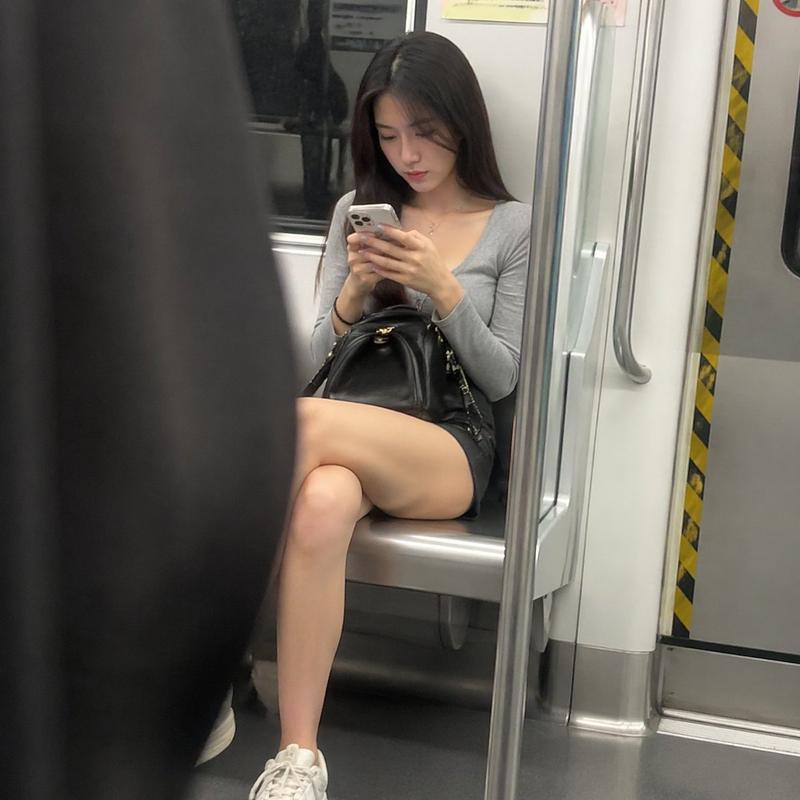
地铁车厢抓拍低头看手机女孩
Enlarge

地铁车厢抓拍低头看手机女孩

Prompt
Inside the subway carriage, a young woman sits on a seat near the door, looking down and focused on her phone, showing a natural state, not looking at the camera. She is wearing a gray tight top, a black short skirt, and white sneakers, with long hair falling naturally. The character is located in the right third of the frame, with a blurred foreground obstruction on the left, creating a candid shooting perspective. The door and handrails form clear vertical lines, guiding the line of sight. The overall tone is the cold-toned subway lighting, soft top light, without obvious strong shadows, shallow depth of field makes the subject clear, and the background is slightly blurred. The image has a real camera graininess and a slightly imperfect composition, showing a real moment of a casual snapshot, rather than a posed shot.
Category
Photography & Realism
Model
ChatGPT
Creator
@ohmuyi
Views996
Source ID
13688
Published
Apr 24, 2026

Guide

About "地铁车厢抓拍低头看手机女孩"

What is this prompt for?

"地铁车厢抓拍低头看手机女孩" AI image prompt for ChatGPT (Photography & Realism). 在地铁车厢内,一位年轻女性坐在靠近车门的座位上,低头专注于手机,展现出自然的状态,没有看向镜头。她穿着灰色紧身上衣、黑色短裙和白色运动鞋,长发自然垂落。人物位于画面右侧三分之一的位…

The full copyable prompt and example visuals above are ready for AI image generation or one-click recreate in Picva.

How to use this prompt

  1. Step 1

    Open the prompt detail

    Review the example visuals, category, and full prompt text for "地铁车厢抓拍低头看手机女孩".

  2. Step 2

    Copy the prompt

    Copy the prompt body from this page, or load it directly in Studio.

  3. Step 3

    Pick a model (ChatGPT)

    Prefer ChatGPT. If you switch models, keep subject and composition and tweak style terms.

  4. Step 4

    Generate and export

    Recreate the look in Picva, or export into your workflow for editing and publishing.

FAQ

What is the "地铁车厢抓拍低头看手机女孩" prompt?
It is an AI image-generation prompt for ChatGPT in the Photography & Realism category. This page includes the full prompt text, example visuals, and a one-click recreate path in Picva.
How do I use this prompt to generate an image?
Copy the prompt from this page, or use Generate / Studio. Paste it into a compatible image model, or recreate the look in Picva with optional reference images.
Which model is this prompt for?
This page lists ChatGPT. Most descriptive prompts also transfer to nearby image models such as GPT Image, Flux, or Midjourney with light style tweaks.
Can I use the result commercially?
You can usually copy the prompt for creation, but commercial use of the final image depends on the model terms, reference-image rights, and the generated content. Follow the source author and platform rules.