16

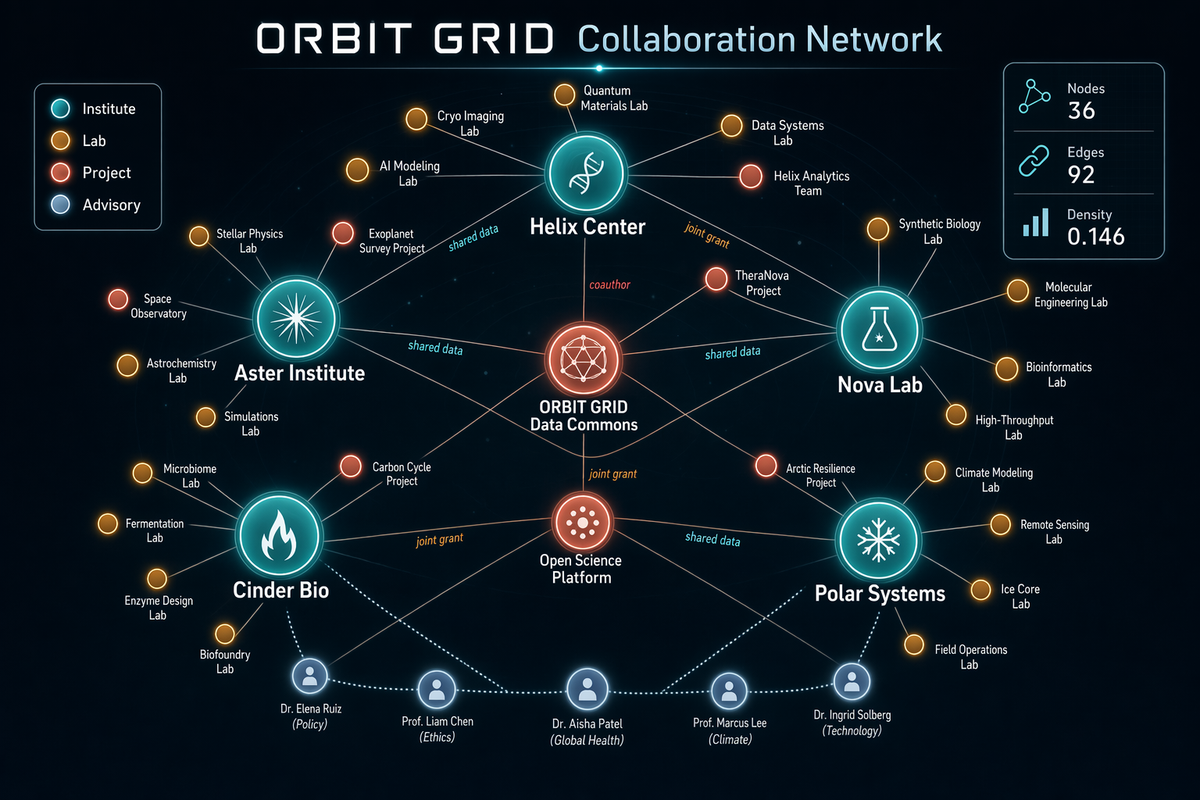
Network Graph Collaboration Map
Enlarge

Network Graph Collaboration Map

Prompt
Generate a sophisticated network graph visualization on a dark charcoal canvas showing collaborations across a fictional research consortium called ORBIT GRID. Use glowing node colors in teal, amber, coral, pale blue, and white, with fine connecting lines and clean labels. The composition should be balanced, readable, and intentionally designed rather than random. Include a title in crisp text reading "ORBIT GRID Collaboration Network" and a legend with "Institute", "Lab", "Project", and "Advisory". Show approximately 36 nodes, with larger hubs labeled "Helix Center", "Nova Lab", "Aster Institute", "Cinder Bio", and "Polar Systems". Add edge labels sparingly, such as "shared data", "joint grant", and "coauthor". Include a right-side stats card reading "Nodes 36", "Edges 92", and "Density 0.146". Emphasize clean hierarchy, accurate node-label placement, anti-overlap spacing, subtle depth, and crisp typography suited for a polished technical visualization generated by gpt-image-2.
Category
Charts & Infographics
Model
GPT Image 2
Creator
wuyoscar
Views1
Source ID
108

Guide

About "Network Graph Collaboration Map"

What is this prompt for?

"Network Graph Collaboration Map" AI image prompt for GPT Image 2 (Charts & Infographics). Generate a sophisticated network graph visualization on a dark charc…

The full copyable prompt and example visuals above are ready for AI image generation or one-click recreate in Picva.

How to use this prompt

  1. Step 1

    Open the prompt detail

    Review the example visuals, category, and full prompt text for "Network Graph Collaboration Map".

  2. Step 2

    Copy the prompt

    Copy the prompt body from this page, or load it directly in Studio.

  3. Step 3

    Pick a model (GPT Image 2)

    Prefer GPT Image 2. If you switch models, keep subject and composition and tweak style terms.

  4. Step 4

    Generate and export

    Recreate the look in Picva, or export into your workflow for editing and publishing.

FAQ

What is the "Network Graph Collaboration Map" prompt?
It is an AI image-generation prompt for GPT Image 2 in the Charts & Infographics category. This page includes the full prompt text, example visuals, and a one-click recreate path in Picva.
How do I use this prompt to generate an image?
Copy the prompt from this page, or use Generate / Studio. Paste it into a compatible image model, or recreate the look in Picva with optional reference images.
Which model is this prompt for?
This page lists GPT Image 2. Most descriptive prompts also transfer to nearby image models such as GPT Image, Flux, or Midjourney with light style tweaks.
Can I use the result commercially?
You can usually copy the prompt for creation, but commercial use of the final image depends on the model terms, reference-image rights, and the generated content. Follow the source author and platform rules.