20

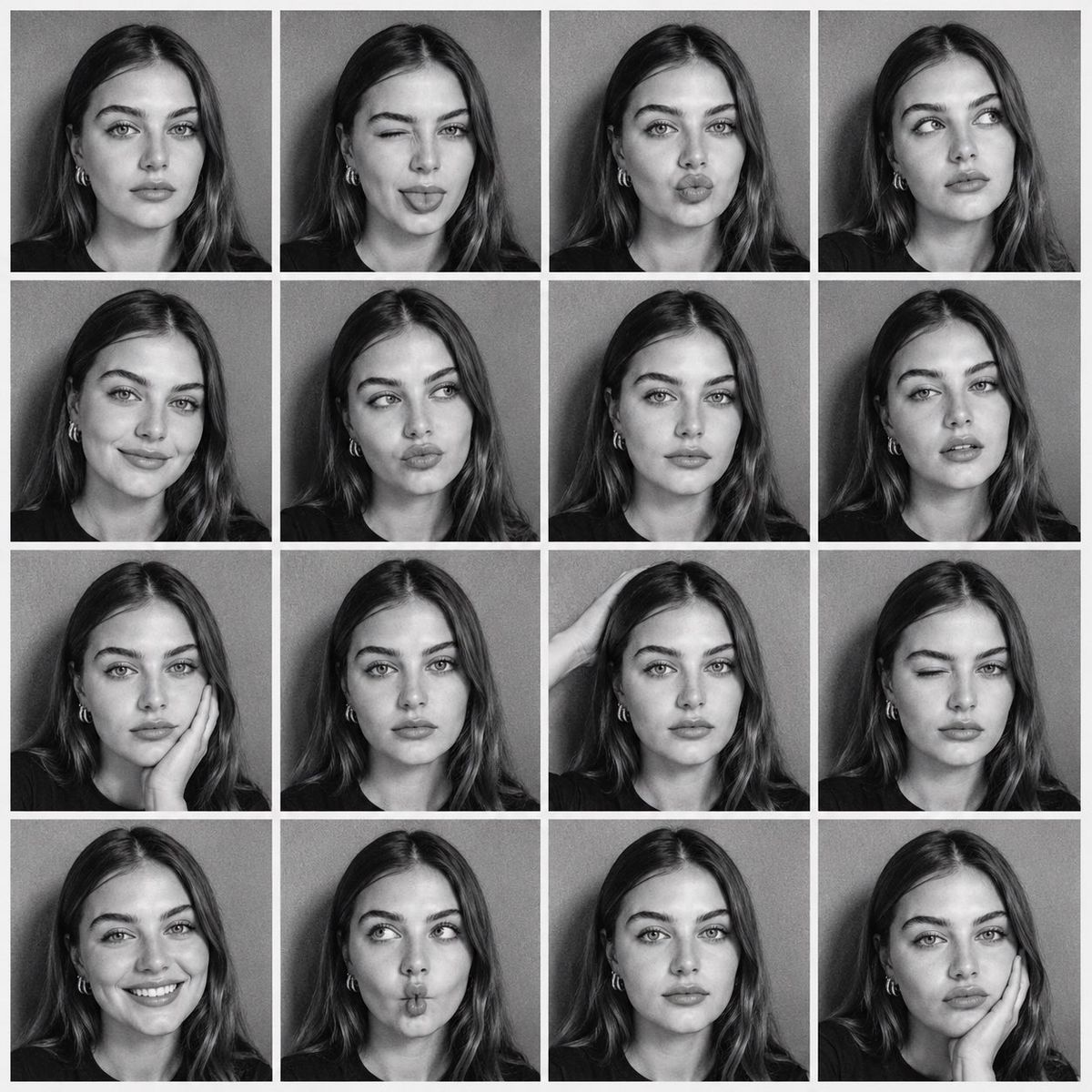
使用上传的人物作为严格的身份参考,创建一张方形 4x4 黑白照片亭联系表。在所有 16 张肖像中保留其确切的面部、可识别特征和发型。相同的黑色...
Enlarge

Example images

使用上传的人物作为严格的身份参考,创建一张方形 4x4 黑白照片亭联系表。在所有 16 张肖像中保留其确切的面部、可识别特征和发型。相同的黑色...

Prompt
使用上传的人物作为严格的身份参考,创建一张方形 4x4 黑白照片亭联系表。在所有 16 张肖像中保留其确切的面部、可识别特征和发型。相同的黑色 T 恤、灰色背景、正面的闪光灯、紧凑的头部和肩膀构图、自然的肤色、锐利的眼睛、高对比度、微妙的模拟颗粒以及细白的边沟。
Category
创意图片
Model
GPT Image 2
Views2
Source ID
2078446454029345158
Published
Jul 19, 2026

Guide

About "使用上传的人物作为严格的身份参考,创建一张方形 4x4 黑白照片亭联系表。在所有 16 张肖像中保留其确切的面部、可识别特征和发型。相同的黑色..."

What is this prompt for?

"使用上传的人物作为严格的身份参考,创建一张方形 4x4 黑白照片亭联系表。在所有 16 张肖像中保留其确切的面部、可识别特征和发型。相同的黑色..." AI image prompt for GPT Image 2 (创意图片). Saved from X post by @codewithhajra. GPT I…

The full copyable prompt and example visuals above are ready for AI image generation or one-click recreate in Picva.

How to use this prompt

  1. Step 1

    Open the prompt detail

    Review the example visuals, category, and full prompt text for "使用上传的人物作为严格的身份参考,创建一张方形 4x4 黑白照片亭联系表。在所有 16 张肖像中保留其确切的面部、可识别特征和发型。相同的黑色...".

  2. Step 2

    Copy the prompt

    Copy the prompt body from this page, or load it directly in Studio.

  3. Step 3

    Pick a model (GPT Image 2)

    Prefer GPT Image 2. If you switch models, keep subject and composition and tweak style terms.

  4. Step 4

    Generate and export

    Recreate the look in Picva, or export into your workflow for editing and publishing.

FAQ

What is the "使用上传的人物作为严格的身份参考,创建一张方形 4x4 黑白照片亭联系表。在所有 16 张肖像中保留其确切的面部、可识别特征和发型。相同的黑色..." prompt?
It is an AI image-generation prompt for GPT Image 2 in the 创意图片 category. This page includes the full prompt text, example visuals, and a one-click recreate path in Picva.
How do I use this prompt to generate an image?
Copy the prompt from this page, or use Generate / Studio. Paste it into a compatible image model, or recreate the look in Picva with optional reference images.
Which model is this prompt for?
This page lists GPT Image 2. Most descriptive prompts also transfer to nearby image models such as GPT Image, Flux, or Midjourney with light style tweaks.
Can I use the result commercially?
You can usually copy the prompt for creation, but commercial use of the final image depends on the model terms, reference-image rights, and the generated content. Follow the source author and platform rules.