20

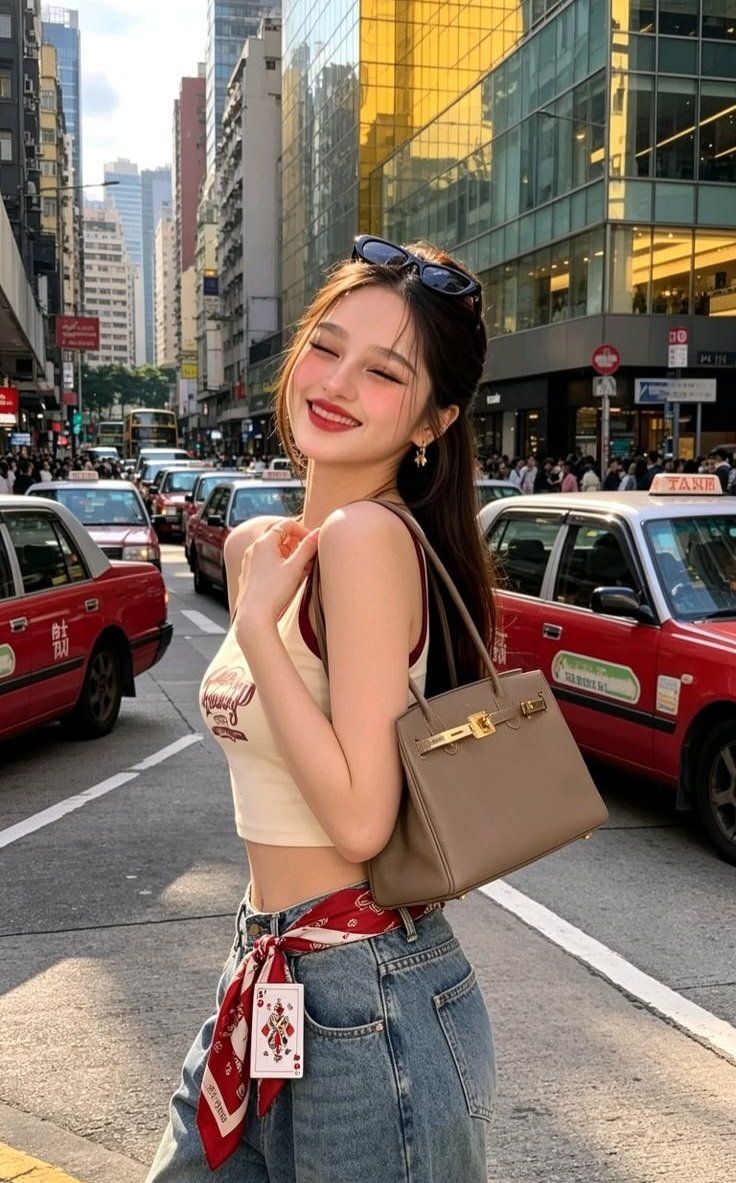
将参考图像转化为一幅迷人的极简涂鸦插图,同时保留原始的白色背景和完整可辨识的街景环境。 保留原始主体、姿势、服装、手袋、红色出租车、建筑物、道路...
Enlarge

Example images

将参考图像转化为一幅迷人的极简涂鸦插图,同时保留原始的白色背景和完整可辨识的街景环境。 保留原始主体、姿势、服装、手袋、红色出租车、建筑物、道路...

Prompt
将参考图像转化为一幅迷人的极简涂鸦插图,同时保留原始的白色背景和完整可辨识的街景环境。 保留原始主体、姿势、服装、手袋、红色出租车、建筑物、道路和整体构图,但将所有元素简化为可爱、俏皮、童趣的形式。使用松散的毛笔轮廓线条,带有自然不匀、略带摇晃的手绘笔触和小瑕疵。保持白色/浅色背景在插图元素周围可见,城市场景柔和简化而非移除。 添加微妙的 watercolor-ink 纹理、最小限度的粉彩晕染、富有表现力的卡通式特征,以及干净的速写本美学。最终作品应给人一种轻盈、可爱、奇幻、手工制作且轻松手绘的感觉,同时仍保留可辨识的原始场景。
Category
创意图片
Model
GPT Image 2
Views1
Source ID
2086297043279258079
Published
Aug 10, 2026

Guide

About "将参考图像转化为一幅迷人的极简涂鸦插图,同时保留原始的白色背景和完整可辨识的街景环境。 保留原始主体、姿势、服装、手袋、红色出租车、建筑物、道路..."

What is this prompt for?

"将参考图像转化为一幅迷人的极简涂鸦插图,同时保留原始的白色背景和完整可辨识的街景环境。 保留原始主体、姿势、服装、手袋、红色出租车、建筑物、道路..." AI image prompt for GPT Image 2 (创意图片). Saved from X post by @MissDelulu9. GPT Im…

The full copyable prompt and example visuals above are ready for AI image generation or one-click recreate in Picva.

How to use this prompt

  1. Step 1

    Open the prompt detail

    Review the example visuals, category, and full prompt text for "将参考图像转化为一幅迷人的极简涂鸦插图,同时保留原始的白色背景和完整可辨识的街景环境。 保留原始主体、姿势、服装、手袋、红色出租车、建筑物、道路...".

  2. Step 2

    Copy the prompt

    Copy the prompt body from this page, or load it directly in Studio.

  3. Step 3

    Pick a model (GPT Image 2)

    Prefer GPT Image 2. If you switch models, keep subject and composition and tweak style terms.

  4. Step 4

    Generate and export

    Recreate the look in Picva, or export into your workflow for editing and publishing.

FAQ

What is the "将参考图像转化为一幅迷人的极简涂鸦插图,同时保留原始的白色背景和完整可辨识的街景环境。 保留原始主体、姿势、服装、手袋、红色出租车、建筑物、道路..." prompt?
It is an AI image-generation prompt for GPT Image 2 in the 创意图片 category. This page includes the full prompt text, example visuals, and a one-click recreate path in Picva.
How do I use this prompt to generate an image?
Copy the prompt from this page, or use Generate / Studio. Paste it into a compatible image model, or recreate the look in Picva with optional reference images.
Which model is this prompt for?
This page lists GPT Image 2. Most descriptive prompts also transfer to nearby image models such as GPT Image, Flux, or Midjourney with light style tweaks.
Can I use the result commercially?
You can usually copy the prompt for creation, but commercial use of the final image depends on the model terms, reference-image rights, and the generated content. Follow the source author and platform rules.