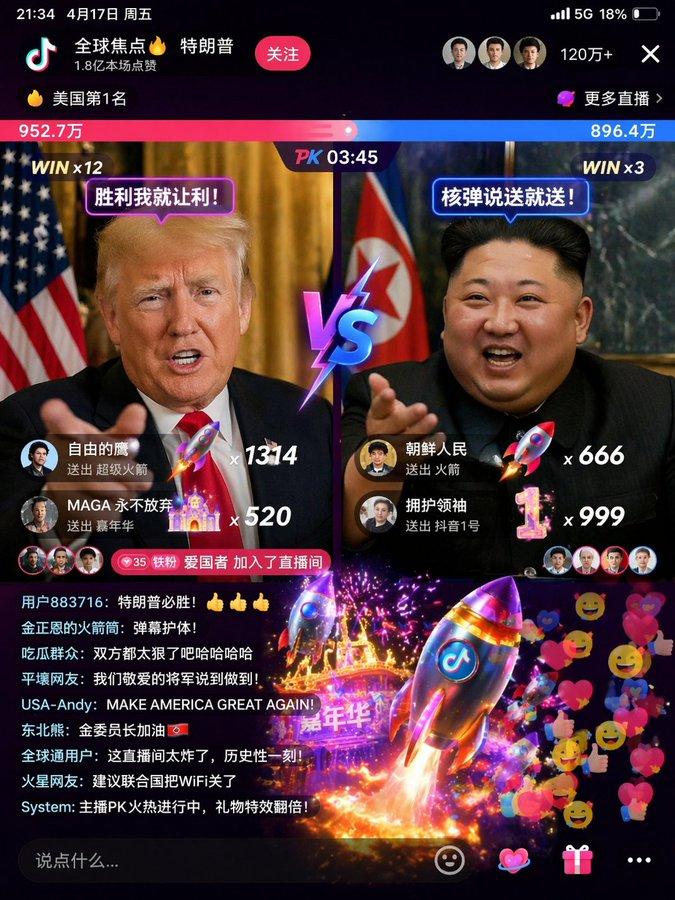
游戏化直播 App 界面
Prompt
{
  "type": "mobile live stream interface mockup",
  "main_subject": "{argument name=\"main subject\" default=\"beautiful young Asian woman smiling\"}",
  "centerpiece_effect": "{argument name=\"centerpiece effect\" default=\"large space shuttle taking off with bright flames and smoke\"}",
  "floating_characters": [
    {"position": "top left", "description": "cartoon pig character Zhu Bajie holding a golden bowl"},
    {"position": "top right", "description": "cartoon monkey character Sun Wukong holding a staff"},
    {"position": "bottom right", "description": "cartoon man with mustache in a suit holding a glowing lightbulb"}
  ],
  "ui_layout": {
    "header": {
      "streamer_info": {"name": "{argument name=\"streamer name\" default=\"小甜心✨\"}", "likes": "28.5万本场点赞", "button": "关注"},
      "top_viewers": {"count": 3, "labels": ["12.8w", "8.9w", "6.6w"]},
      "total_viewers": "10万+"
    },
    "status_bars": {"count": 3, "labels": ["小时榜第1名", "礼物展馆 24/28", "心愿达成 差3.2万"]},
    "gift_notifications": {
      "position": "mid-left",
      "count": 3,
      "items": [
        {"sender": "八戒哥", "action": "送 大火箭", "combo": "x188"},
        {"sender": "齐天大圣", "action": "送 嘉年华", "combo": "x1314"},
        {"sender": "汤森老师", "action": "送 梦幻城堡", "combo": "x520"}
      ]
    },
    "chat_box": {
      "position": "bottom left",
      "count": 7,
      "messages": [
        "甜心小迷弟 加入了直播间",
        "星辰大海: {argument name=\"top chat message\" default=\"女神好美!声音好好听!\"}",
        "抖音用户: 666666",
        "快乐每一天: 太精彩了,火箭升空!",
        "富贵花开 送出 大火箭 x1",
        "风清扬: 这特效绝了!",
        "可可西里: 主播我爱你!"
      ]
    },
    "bottom_right_graphic": {"text": "{argument name=\"bottom graphic text\" default=\"直播间 火力全开\"}", "style": "large 3D glowing typography"},
    "bottom_bar": {"input_placeholder": "说点什么...", "icons_count": 4, "decorations": "floating colorful hearts on the right"}
  }
}- Category
- Charts & Infographics
- Model
- GPT Image 2
- Creator
- Berryxia.AI
- Source ID
- 13523
- Published
- Apr 20, 2026
Views3