F1 赛事结果信息图仪表盘
Prompt
{
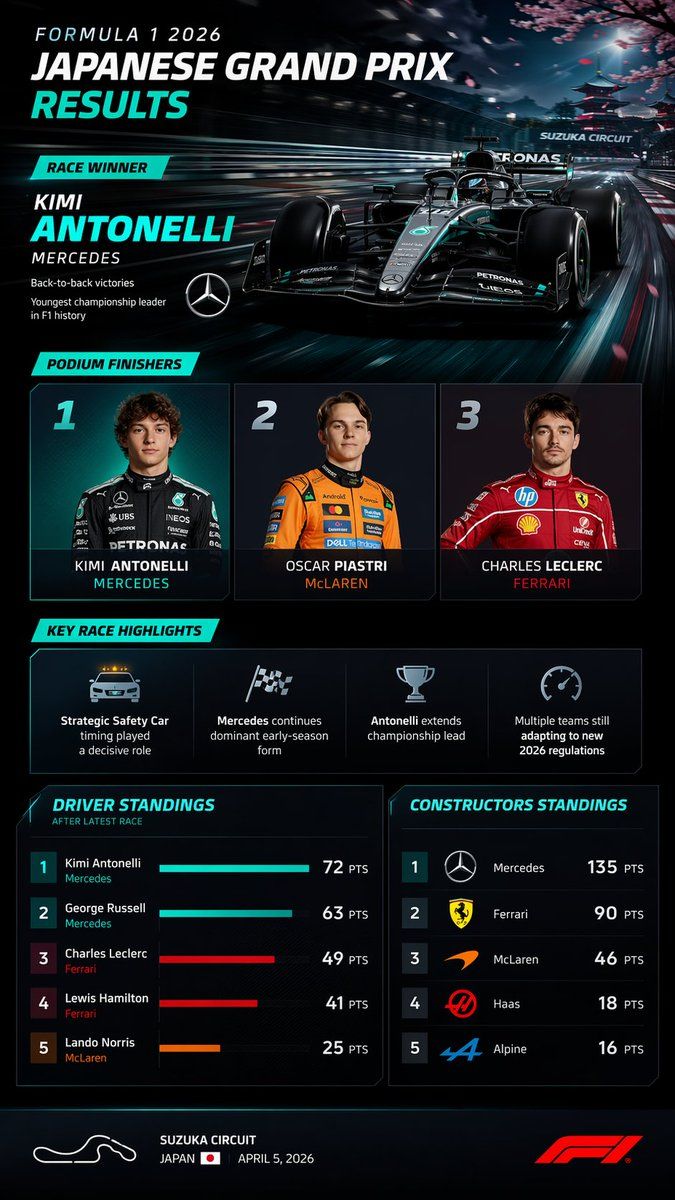
  "type": "sports broadcast infographic dashboard",
  "theme": "dark mode, sleek, modern, neon cyan accents, high-tech F1 graphics",
  "header": {
    "title": "FORMULA 1 {argument name=\"year\" default=\"2026\"} {argument name=\"race name\" default=\"JAPANESE GRAND PRIX\"} RESULTS",
    "winner_callout": {
      "label": "RACE WINNER",
      "driver": "{argument name=\"winner name\" default=\"KIMI ANTONELLI\"}",
      "team": "{argument name=\"winning team\" default=\"MERCEDES\"}",
      "stats": ["Back-to-back victories", "Youngest championship leader in F1 history"],
      "logo": "Mercedes star"
    },
    "background_image": "Sleek black and teal F1 car speeding on a track, heavy motion blur, cherry blossoms and a Japanese pagoda in the background, 'SUZUKA CIRCUIT' text on an overhead gantry."
  },
  "layout": {
    "sections": [
      {
        "title": "PODIUM FINISHERS",
        "position": "middle-top",
        "count": 3,
        "labels": [
          "1 - Photo of young male driver in black Mercedes suit, KIMI ANTONELLI, MERCEDES",
          "2 - Photo of young male driver in orange McLaren suit, OSCAR PIASTRI, McLAREN",
          "3 - Photo of young male driver in red Ferrari suit, CHARLES LECLERC, FERRARI"
        ]
      },
      {
        "title": "KEY RACE HIGHLIGHTS",
        "position": "middle",
        "count": 4,
        "labels": [
          "Safety Car icon: Strategic Safety Car timing played a decisive role",
          "Checkered flag icon: Mercedes continues dominant early-season form",
          "Trophy icon: Antonelli extends championship lead",
          "Speedometer icon: Multiple teams still adapting to new 2026 regulations"
        ]
      },
      {
        "title": "DRIVER STANDINGS",
        "position": "bottom-left",
        "count": 5,
        "labels": [
          "1 Kimi Antonelli Mercedes 72 PTS",
          "2 George Russell Mercedes 63 PTS",
          "3 Charles Leclerc Ferrari 49 PTS",
          "4 Lewis Hamilton Ferrari 41 PTS",
          "5 Lando Norris McLaren 25 PTS"
        ],
        "visuals": "Horizontal bar charts for each driver matching team colors"
      },
      {
        "title": "CONSTRUCTORS STANDINGS",
        "position": "bottom-right",
        "count": 5,
        "labels": [
          "1 Mercedes 135 PTS",
          "2 Ferrari 90 PTS",
          "3 McLaren 46 PTS",
          "4 Haas 18 PTS",
          "5 Alpine 16 PTS"
        ],
        "visuals": "Team logos next to each rank"
      }
    ]
  },
  "footer": {
    "content": "White outline of track layout, {argument name=\"circuit name\" default=\"SUZUKA CIRCUIT\"}, JAPAN with flag, APRIL 5, 2026, red F1 logo."
  }
}- Category
- Charts & Infographics
- Model
- GPT Image 2
- Creator
- 呆大人
- Source ID
- 13620
- Published
- Apr 13, 2026
Views5