17

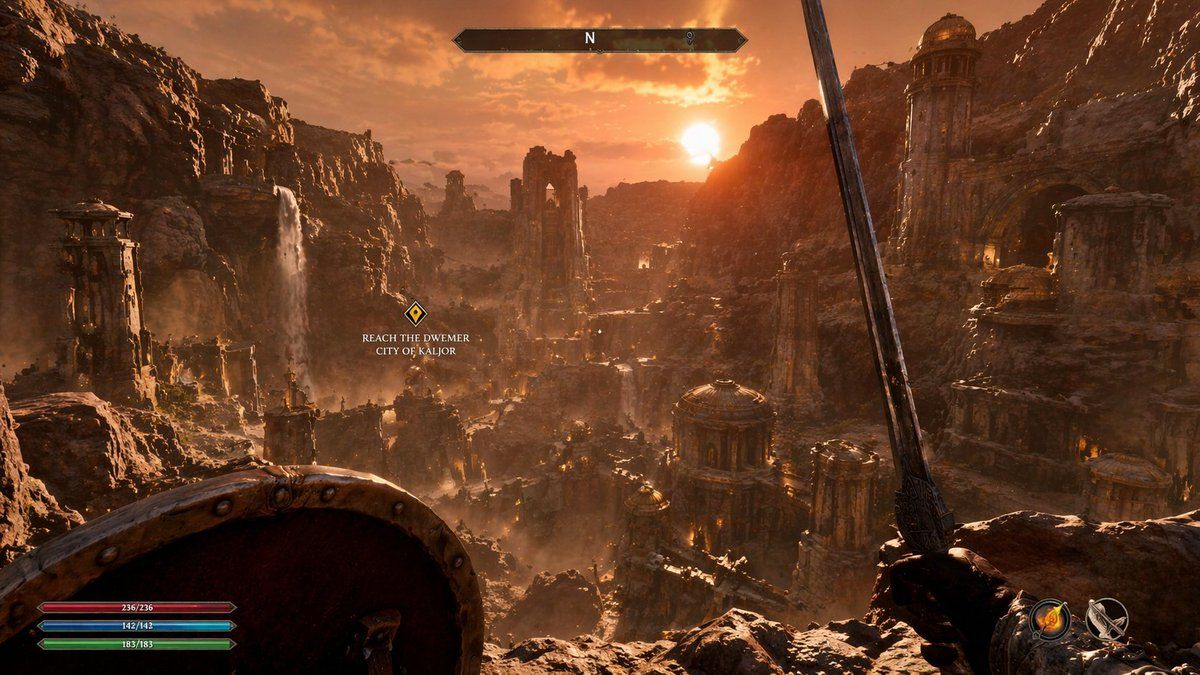
第一人称奇幻 RPG 游戏截图
Enlarge

第一人称奇幻 RPG 游戏截图

Prompt
{
  "type": "first-person RPG video game screenshot",
  "scene": {
    "environment": "{argument name=\"city style\" default=\"ancient ruined Dwemer city in a deep rocky canyon\"}",
    "lighting": "{argument name=\"lighting and atmosphere\" default=\"golden hour sunset, hazy, warm orange glow, dusty atmosphere\"}",
    "details": "cascading waterfalls, towering stone pillars, domed structures with brass accents, rugged cliffs"
  },
  "first_person_view": {
    "left_hand": "{argument name=\"left hand equipment\" default=\"round wooden and metal shield\"}",
    "right_hand": "{argument name=\"right hand equipment\" default=\"long steel sword\"}"
  },
  "ui_overlay": {
    "count": 4,
    "components": [
      {
        "position": "top center",
        "description": "horizontal compass bar with 'N' and a marker"
      },
      {
        "position": "middle left",
        "description": "floating quest marker with text",
        "text": "{argument name=\"quest objective\" default=\"REACH THE DWEMER CITY OF KALJOR\"}"
      },
      {
        "position": "bottom left",
        "description": "3 stacked resource bars (red 236/236, blue 142/142, green 183/183)"
      },
      {
        "position": "bottom right",
        "description": "2 circular quick-slot icons showing a fire spell and a bow"
      }
    ]
  }
}
Category
Posters & Typography
Model
GPT Image 2
Creator
Dr. Beaky
Views3
Source ID
13738
Published
Apr 16, 2026

Guide

About "第一人称奇幻 RPG 游戏截图"

What is this prompt for?

"第一人称奇幻 RPG 游戏截图" AI image prompt for GPT Image 2 (Posters & Typography). 生成一张包含可自定义奇幻环境和标准 RPG 抬头显示(HUD)的第一人称视角游戏截图。 Copy it on Picva and recreate the look in…

The full copyable prompt and example visuals above are ready for AI image generation or one-click recreate in Picva.

How to use this prompt

  1. Step 1

    Open the prompt detail

    Review the example visuals, category, and full prompt text for "第一人称奇幻 RPG 游戏截图".

  2. Step 2

    Copy the prompt

    Copy the prompt body from this page, or load it directly in Studio.

  3. Step 3

    Pick a model (GPT Image 2)

    Prefer GPT Image 2. If you switch models, keep subject and composition and tweak style terms.

  4. Step 4

    Generate and export

    Recreate the look in Picva, or export into your workflow for editing and publishing.

FAQ

What is the "第一人称奇幻 RPG 游戏截图" prompt?
It is an AI image-generation prompt for GPT Image 2 in the Posters & Typography category. This page includes the full prompt text, example visuals, and a one-click recreate path in Picva.
How do I use this prompt to generate an image?
Copy the prompt from this page, or use Generate / Studio. Paste it into a compatible image model, or recreate the look in Picva with optional reference images.
Which model is this prompt for?
This page lists GPT Image 2. Most descriptive prompts also transfer to nearby image models such as GPT Image, Flux, or Midjourney with light style tweaks.
Can I use the result commercially?
You can usually copy the prompt for creation, but commercial use of the final image depends on the model terms, reference-image rights, and the generated content. Follow the source author and platform rules.