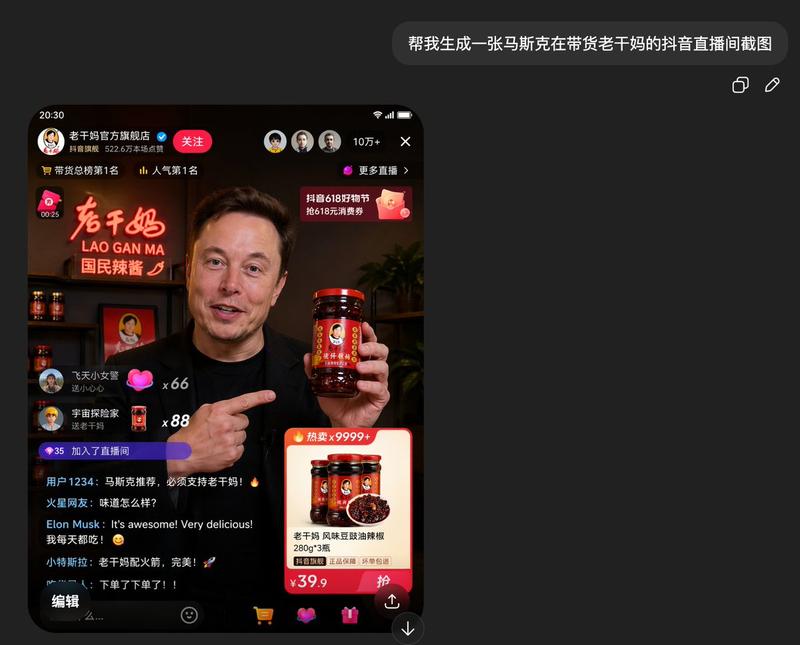
电商直播 UI 原型设计
Prompt
{
  "type": "mobile livestream interface mockup",
  "broadcaster": {
    "person": "{argument name=\"broadcaster name\" default=\"Elon Musk\"}",
    "action": "smiling warmly, holding up a jar of {argument name=\"product name\" default=\"Lao Gan Ma chili crisp\"} to the camera",
    "attire": "black t-shirt and black blazer"
  },
  "environment": {
    "setting": "modern studio or office",
    "background_left": {
      "sign_text": "{argument name=\"promo sign text\" default=\"全网独家首发 老干妈风味 地球人都爱吃\"}",
      "foreground_item": "paper shopping bag with '老干妈' branding"
    },
    "background_right": {
      "shelf_items": [
        "3 jars of Lao Gan Ma chili crisp",
        "{argument name=\"background prop\" default=\"SpaceX Falcon 9 rocket model\"}"
      ]
    }
  },
  "ui_overlay": {
    "top_left": {
      "profile_name": "Elon Musk",
      "subtitle": "1.2亿本场点赞",
      "button": "关注",
      "ranking_tag": "🔥 带货总榜第1名"
    },
    "top_right": {
      "viewer_count": "10万+",
      "link": "更多直播 >",
      "banner": "抖音618好物节 6.1-6.18 火热抢购中"
    },
    "bottom_left_chat": {
      "count": 6,
      "messages": [
        "@宇宙第一辣妹 加入了直播间",
        "铁粉 星辰大海: 支持马总!支持老干妈!",
        "火星居民: 这个一定要买,配饭绝了!",
        "用户8872: 没想到马斯克也爱吃老干妈!",
        "特斯拉车主: 求上链接!立刻下单!",
        "老干妈真香: 从不打广告,却征服了全世界的味道!"
      ]
    },
    "bottom_right_product_card": {
      "sales_tag": "🔥 热卖x 18.9万",
      "status": "讲解中",
      "price": "{argument name=\"product price\" default=\"¥39.9\"}",
      "title": "老干妈风味豆豉油辣椒 280g*2瓶",
      "features": "正品保障 坏了包退 极速发货"
    },
    "bottom_bar": {
      "input_placeholder": "说点什么...",
      "icon_count": 5,
      "icons": ["smiley face", "shopping cart", "heart", "gift box", "three dots"]
    }
  }
}- Category
- UI & Interfaces
- Model
- GPT Image 2
- Creator
- serein
- Source ID
- 13826
- Published
- Apr 16, 2026
Views6