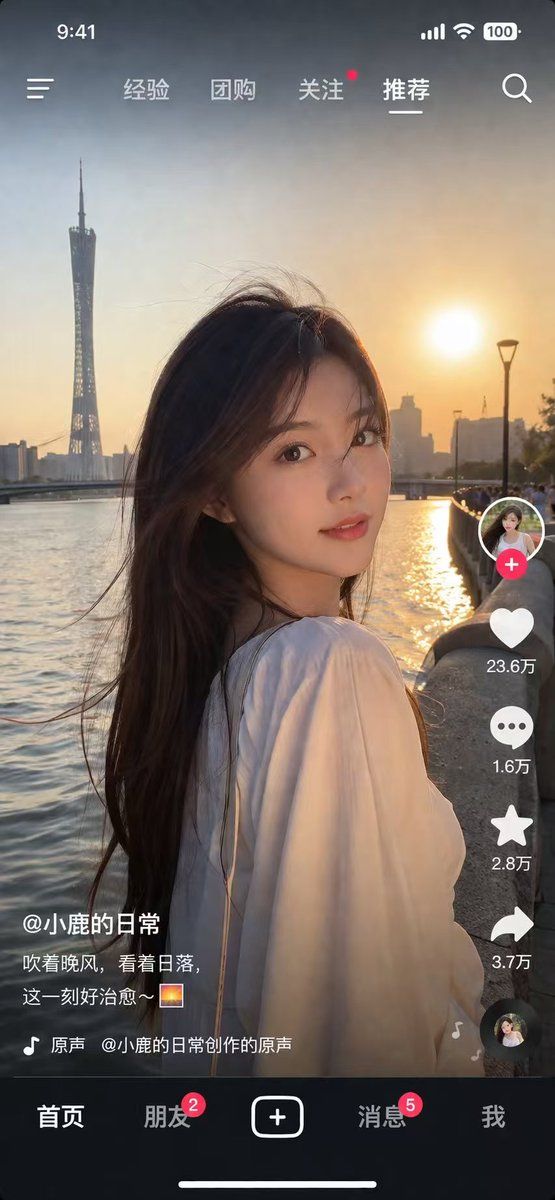
社交媒体视频 App UI 模型
Prompt
{
  "type": "social media short video app interface mockup",
  "main_image": {
    "subject": "{argument name=\"subject description\" default=\"young Asian woman with long dark hair wearing a white off-the-shoulder top\"}",
    "pose": "looking back over her shoulder at the camera, gentle smile, hair blowing slightly in the wind",
    "setting": "{argument name=\"background location\" default=\"riverside promenade at sunset with a tall modern tower and city skyline\"}",
    "lighting": "golden hour, warm sunlight reflecting on the river"
  },
  "ui_layout": {
    "top_bar": {
      "status_icons": ["time 9:41", "cellular signal", "wifi", "battery 100"],
      "navigation": {
        "left": "menu icon",
        "center_tabs": ["经验", "团购", "关注", "{argument name=\"active top tab\" default=\"推荐\"}"],
        "right": "search icon"
      }
    },
    "right_sidebar": {
      "count": 6,
      "elements": [
        "profile picture with pink plus button",
        "heart icon with text '23.6万'",
        "chat bubble icon with text '1.6万'",
        "star icon with text '2.8万'",
        "share arrow icon with text '3.7万'",
        "spinning music record icon"
      ]
    },
    "bottom_left_overlay": {
      "username": "{argument name=\"username\" default=\"@小鹿的日常\"}",
      "caption": "{argument name=\"caption text\" default=\"吹着晚风,看着日落,这一刻好治愈~ 🌅\"}",
      "audio_track": "🎵 原声 @小鹿的日常创作的原声"
    },
    "bottom_navigation_bar": {
      "count": 5,
      "tabs": [
        "首页",
        "朋友 (with red badge '2')",
        "central plus button in rounded square",
        "消息 (with red badge '5')",
        "我"
      ]
    }
  }
}- Category
- UI & Interfaces
- Model
- GPT Image 2
- Creator
- Andy Stewart
- Source ID
- 13844
- Published
- Apr 16, 2026
Views6