MV 预演蓝图
Prompt
{
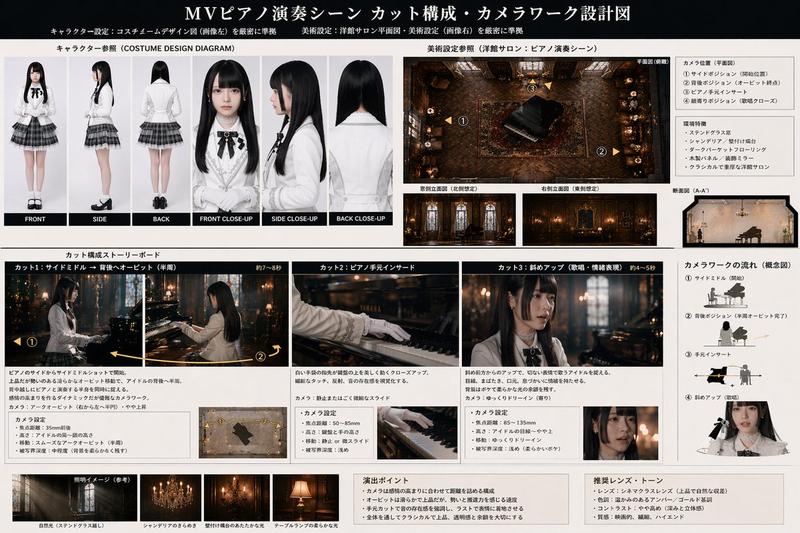
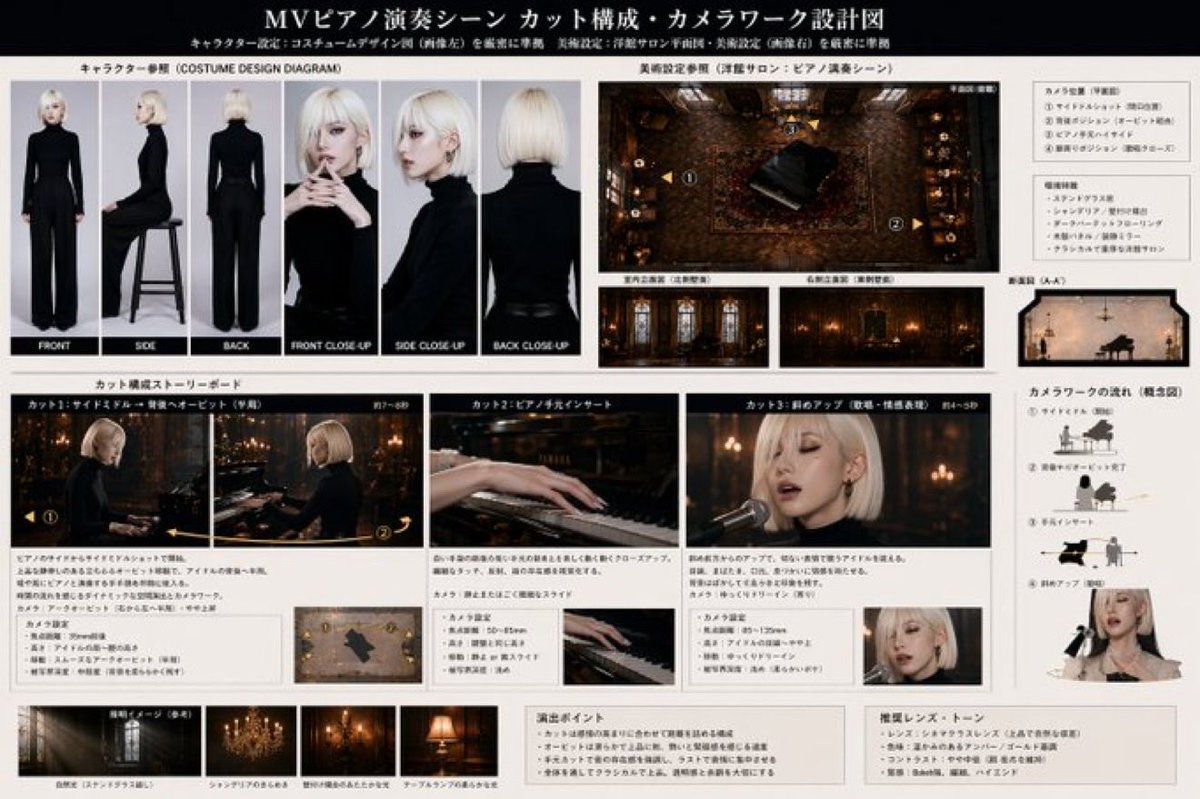
  "type": "music video pre-visualization blueprint",
  "header": {
    "title": "{argument name=\"document title\" default=\"MVピアノ演奏シーン カット構成・カメラワーク設計図\"}",
    "subtitle": "キャラクター設定: コスチュームデザイン図 (画像左) を厳密に準拠 美術設定: 洋館サロン平面図・美術設定 (画像右) を厳密に準拠"
  },
  "character": {
    "description": "{argument name=\"character description\" default=\"young woman with short platinum blonde bob hair, wearing a sleek black turtleneck and black pants\"}"
  },
  "setting": {
    "description": "{argument name=\"scene setting\" default=\"dark, ornate Western-style mansion salon with a grand piano, patterned rugs, and chandeliers\"}"
  },
  "layout": {
    "sections": [
      {
        "title": "キャラクター参照 (COSTUME DESIGN DIAGRAM)",
        "position": "top-left",
        "count": 6,
        "labels": ["FRONT", "SIDE", "BACK", "FRONT CLOSE-UP", "SIDE CLOSE-UP", "BACK CLOSE-UP"],
        "description": "Character turnaround and close-up reference shots on a plain gray background."
      },
      {
        "title": "美術設定参照 (洋館サロン:ピアノ演奏シーン)",
        "position": "top-right",
        "count": 4,
        "labels": ["平面図(俯瞰)", "室内立面図 (左側壁面)", "右側立面図 (右側壁面)", "断面図 (A-A')"],
        "description": "Top-down floor plan of the piano room with numbered camera positions, plus side elevations and a cross-section diagram."
      },
      {
        "title": "カット構成ストーリーボード",
        "position": "middle",
        "count": 3,
        "labels": ["カット1: サイドミドル → 背後へオービット (序盤)", "カット2: ピアノ手元インサート", "カット3: 斜めアップ (歌唱・感情表現)"],
        "description": "Storyboard panels showing the {argument name=\"main action\" default=\"playing the piano and singing emotionally\"}. Each panel includes descriptive text and a small camera diagram below it."
      },
      {
        "title": "カメラワークの流れ (概念図)",
        "position": "middle-right",
        "count": 4,
        "labels": ["① サイドミドル (開始)", "② 背後へオービット完了", "③ 手元インサート", "④ 斜めアップ (歌唱)"],
        "description": "Conceptual diagrams showing camera movement relative to the piano and singer."
      },
      {
        "title": "照明イメージ (参考)",
        "position": "bottom-left",
        "count": 4,
        "labels": ["自然光 (ステンドグラス越し)", "シャンデリアのきらめき", "壁付け燭台のあたたかな光", "テーブルランプの柔らかな光"],
        "description": "Lighting reference thumbnails showing different light sources in the room."
      },
      {
        "title": "Direction and Tone Notes",
        "position": "bottom-right",
        "count": 2,
        "labels": ["演出ポイント", "推奨レンズ・トーン"],
        "description": "Text boxes detailing direction points and recommended lens/tone settings."
      }
    ]
  }
}- Category
- Charts & Infographics
- Model
- GPT Image 2
- Creator
- lpx
- Source ID
- 13879
- Published
- Apr 17, 2026
Views0