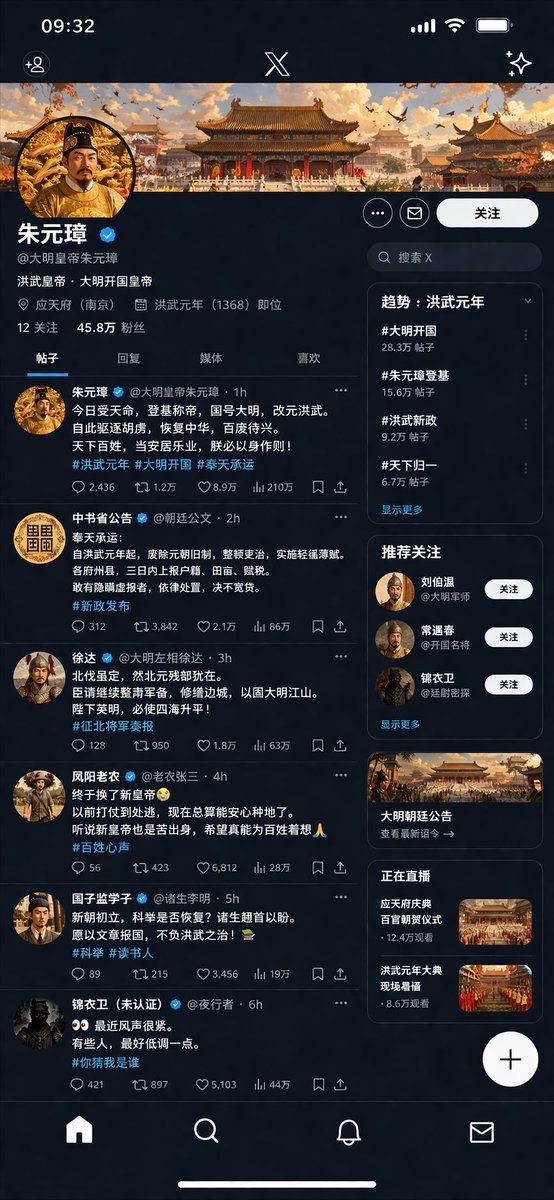
历史皇帝社交媒体 UI 界面模型
Prompt
{
  "type": "social media profile UI mockup",
  "theme": "{argument name=\"theme era\" default=\"Ming Dynasty\"}",
  "app_style": "{argument name=\"app style\" default=\"X/Twitter dark mode\"}",
  "header": {
    "banner_image": "traditional Chinese palace complex at sunset",
    "avatar": "portrait of emperor in yellow robes",
    "name": "{argument name=\"profile name\" default=\"朱元璋\"}",
    "handle": "{argument name=\"profile handle\" default=\"@大明皇帝朱元璋\"}",
    "bio": "{argument name=\"bio text\" default=\"洪武皇帝,大明开国皇帝\"}",
    "location": "应天府 (南京)",
    "joined": "洪武元年 (1368) 即位",
    "stats": "12 关注, 45.8万 粉丝"
  },
  "navigation_tabs": ["帖子", "回复", "媒体", "喜欢"],
  "layout": {
    "left_column_feed": {
      "count": 6,
      "items": [
        { "author": "朱元璋", "handle": "@大明皇帝朱元璋", "content_summary": "proclamation of new dynasty", "tags": ["#洪武元年", "#大明开国", "#奉天承运"] },
        { "author": "中书省公告", "handle": "@朝廷公文", "content_summary": "official edict on taxes", "tags": ["#新政发布"] },
        { "author": "徐达", "handle": "@大明左相徐达", "content_summary": "military report", "tags": ["#征北将军奏报"] },
        { "author": "凤阳老农", "handle": "@老农张三", "content_summary": "peasant expressing relief", "tags": ["#百姓心声"] },
        { "author": "国子监学子", "handle": "@诸生李明", "content_summary": "scholar asking about exams", "tags": ["#科举", "#读书人"] },
        { "author": "锦衣卫 (未认证)", "handle": "@夜行者", "content_summary": "secret police warning", "tags": ["#你猜我是谁"] }
      ]
    },
    "right_column_sidebar": {
      "sections": [
        { "title": "趋势: 洪武元年", "count": 4, "labels": ["#大明开国", "#朱元璋登基", "#洪武新政", "#天下归一"] },
        { "title": "推荐关注", "count": 3, "labels": ["刘伯温", "常遇春", "锦衣卫"] },
        { "title": "promo_card", "count": 1, "label": "大明朝廷公告", "image": "palace building" },
        { "title": "正在直播", "count": 2, "labels": ["应天府庆典", "洪武元年大典"], "thumbnails": "grand ceremonies" }
      ]
    },
    "system_ui": {
      "top_bar": "time 09:32, signal, wifi, battery, X logo",
      "bottom_bar": "home, search, notifications, messages icons",
      "floating_button": "+"
    }
  }
}- Category
- UI & Interfaces
- Model
- GPT Image 2
- Creator
- HuZhou_Mr
- Source ID
- 13897
- Published
- Apr 17, 2026
Views6


