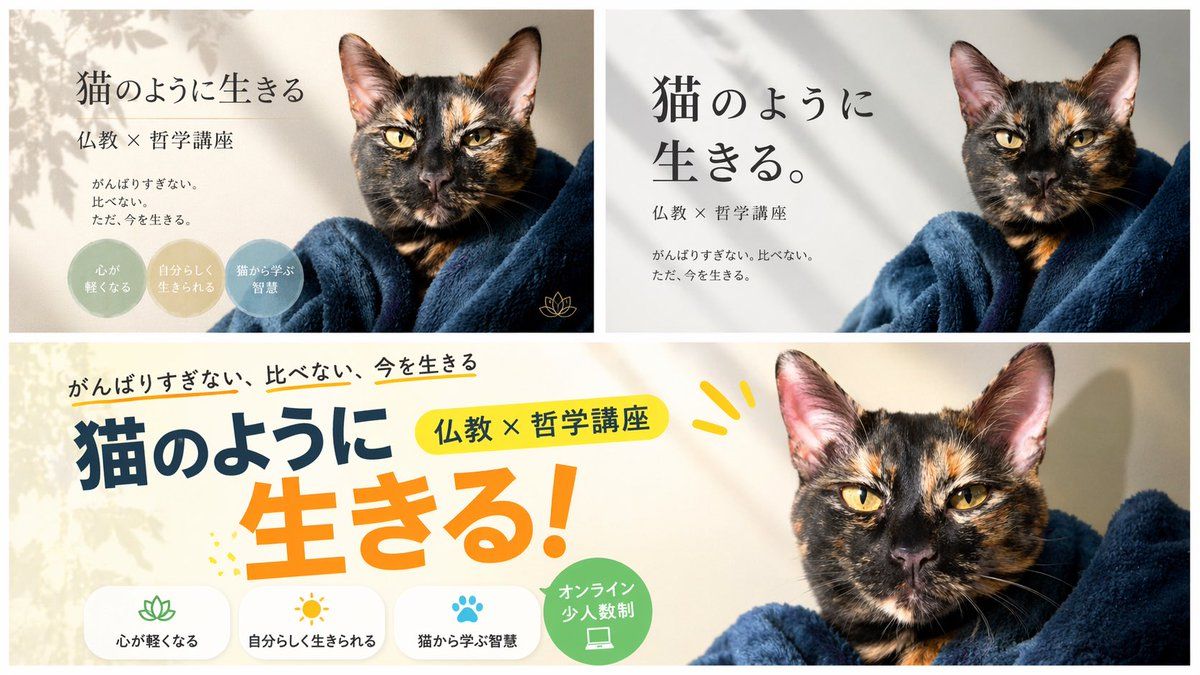
横幅设计变体布局
Prompt
{
  "type": "banner design variations",
  "subject": "{argument name=\"subject\" default=\"tortoiseshell cat wrapped in a dark blue blanket\"}",
  "layout": {
    "description": "A composite image displaying 3 different banner design variations for the same course, arranged with two smaller banners on top and one wide banner on the bottom.",
    "sections": [
      {
        "position": "top-left",
        "style": "elegant and calm with soft leaf shadows",
        "text_elements": [
          "{argument name=\"main headline\" default=\"猫のように生きる\"}",
          "{argument name=\"subheading\" default=\"仏教 × 哲学講座\"}",
          "{argument name=\"body text\" default=\"がんばりすぎない。比べない。ただ、今を生きる。\"}"
        ],
        "design_elements": {
          "badges": {
            "count": 3,
            "shape": "circular",
            "labels": [
              "{argument name=\"badge text 1\" default=\"心が軽くなる\"}",
              "自分らしく生きられる",
              "猫から学ぶ智慧"
            ]
          },
          "icons": {
            "count": 1,
            "description": "small gold lotus icon"
          }
        }
      },
      {
        "position": "top-right",
        "style": "minimalist and modern with clean typography",
        "text_elements": [
          "猫のように生きる。",
          "仏教 × 哲学講座",
          "がんばりすぎない。比べない。ただ、今を生きる。"
        ]
      },
      {
        "position": "bottom",
        "style": "pop, energetic, and casual with colorful accents",
        "text_elements": [
          "がんばりすぎない、比べない、今を生きる",
          "猫のように",
          "生きる!",
          "仏教 × 哲学講座"
        ],
        "design_elements": {
          "icon_text_pairs": {
            "count": 3,
            "descriptions": [
              "lotus icon with text 心が軽くなる",
              "sun icon with text 自分らしく生きられる",
              "paw print icon with text 猫から学ぶ智慧"
            ]
          },
          "badges": {
            "count": 1,
            "shape": "circular green badge",
            "label": "オンライン 少人数制",
            "icon": "laptop"
          }
        }
      }
    ]
  }
}- Category
- Charts & Infographics
- Model
- GPT Image 2
- Creator
- しゅうへい@AIで借金6,000万返す人
- Source ID
- 13906
- Published
- Apr 17, 2026
Views2