18

电影感日式爱情海报
Enlarge

电影感日式爱情海报

Prompt
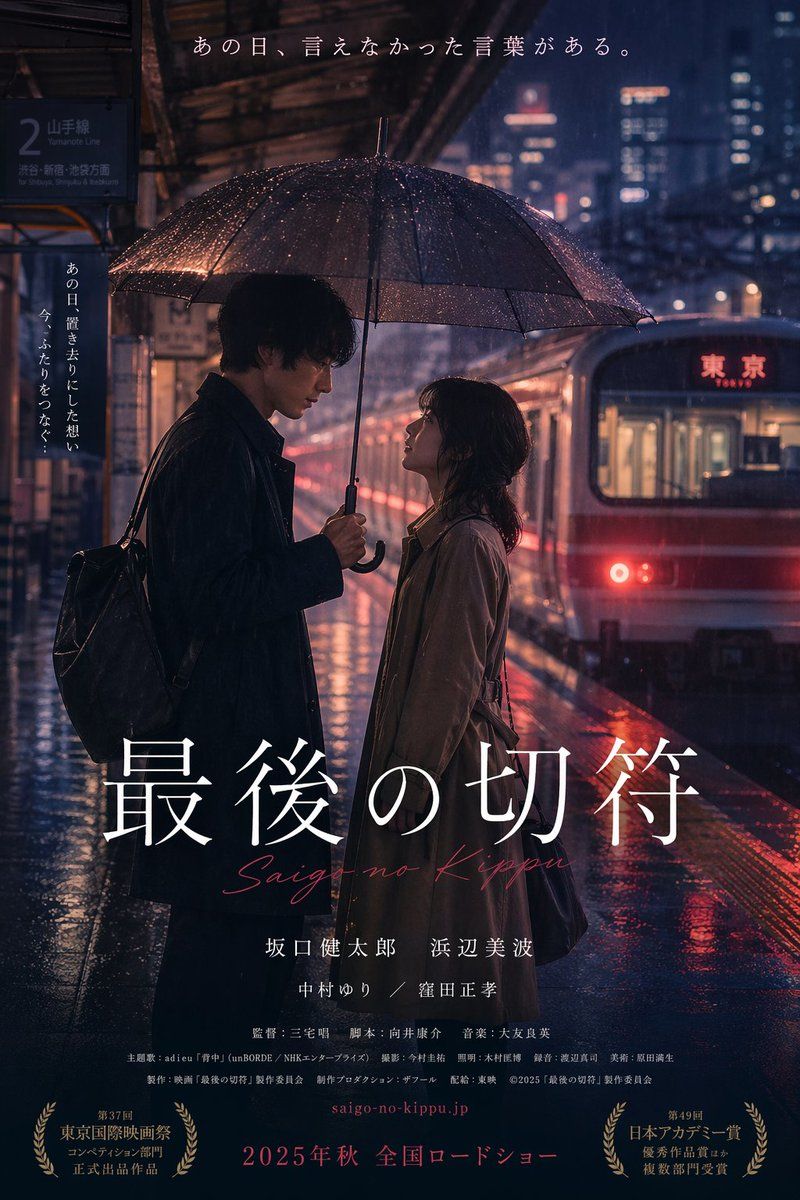
A cinematic Japanese movie poster featuring a romantic, melancholic scene of a man and a woman standing face-to-face on a wet train station platform at night in the rain. The tall man on the left wears a dark coat and backpack, holding a black umbrella over them. The woman on the right wears a tan trench coat, looking up at him. A red and white commuter train with the word Tokyo written in Japanese and English on the front is on the tracks to the right. A station sign on the left indicates the Yamanote Line in Japanese. The lighting is moody with neon city lights reflecting on the wet platform. The poster features prominent text overlays. At the top, a horizontal tagline reads {argument name="top tagline" default="あの日、言えなかった言葉がある。"}. On the left, a vertical tagline reads {argument name="side tagline" default="あの日、置き去りにした想い 今、ふたりをつなぐ..."}. In the lower center, the large main title is {argument name="main title" default="最後の切符"} in a white serif font, with a red cursive subtitle {argument name="romaji subtitle" default="Saigo no Kippu"} below it. Below the title are two lines of Japanese cast names, followed by a dense block of small Japanese production credits. At the bottom center, a red website URL and the release text {argument name="release info" default="2025年秋 全国ロードショー"}. The bottom corners feature two golden award laurels with Japanese text.
Category
UI & Interfaces
Model
GPT Image 2
Views0
Source ID
14188
Published
Apr 20, 2026

Guide

About "电影感日式爱情海报"

What is this prompt for?

"电影感日式爱情海报" AI image prompt for GPT Image 2 (UI & Interfaces). 生成一张充满情绪感、写实的日式电影海报,画面展现雨中火车站的一对情侣,并支持自定义标题和标语。 Copy it on Picva and recreate the look in one cl…

The full copyable prompt and example visuals above are ready for AI image generation or one-click recreate in Picva.

How to use this prompt

  1. Step 1

    Open the prompt detail

    Review the example visuals, category, and full prompt text for "电影感日式爱情海报".

  2. Step 2

    Copy the prompt

    Copy the prompt body from this page, or load it directly in Studio.

  3. Step 3

    Pick a model (GPT Image 2)

    Prefer GPT Image 2. If you switch models, keep subject and composition and tweak style terms.

  4. Step 4

    Generate and export

    Recreate the look in Picva, or export into your workflow for editing and publishing.

FAQ

What is the "电影感日式爱情海报" prompt?
It is an AI image-generation prompt for GPT Image 2 in the UI & Interfaces category. This page includes the full prompt text, example visuals, and a one-click recreate path in Picva.
How do I use this prompt to generate an image?
Copy the prompt from this page, or use Generate / Studio. Paste it into a compatible image model, or recreate the look in Picva with optional reference images.
Which model is this prompt for?
This page lists GPT Image 2. Most descriptive prompts also transfer to nearby image models such as GPT Image, Flux, or Midjourney with light style tweaks.
Can I use the result commercially?
You can usually copy the prompt for creation, but commercial use of the final image depends on the model terms, reference-image rights, and the generated content. Follow the source author and platform rules.