AI 新闻通讯页面布局
Prompt
{
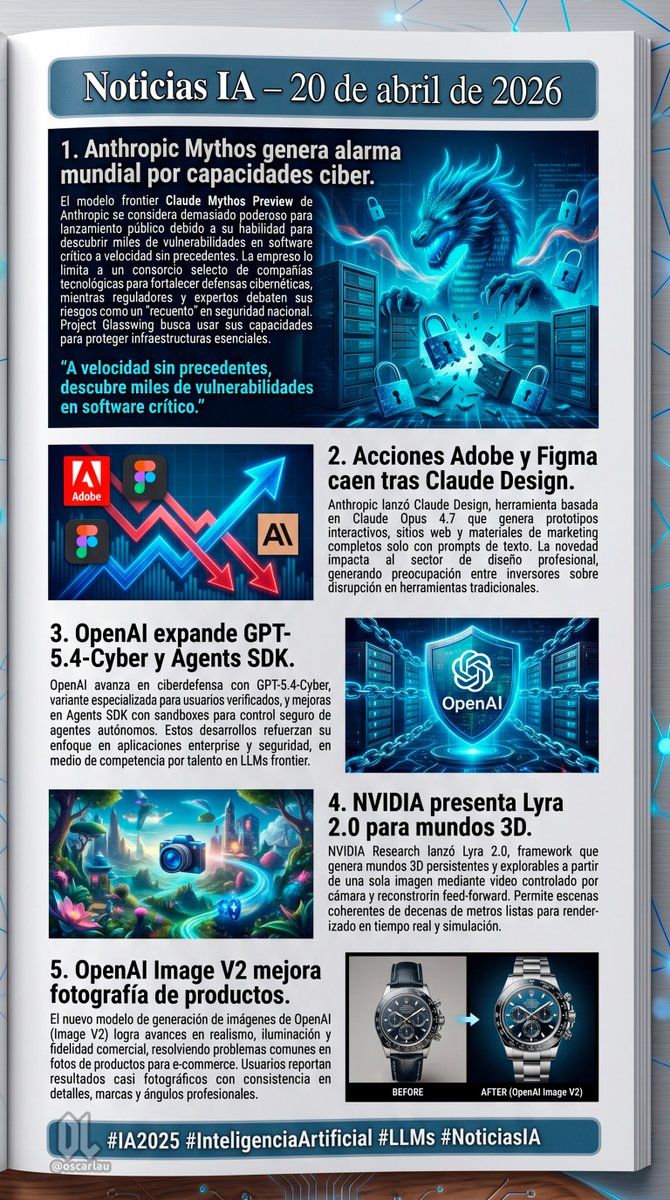
  "type": "digital newsletter page layout",
  "background": "white page resting on a dark surface with glowing blue digital nodes and connecting lines",
  "header": {
    "text": "{argument name=\"main headline\" default=\"Noticias IA – 20 de abril de 2026\"}",
    "style": "white text on a dark blue banner with a light blue border"
  },
  "layout": {
    "sections": [
      {
        "id": 1,
        "title": "{argument name=\"news item 1 title\" default=\"1. Anthropic Mythos genera alarma mundial por capacidades ciber.\"}",
        "image_description": "A glowing blue cyber dragon emerging from servers, surrounded by floating digital padlocks.",
        "layout_style": "Image on the right, title and text on the left, with a cyan pull quote at the bottom left."
      },
      {
        "id": 2,
        "title": "{argument name=\"news item 2 title\" default=\"2. Acciones Adobe y Figma caen tras Claude Design.\"}",
        "image_description": "A stylized stock chart showing jagged red arrows pointing down and a glowing blue arrow pointing up, featuring logos for Adobe, Figma, and an 'AI' icon.",
        "layout_style": "Image on the left, title and text on the right."
      },
      {
        "id": 3,
        "title": "{argument name=\"news item 3 title\" default=\"3. OpenAI expande GPT-5.4-Cyber y Agents SDK.\"}",
        "image_description": "A glowing blue holographic shield with the OpenAI logo in the center, surrounded by digital chains and a server background.",
        "layout_style": "Title and text on the left, image on the right."
      },
      {
        "id": 4,
        "title": "4. NVIDIA presenta Lyra 2.0 para mundos 3D.",
        "image_description": "A vibrant, surreal 3D fantasy landscape with glowing flora, floating islands, and a glowing blue camera icon in the foreground.",
        "layout_style": "Image on the left, title and text on the right."
      },
      {
        "id": 5,
        "title": "5. OpenAI Image V2 mejora fotografía de productos.",
        "image_description": "A side-by-side comparison of a luxury chronograph watch. The left side is labeled 'BEFORE' (darker, less detailed), and the right side is labeled 'AFTER (OpenAI Image V2)' (bright, highly detailed, professional lighting).",
        "layout_style": "Title and text on the left, image on the right."
      }
    ],
    "count": 5
  },
  "footer": {
    "text": "{argument name=\"footer hashtags\" default=\"#IA2025 #InteligenciaArtificial #LLMs #NoticiasIA\"}",
    "logo": "OL logo with '@oscarlau'",
    "style": "white text on a dark blue banner at the bottom"
  }
}- Category
- Charts & Infographics
- Model
- GPT Image 2
- Creator
- Oscar Laura
- Source ID
- 14271
- Published
- Apr 20, 2026
Views3


![Make an infographic of this person’s life based on this article: [Wikipedia Page]](https://cdn.pixshop.app/prompt-library/nano-banana-1991666924862963877/primary-0-1768410178238-q2gagvh4.jpeg)