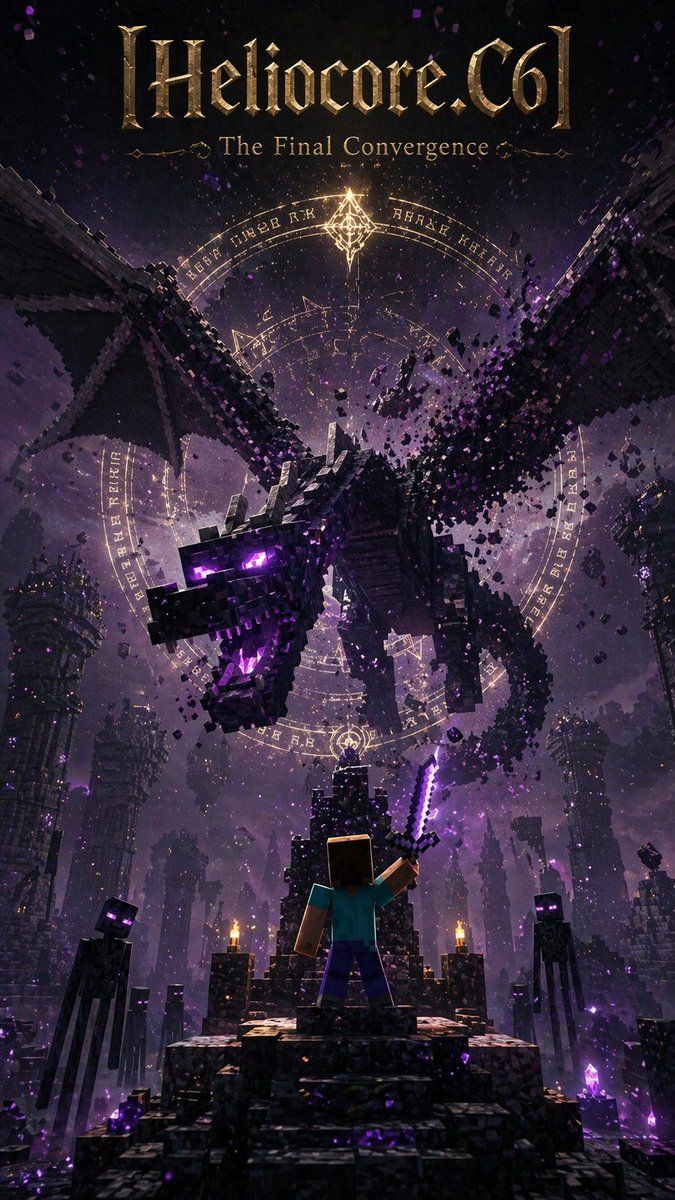
Minecraft 末影龙奇幻海报
Prompt
Create a dramatic vertical dark-fantasy poster in a Minecraft-inspired voxel style, like an epic movie or game cover. At the very top, place a large ornate metallic-gold blackletter title reading {argument name="headline text" default="[Heliocore.C6]"}, with a smaller elegant serif subtitle beneath it reading {argument name="subtitle" default="The Final Convergence"}. The main scene shows 1 massive Ender Dragon made of black cubic blocks, flying forward and downward out of the sky with its wings spread wide, mouth open, glowing purple eyes, and violet energy in its throat, while chunks of voxel debris break apart around its body. Behind the dragon, place 3 large concentric glowing magic circles with arcane runes and geometric symbols in pale gold light, centered in the sky like a summoning seal. In the foreground, show 1 blocky hero seen from behind, resembling Steve, standing on a ruined stone staircase-throne and raising 1 glowing purple enchanted sword toward the dragon. Surround the platform with 4 visible Endermen total, tall and slender with black blocky bodies and glowing purple eyes, acting as ominous witnesses. The environment is an enormous ruined End-city style abyss with towering broken pillars, floating block fragments, crystal clusters, and distant structures fading into purple fog. Use a palette of black, charcoal, deep violet, magenta glow, and antique gold highlights, with cinematic volumetric lighting, heavy atmosphere, sparks, dust, magical particles, extreme scale, high contrast, and a polished ultra-detailed poster composition.- Category
- Posters & Typography
- Model
- GPT Image 2
- Creator
- Heliocore.C6
- Source ID
- 14484
- Published
- Apr 21, 2026
Views11