极简护肤品牌指南项目
Prompt
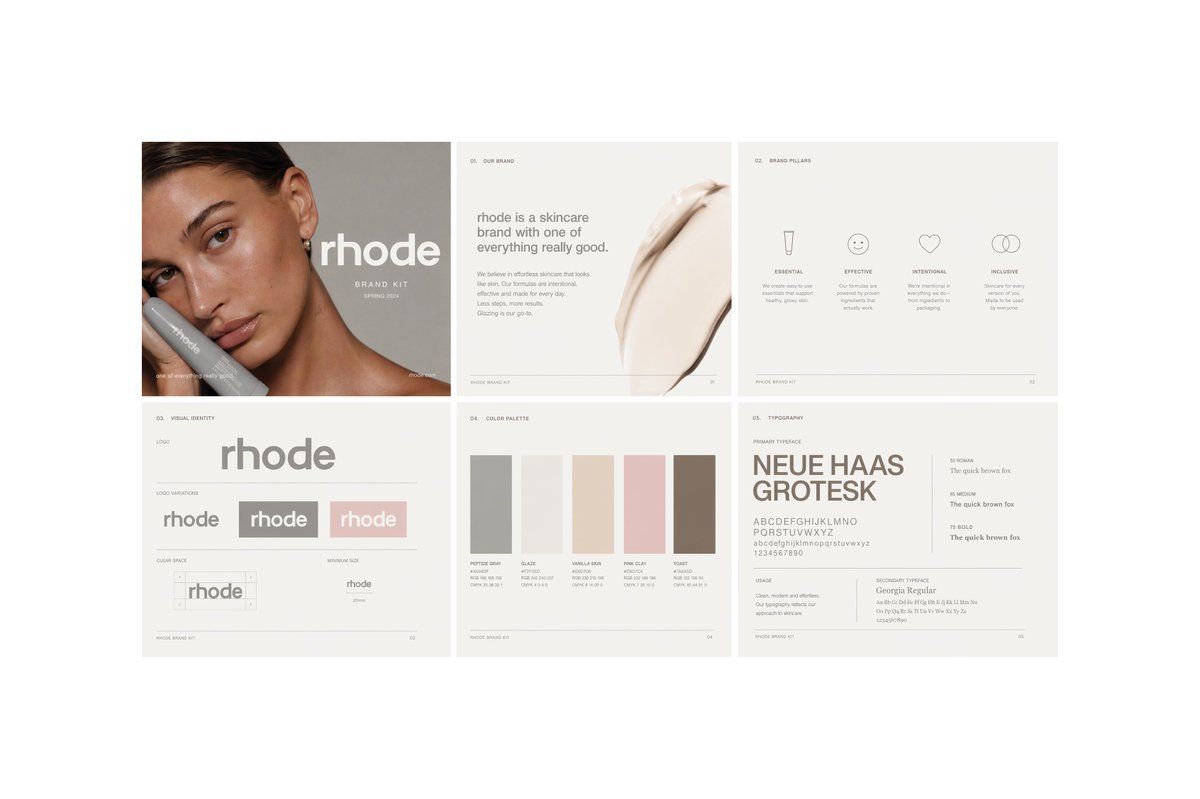
{"type":"minimal skincare brand book spread","brand":{"name":"{argument name=\"brand name\" default=\"rhode\"}","industry":"skincare","style":"quiet luxury, clean, editorial, minimalist, soft neutral tones"},"canvas":{"background":"very light warm gray","format":"wide landscape presentation board","grid":"2 rows x 3 columns","count":6,"gutters":"thin white spacing between panels"},"layout":{"sections":[{"title":"cover","position":"top-left","count":1,"elements":["cropped beauty portrait of a woman with slicked-back dark hair and visible ear, neck, and shoulder","large lowercase wordmark over the portrait","small subtitle reading brand kit and a season-year line","soft taupe-gray background","a large square color block overlay obscuring the center-left of the face"]},{"title":"01. OUR BRAND","position":"top-center","count":1,"elements":["small section number and title at top","left-aligned paragraph block","headline stating that the brand is a skincare brand with one of everything really good","short supporting body copy in small light gray text","large creamy skincare smear image on the right side"]},{"title":"02. BRAND PILLARS","position":"top-right","count":1,"elements":["small section number and title at top","4 icon-and-text columns","labels: ESSENTIAL, EFFECTIVE, INTENTIONAL, INCLUSIVE","icons: tube, smiley face, heart, interlocking circles","one short descriptor paragraph under each pillar"]},{"title":"03. VISUAL IDENTITY","position":"bottom-left","count":1,"elements":["small section number and title at top","large central lowercase wordmark","logo variations row with 3 variants","labels for supporting subareas including logo, logo variation, clear space, minimum size","clear space diagram","minimum size example"]},{"title":"04. COLOR PALETTE","position":"bottom-center","count":1,"elements":["small section number and title at top","5 vertical rectangular color swatches","labels: PEPTIDE GRAY, GLAZE, VANILLA SKIN, PINK GLAZE, TOAST","tiny specification lines under each swatch"]},{"title":"05. TYPOGRAPHY","position":"bottom-right","count":1,"elements":["small section number and title at top","large sample text for primary typeface","primary typeface name shown as {argument name=\"primary typeface\" default=\"NEUE HAAS GROTESK\"}","alphabet and numerals sample","3 weight samples labeled 55 ROMAN, 65 MEDIUM, 75 BOLD with the line 'The quick brown fox'","secondary typeface line showing Georgia Regular","small usage notes blocks"]}],"footer":"tiny page markers and brand kit captions on each panel"},"palette":{"overall":["warm off-white","light gray","taupe","beige","blush pink","soft brown"]},"typography":{"wordmark":"bold rounded lowercase sans serif","body":"small understated editorial sans serif","mood":"premium, restrained, airy"},"rendering":{"look":"high-end brand guidelines presentation mockup","lighting":"soft flat studio lighting","detail":"crisp layout, subtle contrast, lots of negative space"}}- Category
- Charts & Infographics
- Model
- GPT Image 2
- Creator
- Franrome
- Source ID
- 15787
- Published
- Apr 24, 2026
Views4