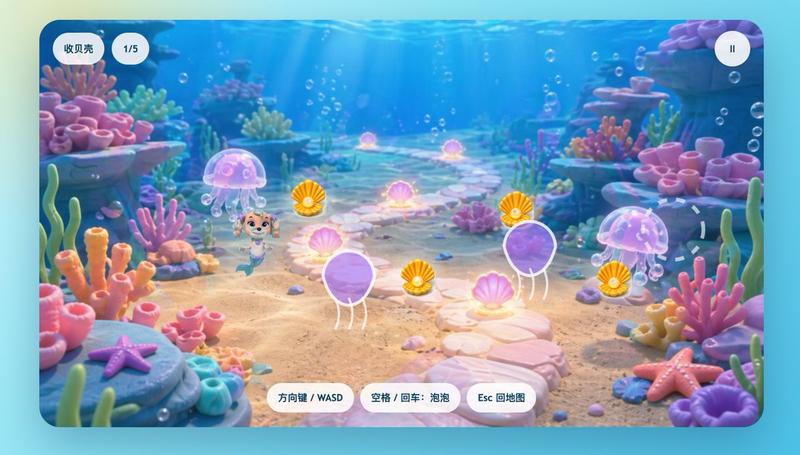
可爱的水下美人鱼小狗游戏 UI
Prompt
A cute children’s 3D game screenshot in a bright underwater world, shown from a slightly elevated third-person view inside a colorful seaweed maze. The scene has a soft, glossy, toy-like look with rounded shapes, smooth clay-style materials, pastel-saturated colors, and cinematic god rays shining down through clear blue water. In the maze, a small mermaid puppy inspired by Coral from Paw Patrol stands near the lower-left quadrant, smiling with a friendly heroic expression. She has a light tan puppy face, big expressive eyes, pink-purple mermaid-themed accessories, and a small mermaid tail, designed in an adorable family-friendly animated style. Near her on the sandy seabed is a visible pair of scissors, the hidden-object target. The maze walls are made of dense green and teal seaweed with rounded pebble borders, creating winding paths across the center of the scene. The seabed is pale golden sand with caustic light patterns, scattered tiny shells and stones, and many floating air bubbles. Around the maze are whimsical coral-rock formations in blue, purple, and turquoise, including 1 shell-shaped treasure alcove on the left with a starfish above it and 1 large open pink clam shell with a pearl on the right. On the right side of the play area are 2 turtles: 1 larger light-green turtle and 1 smaller brown-green turtle, plus 3 separate clumps of upright sea plants in the open sand. Add a translucent white cross-shaped path marker or objective indicator over the center of the maze. Present it as a polished mobile game interface framed by a rounded rectangular screen. Include 6 UI elements total: top left a pill-shaped white label with the Chinese text “找剪刀”, next to it a white rounded counter reading “0/3”, top right a circular white pause button with a pause icon, and along the bottom center 3 white rounded instruction buttons labeled “方向键 / WASD”, “空格 / 回车:剪刀”, and “Esc 回地图”. The overall mood is comforting, playful, magical, and reassuring, like an educational hide-and-seek mini-game for a sick child, with high-end casual game art and a clean app-store-quality presentation.
- Category
- Charts & Infographics
- Model
- GPT Image 2
- Creator
- 小鲸鱼
- Source ID
- 17146
- Published
- Apr 29, 2026
Views4