16

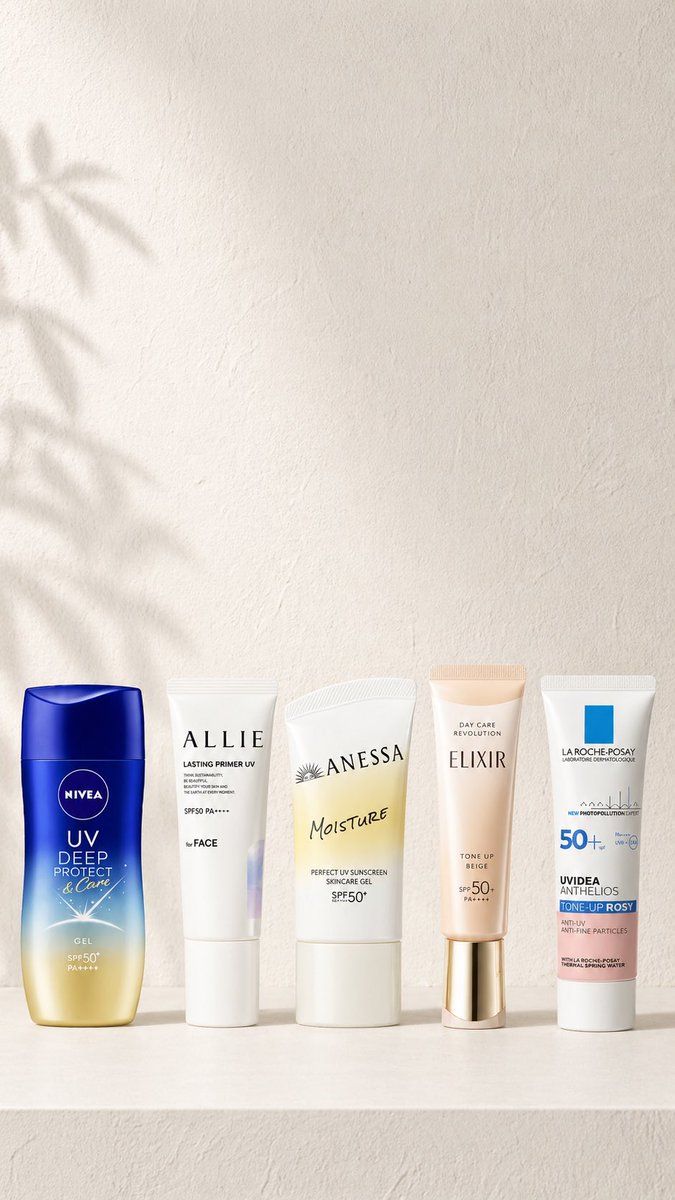
极简防晒产品封面
Enlarge

极简防晒产品封面

Prompt
A clean, minimalist product still life for a beauty reel cover, shot in a vertical 9:16 composition. Place exactly 5 sunscreen and UV skincare products standing upright in a straight row on a pale off-white shelf against a warm ivory textured plaster wall. From left to right: 1) a glossy blue-to-gold gradient bottle with a rounded cap, 2) a matte white squeeze tube, 3) a slightly curved white squeeze tube with soft beige tinting and elegant black lettering, 4) a slim beige-pink tube with a metallic gold cap, 5) a white tube with blue labeling. Use soft natural sunlight coming from the left, creating delicate botanical leaf shadows on the upper left side of the wall and faint shadows behind the products. Keep the styling airy, premium, and understated, with lots of negative space above the products for cover text. Neutral cream, white, beige, and blue palette, realistic commercial photography, subtle texture, sharp focus on the packaging, gentle high-end skincare advertising mood.
Category
Charts & Infographics
Model
GPT Image 2
Creator
ふゆな
Views5
Source ID
17190
Published
Apr 29, 2026

Guide

About "极简防晒产品封面"

What is this prompt for?

"极简防晒产品封面" AI image prompt for GPT Image 2 (Charts & Infographics). 此提示词可生成精致的竖版护肤品陈列照片,适用于社交媒体短视频封面、美妆推广及简约生活方式品牌宣传。 Copy it on Picva and recreate the look in…

The full copyable prompt and example visuals above are ready for AI image generation or one-click recreate in Picva.

How to use this prompt

  1. Step 1

    Open the prompt detail

    Review the example visuals, category, and full prompt text for "极简防晒产品封面".

  2. Step 2

    Copy the prompt

    Copy the prompt body from this page, or load it directly in Studio.

  3. Step 3

    Pick a model (GPT Image 2)

    Prefer GPT Image 2. If you switch models, keep subject and composition and tweak style terms.

  4. Step 4

    Generate and export

    Recreate the look in Picva, or export into your workflow for editing and publishing.

FAQ

What is the "极简防晒产品封面" prompt?
It is an AI image-generation prompt for GPT Image 2 in the Charts & Infographics category. This page includes the full prompt text, example visuals, and a one-click recreate path in Picva.
How do I use this prompt to generate an image?
Copy the prompt from this page, or use Generate / Studio. Paste it into a compatible image model, or recreate the look in Picva with optional reference images.
Which model is this prompt for?
This page lists GPT Image 2. Most descriptive prompts also transfer to nearby image models such as GPT Image, Flux, or Midjourney with light style tweaks.
Can I use the result commercially?
You can usually copy the prompt for creation, but commercial use of the final image depends on the model terms, reference-image rights, and the generated content. Follow the source author and platform rules.