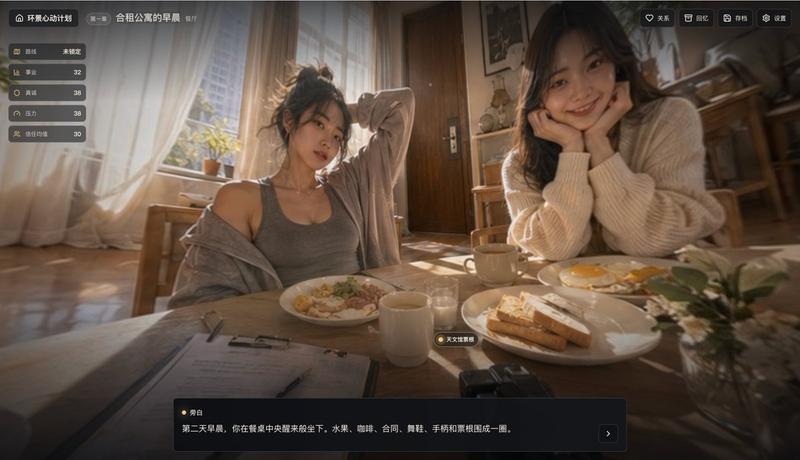
电影感咖啡馆叙事类 App UI
Prompt
{"type":"cinematic app interface screenshot","product":"story-driven life simulation / memory collection app","language":"Chinese UI","screen":{"aspect_ratio":"16:9 landscape","theme":"dark translucent glassmorphism overlay on top of a warm café photo","style":"premium mobile-game-like desktop web app, moody, emotional, softly blurred edges, amber highlights, realistic photography background with crisp UI panels"},"background_scene":{"location":"cozy coffee shop at night","lighting":"warm tungsten café lighting with deep shadows and orange-brown tones","camera":"slightly wide-angle selfie perspective from the front-left, immersive and casual","subjects":[{"count":1,"role":"foreground woman taking a selfie","appearance":"long wavy dark hair, cream knit cardigan over a light top, seated close to camera, extended arm toward lens, face intentionally anonymized/blurred"},{"count":1,"role":"background woman filming","appearance":"ponytail, oversized light hoodie, standing beside a camera on a tripod, face intentionally anonymized/blurred"}],"environment_details":{"count":10,"items":["large windows showing night city lights","ceiling fan","wooden tables","wooden chairs and stools","potted plants","table lamps","bookshelf","framed wall art","curtains","camera tripod"]}},"layout":{"top_bar":{"count":8,"items":["home icon button","title \"环景心动计划\"","chapter tag \"第二章\"","main page title \"咖啡店样片\"","subtitle \"苏晓晴的咖啡店\"","favorite button \"关系\"","review button \"回忆\"","save button \"存档\" and settings button \"设置\""]},"left_stats_panel":{"position":"top-left vertical card stack","count":5,"labels":["路线","事业","真诚","压力","信任均值"],"values":["未锁定","32","40","38","31"]},"right_memory_panel":{"position":"right sidebar","title":"回忆","count":6,"sections":[{"title":"featured memory card","count":1,"labels":["咖啡店样片"]},{"title":"已到达场景","count":4,"labels":["雨夜重逢","停电楼顶","合租公寓的早晨","咖啡店样片"]},{"title":"已发现回忆","count":1,"labels":["还没有发现隐藏回忆"]}]},"bottom_dialogue_box":{"position":"bottom center-left overlay","count":2,"items":["speaker name \"苏晓晴\"","dialogue text \"我想拍一个人终于可以喘口气的地方。不是被取悦,是被接住。\""]}},"text_style":{"font":"clean modern sans-serif Chinese UI font","color":"off-white and muted gray on dark translucent panels","accent":"soft gold / amber icons and highlights"},"generation_notes":"Create a polished product mockup / in-app screenshot for {argument name=\"app name\" default=\"环景心动计划\"}, showing chapter {argument name=\"chapter label\" default=\"第二章\"} and scene title {argument name=\"scene title\" default=\"咖啡店样片\"}. Keep the exact Chinese labels visible. Emphasize a warm emotional café atmosphere, realistic photographic background, cinematic depth of field, and elegant dark UI overlays. Include the exact dialogue line and stats values. Use subtle vignette, glossy panel edges, and a premium narrative-game interface aesthetic."}- Category
- Charts & Infographics
- Model
- GPT Image 2
- Creator
- HankAI
- Source ID
- 17631
- Published
- May 1, 2026
Views4