15

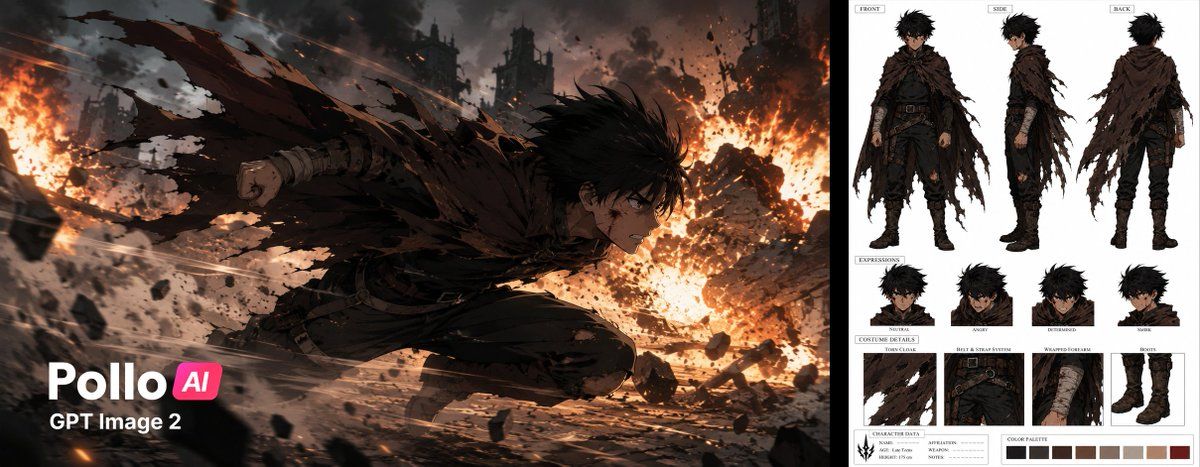
动漫动作帧冲刺
Enlarge

动漫动作帧冲刺

Prompt
"Dynamic 2D anime action frame of a {argument name="character" default="young fighter"} sprinting at full speed through a {argument name="environment" default="devastated smoky battlefield"}, side profile composition, body leaning forward with explosive momentum, torn cloak and loose fabric whipping violently in the wind, black hair swept back by speed, clenched fist, dust clouds bursting around his feet, shattered debris flying through the air, massive fire explosions erupting around him as he dodges through thick smoke, shockwaves, sparks, and flying rubble, dark ruined silhouettes in the background, dramatic motion blur, {argument name="art style" default="strong cel shading, crisp inked linework"}, cinematic wide aspect ratio, intense speed lines, impact sparks, epic battle atmosphere, high contrast lighting, polished modern anime style, no logos, no readable insignias, no lasers, no energy powers. aspect ratio 16:9"
Category
Brand & Logos
Model
GPT Image 2
Creator
Knightama
Views4
Source ID
19013
Published
May 8, 2026

Guide

About "动漫动作帧冲刺"

What is this prompt for?

"动漫动作帧冲刺" AI image prompt for GPT Image 2 (Brand & Logos). 用于生成高能量 2D 动漫动作帧的详细提示词,包含爆发性的动感和电影级光影效果。 Copy it on Picva and recreate the look in one click.

The full copyable prompt and example visuals above are ready for AI image generation or one-click recreate in Picva.

How to use this prompt

  1. Step 1

    Open the prompt detail

    Review the example visuals, category, and full prompt text for "动漫动作帧冲刺".

  2. Step 2

    Copy the prompt

    Copy the prompt body from this page, or load it directly in Studio.

  3. Step 3

    Pick a model (GPT Image 2)

    Prefer GPT Image 2. If you switch models, keep subject and composition and tweak style terms.

  4. Step 4

    Generate and export

    Recreate the look in Picva, or export into your workflow for editing and publishing.

FAQ

What is the "动漫动作帧冲刺" prompt?
It is an AI image-generation prompt for GPT Image 2 in the Brand & Logos category. This page includes the full prompt text, example visuals, and a one-click recreate path in Picva.
How do I use this prompt to generate an image?
Copy the prompt from this page, or use Generate / Studio. Paste it into a compatible image model, or recreate the look in Picva with optional reference images.
Which model is this prompt for?
This page lists GPT Image 2. Most descriptive prompts also transfer to nearby image models such as GPT Image, Flux, or Midjourney with light style tweaks.
Can I use the result commercially?
You can usually copy the prompt for creation, but commercial use of the final image depends on the model terms, reference-image rights, and the generated content. Follow the source author and platform rules.