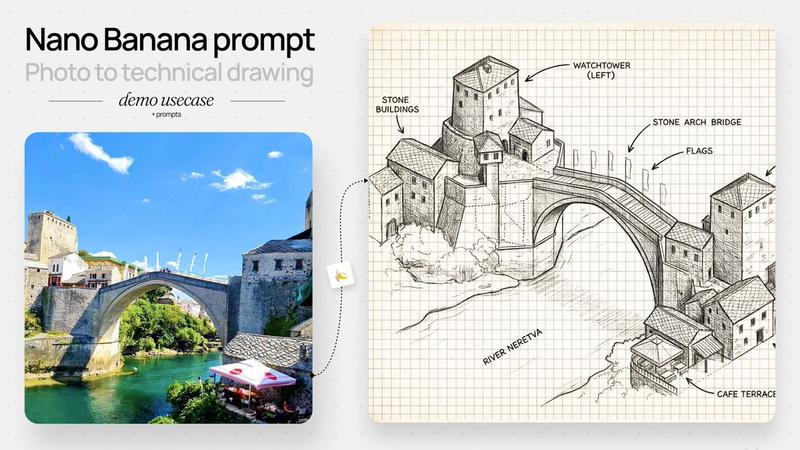
带标注的石拱桥草图
Prompt
{"type":"annotated architectural concept sketch","subject":"a hand-drawn isometric ink illustration of the historic Mostar-style stone arch bridge spanning a river, with clustered medieval stone buildings on both banks and two square watchtowers","style":{"medium":"black graphite and technical pen linework","look":"architectural field notebook, concept art, detailed hatching, crosshatching, visible construction lines, rough perspective guide marks","paper":"aged cream graph paper with evenly spaced square grid, slightly yellowed background","color":"monochrome black and gray ink only, no watercolor except subtle paper tone"},"scene":{"main landmark":"{argument name=\"bridge name\" default=\"stone arch bridge\"}","river":"{argument name=\"river name\" default=\"River Neretva\"}","architecture":"Balkan Ottoman-era stone buildings with tiled roofs, small rectangular windows, arched doorways, stacked hillside masonry, one cafe terrace at the lower right riverbank","composition":"wide landscape canvas, three-quarter aerial isometric view, left village cluster higher on the page, right village cluster lower on the page, large single-span arch bridge centered diagonally across the river","details":"arched bridge deck with parapets, flagpoles with small flags along the bridge, stone textures, roof tile patterns, riverbank vegetation scribbles, light shadows beneath the bridge"},"layout":{"labels":{"count":8,"items":[{"text":"STONE BUILDINGS","position":"upper left","points_to":"left cluster of stone houses"},{"text":"WATCHTOWER (LEFT)","position":"top center-left","points_to":"tall square tower above the left bank"},{"text":"STONE ARCH BRIDGE","position":"upper center-right","points_to":"main bridge span"},{"text":"FLAGS","position":"upper right of bridge","points_to":"row of flagpoles on bridge"},{"text":"WATCHTOWER (RIGHT)","position":"upper right","points_to":"tall square tower on the right bank"},{"text":"STONE BUILDINGS","position":"right middle","points_to":"right cluster of stone houses"},{"text":"CAFE TERRACE","position":"lower right","points_to":"small covered terrace by the river"},{"text":"RIVER NERETVA","position":"lower left river area","points_to":"river flowing under the bridge"}]},"annotation_style":"uppercase sans-serif handwritten labels with curved arrow callouts, clean black lettering","grid":"full-page visible square grid behind all drawing elements"},"text_parameters":{"left watchtower label":"{argument name=\"left tower label\" default=\"WATCHTOWER (LEFT)\"}","right watchtower label":"{argument name=\"right tower label\" default=\"WATCHTOWER (RIGHT)\"}","cafe label":"{argument name=\"cafe label\" default=\"CAFE TERRACE\"}"},"rendering_instructions":"Generate a precise but hand-sketched architectural diagram, not a photorealistic image. Keep the background clean and uncluttered, preserve the graph-paper notebook aesthetic, use strong line hierarchy for the bridge and buildings, lighter sketch lines for terrain and river flow, and make every label legible in English."}- Category
- Charts & Infographics
- Model
- GPT Image 2
- Creator
- Ren
- Source ID
- 19537
- Published
- May 10, 2026
Views4