中文健康恢复 App UI
Prompt
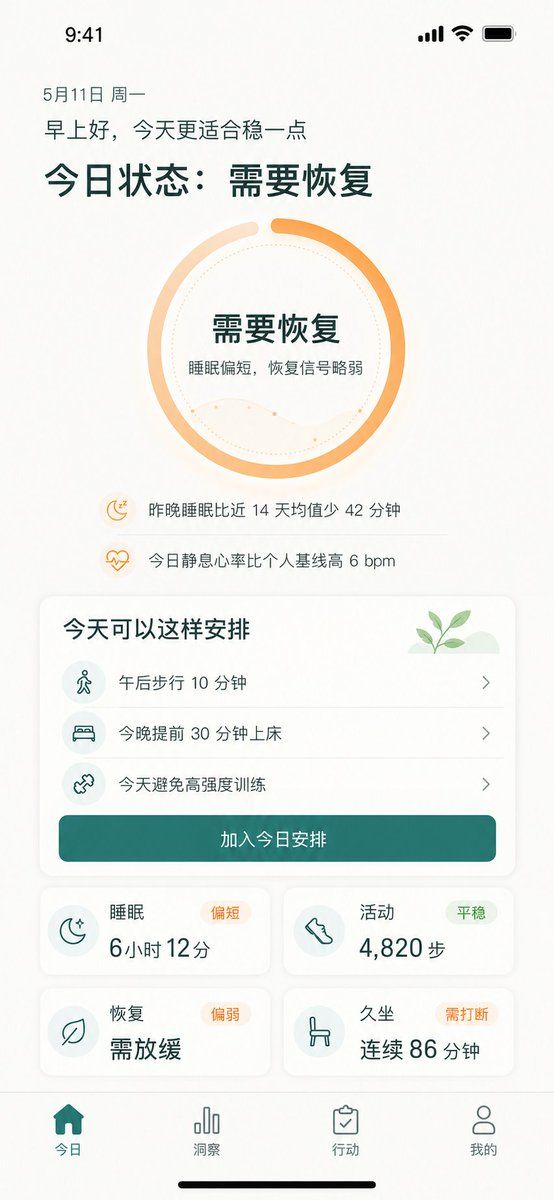
{"type":"high-fidelity mobile health recovery dashboard UI mockup","platform":"iPhone portrait screen, 9:41 status bar, white warm background, soft shadows, rounded cards, minimalist wellness app visual style","language":"Simplified Chinese UI text","theme":{"primary_color":"{argument name=\"primary color\" default=\"deep teal green\"}","accent_color":"{argument name=\"accent color\" default=\"warm orange\"}","background":"off-white with subtle beige texture","typography":"clean modern sans-serif, bold large Chinese headings, lighter body text"},"screen":{"top_status_bar":"time 9:41 at top left, cellular signal, Wi-Fi, battery icons at top right","date":"5月11日 周一","greeting":"{argument name=\"greeting text\" default=\"早上好,今天更适合稳一点\"}","main_headline":"{argument name=\"main status headline\" default=\"今日状态:需要恢复\"}"},"hero_status_ring":{"position":"upper center","shape":"large circular progress ring","count":1,"style":"thick orange gradient ring about 85 percent complete with a small gap at top, pale peach secondary arc, dotted inner circle, faint wavy line chart inside","center_text":["需要恢复","睡眠偏短,恢复信号略弱"]},"insight_rows":{"position":"below ring","count":2,"items":[{"icon":"small orange moon with zzz","text":"昨晚睡眠比近 14 天均值少 42 分钟"},{"icon":"small orange heart pulse","text":"今日静息心率比个人基线高 6 bpm"}]},"schedule_card":{"position":"middle","title":"今天可以这样安排","decoration":"small green sprout illustration on pale green hill in top right","count":3,"items":[{"icon":"walking person in pale teal circle","text":"午后步行 10 分钟","chevron":"right"},{"icon":"bed in pale teal circle","text":"今晚提前 30 分钟上床","chevron":"right"},{"icon":"dumbbell/cross training icon in pale teal circle","text":"今天避免高强度训练","chevron":"right"}],"primary_button":"加入今日安排"},"metric_cards":{"position":"lower middle in 2 by 2 grid","count":4,"cards":[{"title":"睡眠","status_badge":"偏短","icon":"crescent moon with stars","main_value":"6小时 12分"},{"title":"活动","status_badge":"平稳","icon":"shoe/footprint","main_value":"4,820 步"},{"title":"恢复","status_badge":"偏弱","icon":"leaf","main_value":"需放缓"},{"title":"久坐","status_badge":"需打断","icon":"chair","main_value":"连续 86 分钟"}]},"bottom_navigation":{"position":"bottom fixed tab bar","count":4,"tabs":[{"label":"今日","icon":"filled home","state":"active teal"},{"label":"洞察","icon":"bar chart","state":"inactive gray"},{"label":"行动","icon":"clipboard check","state":"inactive gray"},{"label":"我的","icon":"user outline","state":"inactive gray"}],"home_indicator":"black iPhone home indicator at very bottom"},"composition":"single mobile app screen mockup centered in portrait, generous spacing, readable Chinese text, soft rounded rectangles, subtle dividers between schedule rows, wellness recovery tracking product design suitable for demo presentation"}- Category
- Charts & Infographics
- Model
- GPT Image 2
- Creator
- 马提尼
- Source ID
- 19712
- Published
- May 11, 2026
Views2