19

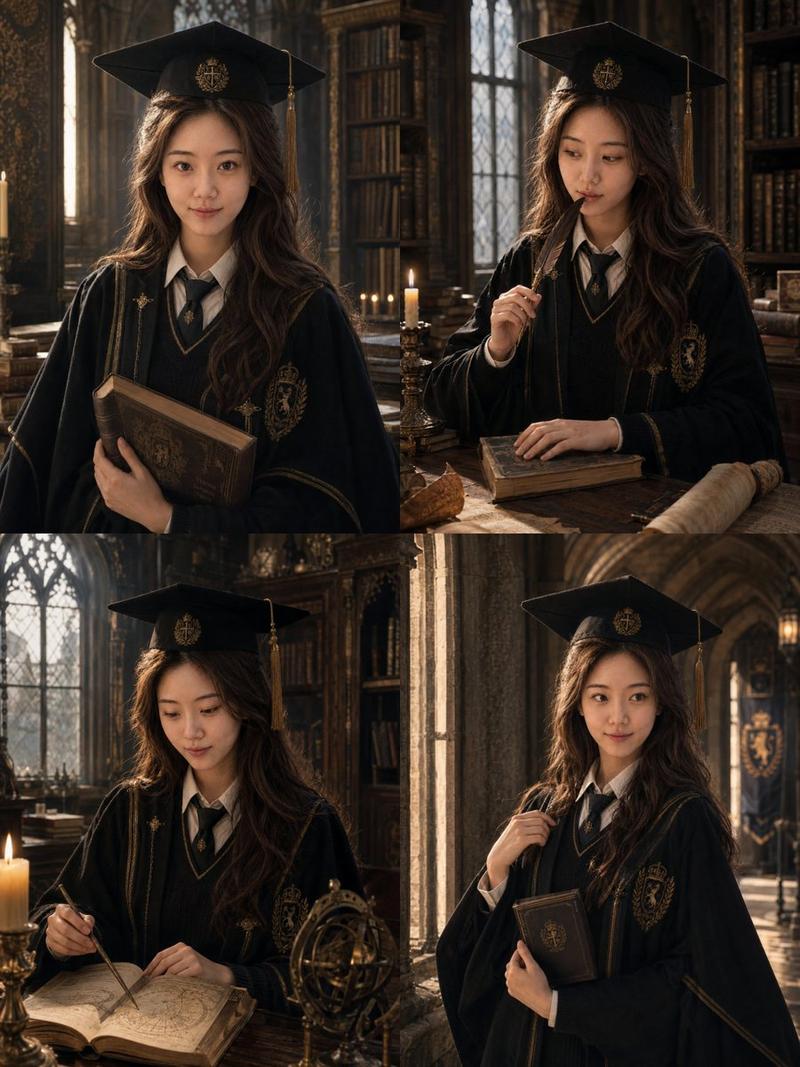
英伦魔法学院毕业肖像
Enlarge

Example images

英伦魔法学院毕业肖像

Prompt
请基于用户上传的 1-3 张清晰个人照片,**一次性生成 4 张不同的单独精修毕业写真照片**,主题为:**「英伦魔法学院毕业写真」**

### 【输出要求】
- 一次性输出 **4 张不同的单独照片**
- 不要做四宫格,不要拼图
- 每张图都是独立成片
- 每张图统一为 **3:4 竖构图**
- 4 张图属于同一组完整写真,人物、服饰、妆造、色彩体系保持统一
- 但每张图的 **表情、动作、姿态、视线、镜头角度、道具互动** 必须明显不同

### 【人物一致性】
请严格保留用户本人真实身份特征,包括:脸型、五官比例、眼睛、鼻子、嘴唇、肤色、年龄感、发型基础、整体气质。4 张图里都必须清楚看起来是 **同一个真实女生**。

### 【整体定位】
毕业 + 学院感 + 魔法世界观。“像刚从英伦魔法学院毕业的优等生,在毕业典礼前后留下的一组纪念肖像。”

### 【服饰要求】
服装请采用 **“学院毕业袍 + 魔法元素”** 的设计逻辑。根据 {argument name="学位等级" default="学士"} 自然区分层级气质。根据 {argument name="学院主配色" default="酒红金"} 统一色彩细节。

### 【帽子设计】
帽子必须保留 **学位帽基础结构**,同时加入克制的魔法学院元素,保留流苏,帽檐可加入学院徽章。

### 【场景与背景】
场景请围绕 **英伦魔法学院** 的世界观展开。请从 {argument name="背景主场景" default="古堡走廊"} 中统一选择一个主要场景。

### 【色彩与光线】
深木色、暗红、墨绿等体系。光线使用窗边冷光 + 烛光暖光混合,具有电影截图感。
Category
Photography & Realism
Model
GPT Image 2
Views5
Source ID
20227
Published
May 14, 2026

Guide

About "英伦魔法学院毕业肖像"

What is this prompt for?

"英伦魔法学院毕业肖像" AI image prompt for GPT Image 2 (Photography & Realism). 一份高精度的提示词,用于创作一套哈利波特风格的魔法学院毕业照,确保多张照片中人物的一致性。 Copy it on Picva and recreate the look in o…

The full copyable prompt and example visuals above are ready for AI image generation or one-click recreate in Picva.

How to use this prompt

  1. Step 1

    Open the prompt detail

    Review the example visuals, category, and full prompt text for "英伦魔法学院毕业肖像".

  2. Step 2

    Copy the prompt

    Copy the prompt body from this page, or load it directly in Studio.

  3. Step 3

    Pick a model (GPT Image 2)

    Prefer GPT Image 2. If you switch models, keep subject and composition and tweak style terms.

  4. Step 4

    Generate and export

    Recreate the look in Picva, or export into your workflow for editing and publishing.

FAQ

What is the "英伦魔法学院毕业肖像" prompt?
It is an AI image-generation prompt for GPT Image 2 in the Photography & Realism category. This page includes the full prompt text, example visuals, and a one-click recreate path in Picva.
How do I use this prompt to generate an image?
Copy the prompt from this page, or use Generate / Studio. Paste it into a compatible image model, or recreate the look in Picva with optional reference images.
Which model is this prompt for?
This page lists GPT Image 2. Most descriptive prompts also transfer to nearby image models such as GPT Image, Flux, or Midjourney with light style tweaks.
Can I use the result commercially?
You can usually copy the prompt for creation, but commercial use of the final image depends on the model terms, reference-image rights, and the generated content. Follow the source author and platform rules.