白上吹雪婚纱设定集
Prompt
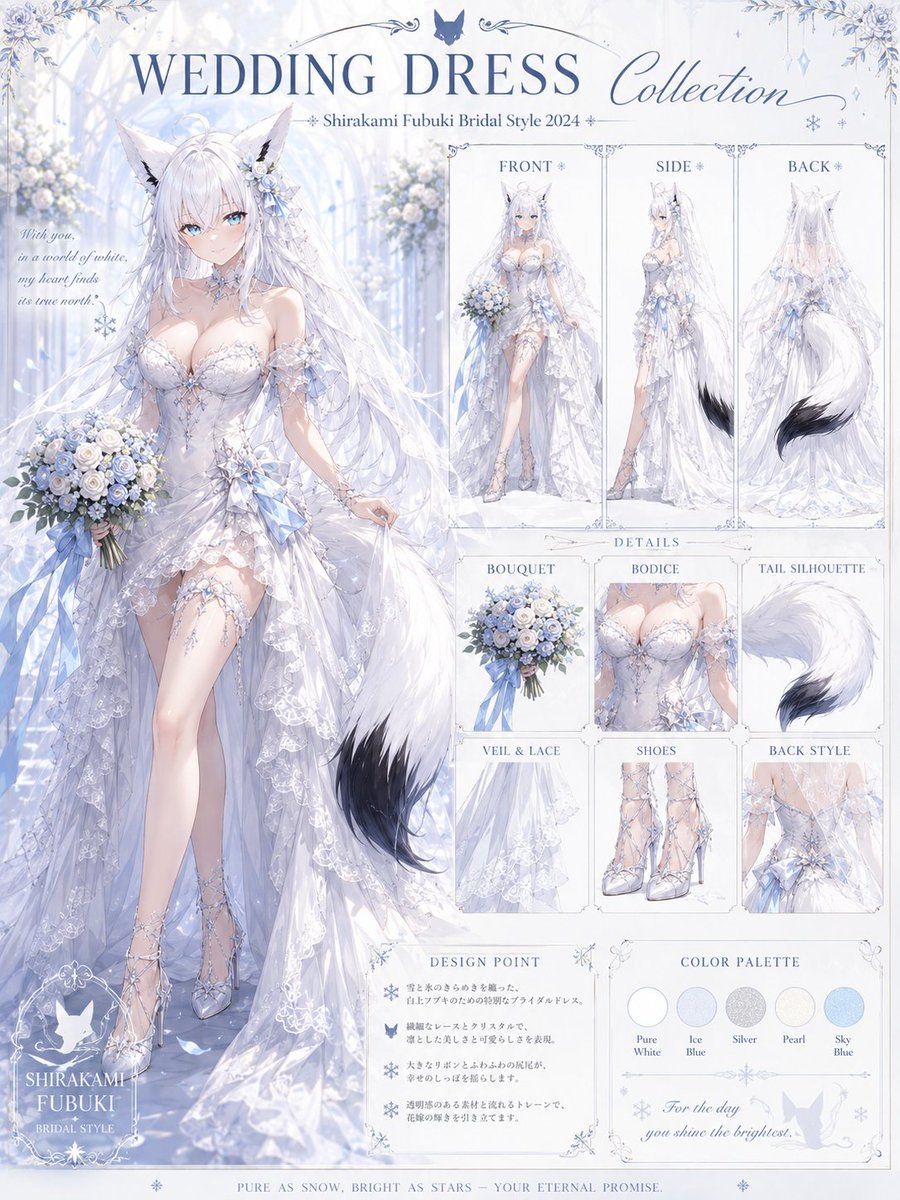
Goal: Create an elegant anime bridal fashion collection sheet for {argument name="character name" default="Shirakami Fubuki"}, presenting a white fox-girl idol in a luxury wedding dress design.

Canvas: Vertical poster layout, 3:4 aspect ratio, pale icy blue and white palette, ornate wedding stationery aesthetic, high-resolution anime illustration with delicate linework, soft glow, translucent fabrics, floral borders, snowflake motifs, and a bright glass-chapel background filled with white roses and blue hydrangeas.

Main composition: On the left half, place one large full-body bridal illustration of the character walking forward in a graceful pose, holding a bouquet in her left hand and lifting the skirt or veil lightly with her right hand. She has long {argument name="hair color" default="silver-white"} hair, large white fox ears, a fluffy white fox tail with a dark black tip, pale skin, and a serene bridal presence. Dress her in a {argument name="dress color" default="pure white and ice blue"} lace wedding dress with a fitted sweetheart bodice, crystal snowflake appliques, off-shoulder lace sleeves, translucent layered overskirt, asymmetrical high-low front revealing one leg, long cathedral veil, ribbon accents, pearl chains, and sparkling lace-up heels. Add a blue-and-white bouquet of roses, small flowers, greenery, and trailing blue ribbons.

Top typography: Large title text across the top: “WEDDING DRESS Collection”. Under it, smaller subtitle: “Shirakami Fubuki Bridal Style 2024”. Use refined serif capitals for “WEDDING DRESS” and elegant script for “Collection”. Include a small fox or butterfly-like emblem centered above the title and thin ornamental flourishes.

Right-side fashion sheet layout: Create a clean panel grid on the right half with exactly 3 upper view panels labeled “FRONT”, “SIDE”, and “BACK”. The FRONT panel shows a small full-body front view of the bride with bouquet and dress train. The SIDE panel shows the profile view emphasizing layered veil, bodice, leg slit, and tail. The BACK panel shows the rear view emphasizing the long veil, open-back lace, flowing train, and large fox tail with black tip.

Details section: Below the three view panels, create exactly 6 small detail cards labeled: “BOUQUET” showing the blue-white rose bouquet with ribbons; “BODICE” showing a close-up of the sweetheart corset, lace, pearls, and snowflake crystals; “TAIL SILHOUETTE” showing the fluffy white tail with black tip; “VEIL & LACE” showing translucent lace layers and embroidery; “SHOES” showing silver-white lace-up bridal heels; “BACK STYLE” showing the open back, ribbon bow, veil, and lace train.

Lower information panels: Add a “DESIGN POINT” box with four short decorative bullet lines using snowflake and butterfly icons, written in small delicate Japanese-style placeholder text or tiny unreadable ornamental text. Add a “COLOR PALETTE” box with exactly 5 circular swatches labeled “Pure White”, “Ice Blue”, “Silver”, “Pearl”, and “Sky Blue”. Add a small cursive quote inside the palette area: “For the day you shine the brightest.”

Additional visible text: On the left near the bride, add a delicate cursive quote: “With you, in a world of white, my heart finds its true north.” At bottom left, add a logo-style name block: “SHIRAKAMI FUBUKI” and “BRIDAL STYLE”. Along the bottom border, add the tagline: “PURE AS SNOW, BRIGHT AS STARS — YOUR ETERNAL PROMISE.”

Visual style: Premium character design reference sheet, romantic bridal catalog, icy blue fantasy wedding theme, soft bloom lighting, detailed lace and crystal rendering, ornate thin borders, subtle snowflakes, butterflies, floral corner decorations, clean editorial spacing. Keep all panels readable and symmetrical, with no extra characters and no modern UI elements.- Category
- Charts & Infographics
- Model
- GPT Image 2
- Creator
- リベ|生成AIで自由に生きてます
- Source ID
- 20603
- Published
- May 15, 2026
Views7