11

烟雨荷塘鹭影晨曦
Enlarge

烟雨荷塘鹭影晨曦

Prompt
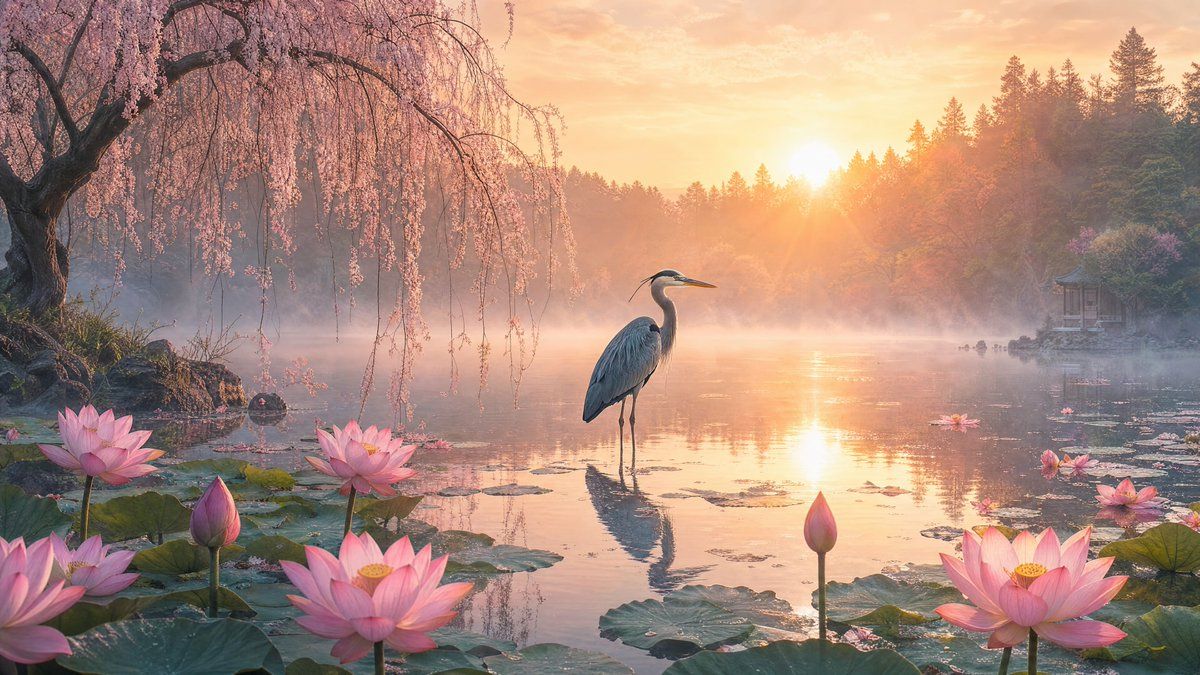
Create a serene cinematic fantasy landscape of {argument name="scene setting" default="a misty lotus pond at sunrise"}, wide 16:9 composition. In the center, place one elegant {argument name="main bird" default="great blue heron"} standing still in shallow reflective water, its long legs mirrored on the pond surface, head turned slightly to the side in a quiet contemplative pose. Surround the foreground with large green lily pads and exactly 9 prominent pink lotus elements: 6 fully open pink lotus blossoms and 3 closed pink lotus buds, distributed across the left foreground, center foreground, and right foreground. On the far left, add a large old weeping cherry tree with dark twisting branches and long curtains of delicate pale pink blossoms hanging down over the water. The background should show a calm lake fading into soft morning mist, dense evergreen forest silhouettes and flowering trees on the hills, and a small traditional pavilion partly hidden on the right shore. The sun should sit low near the upper center-right, casting warm golden-orange light, visible rays, and glowing reflections across the water. Use a dreamy, tranquil mood inspired by silence and solitude, with soft haze, pastel pinks, peach sky tones, teal-green foliage, realistic details, cinematic depth, volumetric light, crisp foreground flowers, subtle ripples, and no people, no text, no watermark.
Category
Charts & Infographics
Model
GPT Image 2
Creator
Viki
Views3
Source ID
20668
Published
May 15, 2026

Guide

About "烟雨荷塘鹭影晨曦"

What is this prompt for?

"烟雨荷塘鹭影晨曦" AI image prompt for GPT Image 2 (Charts & Infographics). 一幅电影质感的奇幻自然场景,描绘了日出时分荷花丛中一只孤独的苍鹭,非常适合作为宁静的壁纸或冥想主题视觉素材。 Copy it on Picva and recreate the lo…

The full copyable prompt and example visuals above are ready for AI image generation or one-click recreate in Picva.

How to use this prompt

  1. Step 1

    Open the prompt detail

    Review the example visuals, category, and full prompt text for "烟雨荷塘鹭影晨曦".

  2. Step 2

    Copy the prompt

    Copy the prompt body from this page, or load it directly in Studio.

  3. Step 3

    Pick a model (GPT Image 2)

    Prefer GPT Image 2. If you switch models, keep subject and composition and tweak style terms.

  4. Step 4

    Generate and export

    Recreate the look in Picva, or export into your workflow for editing and publishing.

FAQ

What is the "烟雨荷塘鹭影晨曦" prompt?
It is an AI image-generation prompt for GPT Image 2 in the Charts & Infographics category. This page includes the full prompt text, example visuals, and a one-click recreate path in Picva.
How do I use this prompt to generate an image?
Copy the prompt from this page, or use Generate / Studio. Paste it into a compatible image model, or recreate the look in Picva with optional reference images.
Which model is this prompt for?
This page lists GPT Image 2. Most descriptive prompts also transfer to nearby image models such as GPT Image, Flux, or Midjourney with light style tweaks.
Can I use the result commercially?
You can usually copy the prompt for creation, but commercial use of the final image depends on the model terms, reference-image rights, and the generated content. Follow the source author and platform rules.