Hermes Agent 手绘速记信息图
Prompt
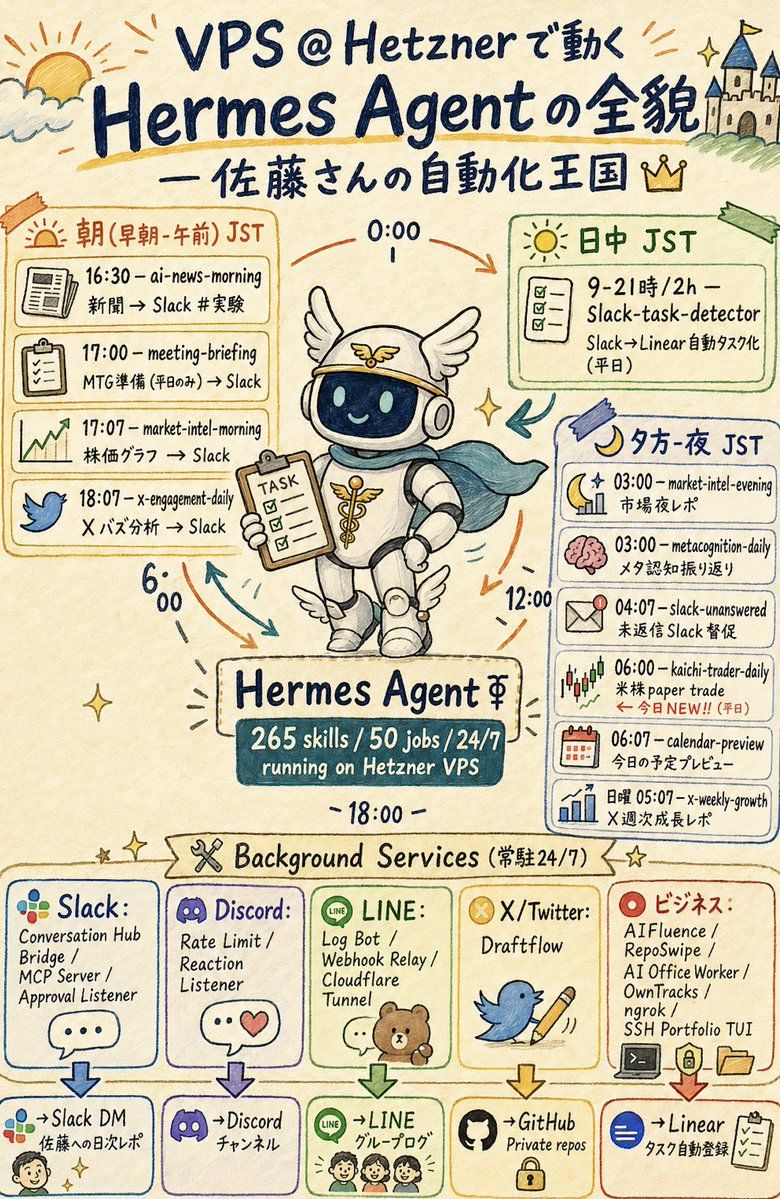
Goal: Create a vertical hand-drawn graphic recording infographic in Japanese about {argument name="main topic" default="VPS @ Hetznerで動く Hermes Agentの全貌"}, with a friendly automation-kingdom theme and a central mascot robot.

Canvas: Portrait 2:3 poster, warm cream paper background, watercolor marker texture, dark navy handwritten lettering, loose sketch lines, pastel accent colors, small sparkles, arrows, doodles, and imperfect hand-drawn boxes.

Header: At the very top, draw a sunrise/cloud doodle on the left and a small castle on a hill on the right. Large title text reads “VPS @ Hetznerで動く Hermes Agentの全貌”. Under it, add the subtitle “— 佐藤さんの自動化王国” with a small crown icon.

Central subject: In the middle, draw a cute Hermes-themed robot mascot wearing a winged helmet, headphones, white rounded armor, small wing decorations on boots, and a teal cape. The robot smiles through a dark glass face screen and holds a clipboard labeled “TASK”. Around it, place circular time arrows and labels “0:00”, “6:00”, “12:00”, and “18:00”. Beneath the robot, add a nameplate reading “Hermes Agent ⚚” and a dark teal stats plaque reading “265 skills / 50 jobs / 24/7 running on Hetzner VPS”.

Main schedule layout: Use exactly 3 large schedule panels around the mascot. Left panel is orange and titled “朝(早朝・午前)JST”; it contains exactly 4 task rows with icons: 1) newspaper icon, “16:30 — ai-news-morning / 新聞 → Slack #実験”; 2) clipboard icon, “17:00 — meeting-briefing / MTG準備(平日のみ)→ Slack”; 3) rising chart icon, “17:07 — market-intel-morning / 株価グラフ → Slack”; 4) blue bird icon, “18:07 — x-engagement-daily / X バズ分析 → Slack”. Upper right panel is green and titled “日中 JST”; it contains exactly 1 task card with checklist icon: “9–21時 / 2h — Slack-task-detector / Slack→Linear 自動タスク化(平日)”. Right panel is blue and titled “夕方・夜 JST”; it contains exactly 6 task rows with icons: 1) moon and chart, “03:00 — market-intel-evening / 市場夜レポ”; 2) pink brain, “03:00 — metacognition-daily / メタ認知振り返り”; 3) envelope alert, “04:07 — slack-unanswered / 未返信 Slack 督促”; 4) candlestick chart, “06:00 — kaichi-trader-daily / 米株 paper trade / ← 今日NEW!!(平日)”; 5) calendar, “06:07 — calendar-preview / 今日の予定プレビュー”; 6) bar chart, “日曜 05:07 — x-weekly-growth / X 週次成長レポ”.

Background services section: Across the lower third, add a ribbon title “Background Services(常駐24/7)” with a crossed-tools icon and stars. Below it, create exactly 5 vertical service cards, each with a logo-style icon, service list, down arrow, and destination box. Card 1: “Slack:” with multicolor Slack-like dots, services “Conversation Hub / Bridge / MCP Server / Approval Listener”, destination “→Slack DM / 佐藤への日次レポ” with a small face doodle. Card 2: “Discord:” with purple gamepad logo, services “Rate Limit / Reaction Listener”, destination “→Discord / チャンネル”. Card 3: “LINE:” with green LINE icon and small bear/family doodle, services “Log Bot / Webhook Relay / Cloudflare Tunnel”, destination “→LINE / グループログ”. Card 4: “X/Twitter:” with yellow X badge, blue bird holding a pencil, service “Draftflow”, destination “→GitHub / Private repos” with a lock icon. Card 5: “ビジネス:” with red target icon, services “AIFluence / RepoSwipe / AI Office Worker / OwnTracks / ngrok / SSH Portfolio TUI”, destination “→Linear / タスク自動登録” with checklist icon.

Visual style: Japanese sketchnote, analog marker and colored pencil, playful but information-dense, clean enough to read, charming imperfect typography, cream background, navy ink, orange/green/blue/purple/red outlined boxes, small decorative arrows and sparkles. Keep all visible text handwritten and preserve the Japanese/English mixed labels exactly where specified.

Constraints: Use exactly 3 main schedule panels, exactly 11 scheduled task rows total, exactly 5 background service cards, and exactly 5 destination boxes. Do not add extra brands, watermarks, QR codes, photorealism, or typed sans-serif UI styling.- Category
- Charts & Infographics
- Model
- GPT Image 2
- Creator
- たかお @10人でユニコーンを証明する社長🦄
- Source ID
- 21595
- Published
- May 19, 2026
Views3