20

照片级真实感 8K 图像修复
Enlarge

照片级真实感 8K 图像修复

Prompt
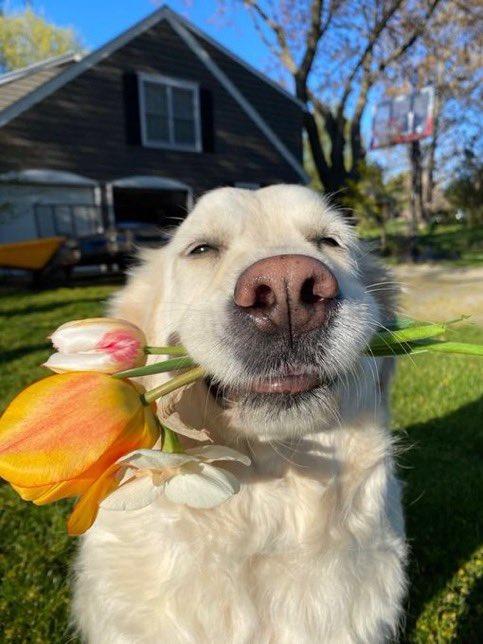
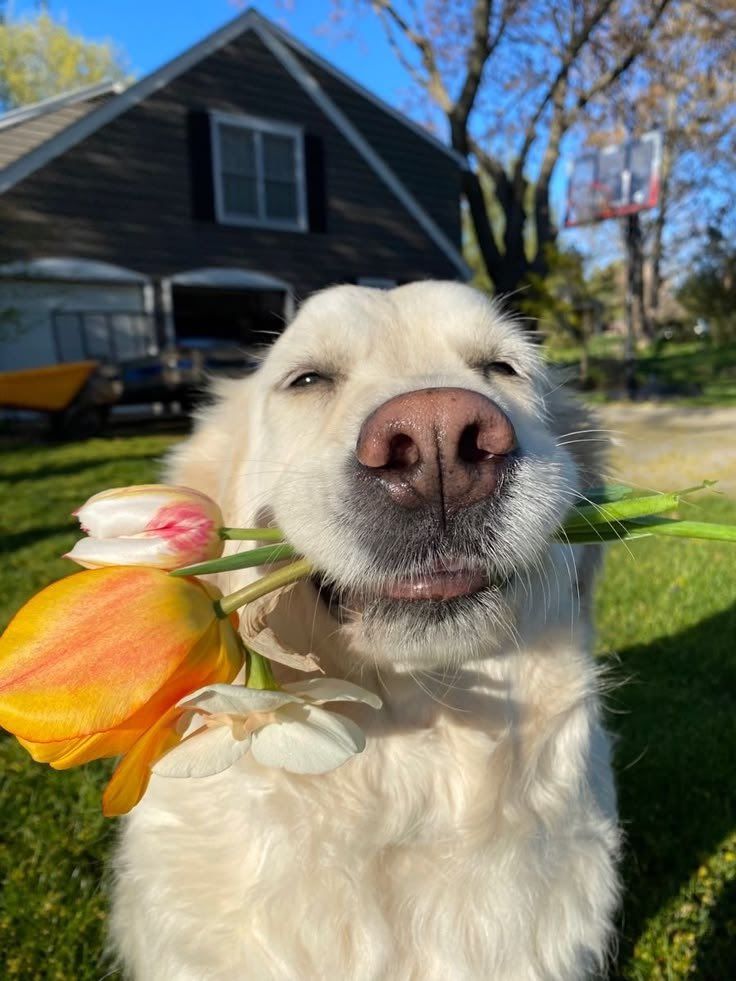
Using the provided reference image, restore and upscale it into an ultra-premium photorealistic 8K image. Keep 100% of the original identity, pose, framing, perspective, and composition unchanged: the dog remains centered close to the camera, holding the same flowers in its mouth, with the same yard and house setting behind it. Remove the heavy blur and pixelation, recover natural microdetails such as crisp eyes, realistic nose texture, individual whiskers, soft fur strands, flower petals, grass, house edges, and tree detail. Make the result look like a high-quality cinematic studio-grade photo with natural daylight, high contrast, rich but realistic colors, clean focus, and no artificial-looking reconstruction. Do not change the subject, do not add new objects, do not alter the expression, and do not stylize it as illustration or CGI. Enhancement strength: {argument name="enhancement strength" default="ultra-premium 8K cinematic restoration"}. Detail priority: {argument name="detail priority" default="sharp eyes, realistic pores, whiskers, fur, and flower texture"}. Color grade: {argument name="color grade" default="natural sunny high-contrast photorealism"}.
Category
Charts & Infographics
Model
GPT Image 2
Creator
carpe
Views13
Source ID
21779
Published
May 20, 2026

Guide

About "照片级真实感 8K 图像修复"

What is this prompt for?

"照片级真实感 8K 图像修复" AI image prompt for GPT Image 2 (Charts & Infographics). 将模糊的参考照片转化为清晰、具有电影质感且逼真的 8K 修复图像,同时保留原始构图和主体特征。 Copy it on Picva and recreate the loo…

The full copyable prompt and example visuals above are ready for AI image generation or one-click recreate in Picva.

How to use this prompt

  1. Step 1

    Open the prompt detail

    Review the example visuals, category, and full prompt text for "照片级真实感 8K 图像修复".

  2. Step 2

    Copy the prompt

    Copy the prompt body from this page, or load it directly in Studio.

  3. Step 3

    Pick a model (GPT Image 2)

    Prefer GPT Image 2. If you switch models, keep subject and composition and tweak style terms.

  4. Step 4

    Generate and export

    Recreate the look in Picva, or export into your workflow for editing and publishing.

FAQ

What is the "照片级真实感 8K 图像修复" prompt?
It is an AI image-generation prompt for GPT Image 2 in the Charts & Infographics category. This page includes the full prompt text, example visuals, and a one-click recreate path in Picva.
How do I use this prompt to generate an image?
Copy the prompt from this page, or use Generate / Studio. Paste it into a compatible image model, or recreate the look in Picva with optional reference images.
Which model is this prompt for?
This page lists GPT Image 2. Most descriptive prompts also transfer to nearby image models such as GPT Image, Flux, or Midjourney with light style tweaks.
Can I use the result commercially?
You can usually copy the prompt for creation, but commercial use of the final image depends on the model terms, reference-image rights, and the generated content. Follow the source author and platform rules.