18

未来感 Apple 广告创意方案
Enlarge

未来感 Apple 广告创意方案

Prompt
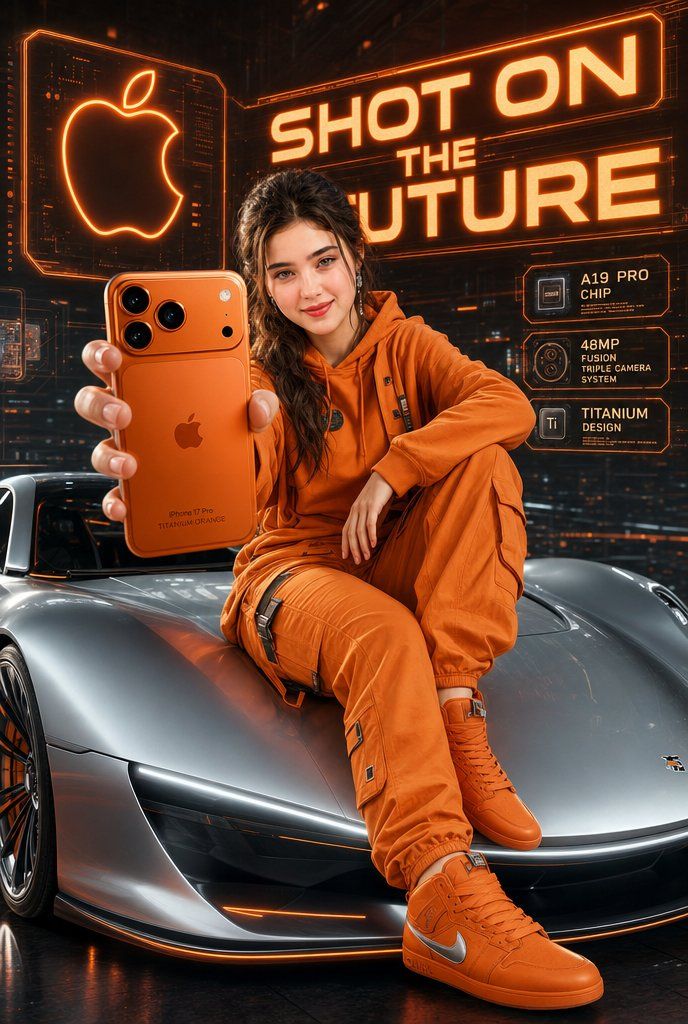
A high-tech, futuristic Apple advertisement with the bold glowing text "SHOT ON THE FUTURE" in the background. In the center, a {argument name="subject" default="stylish young woman"} with a confident smile is sitting on the hood of a {argument name="vehicle" default="sleek, silver futuristic sports car"}. She is holding a large, metallic "{argument name="phone color" default="Titanium Orange"}" iPhone 17 Pro close to the camera, showing off its back and advanced camera lenses.\nShe is wearing a trendy, matching orange monochrome outfit, including an orange hoodie, cargo pants, and orange sneakers with a silver swoosh. The background features a glowing neon Apple logo and orange-tinted holographic tech UI displays. The entire scene has a cinematic, vibrant orange and silver color palette with sharp focus and hyper-realistic details.
Category
Charts & Infographics
Model
GPT Image 2
Creator
Hania Ai
Views3
Source ID
22718
Published
May 26, 2026

Guide

About "未来感 Apple 广告创意方案"

What is this prompt for?

"未来感 Apple 广告创意方案" AI image prompt for GPT Image 2 (Charts & Infographics). 一个用于未来感 Apple 广告的高科技提示词,包含时尚的人物主体和充满活力的橙色品牌元素。 Copy it on Picva and recreate the lo…

The full copyable prompt and example visuals above are ready for AI image generation or one-click recreate in Picva.

How to use this prompt

  1. Step 1

    Open the prompt detail

    Review the example visuals, category, and full prompt text for "未来感 Apple 广告创意方案".

  2. Step 2

    Copy the prompt

    Copy the prompt body from this page, or load it directly in Studio.

  3. Step 3

    Pick a model (GPT Image 2)

    Prefer GPT Image 2. If you switch models, keep subject and composition and tweak style terms.

  4. Step 4

    Generate and export

    Recreate the look in Picva, or export into your workflow for editing and publishing.

FAQ

What is the "未来感 Apple 广告创意方案" prompt?
It is an AI image-generation prompt for GPT Image 2 in the Charts & Infographics category. This page includes the full prompt text, example visuals, and a one-click recreate path in Picva.
How do I use this prompt to generate an image?
Copy the prompt from this page, or use Generate / Studio. Paste it into a compatible image model, or recreate the look in Picva with optional reference images.
Which model is this prompt for?
This page lists GPT Image 2. Most descriptive prompts also transfer to nearby image models such as GPT Image, Flux, or Midjourney with light style tweaks.
Can I use the result commercially?
You can usually copy the prompt for creation, but commercial use of the final image depends on the model terms, reference-image rights, and the generated content. Follow the source author and platform rules.