19

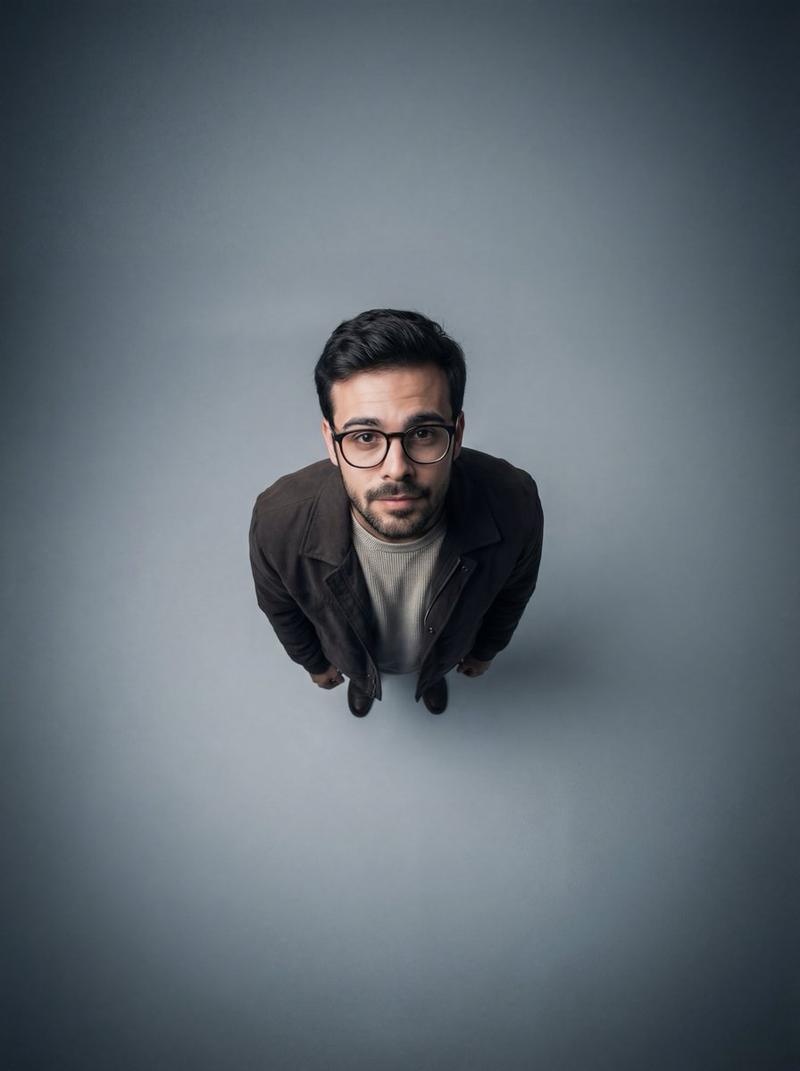
俯视视角航拍风格摄影棚肖像
Enlarge

俯视视角航拍风格摄影棚肖像

Prompt
Ultra-wide angle, 90-degree top-down aerial studio portrait of a {argument name="subject" default="woman"} looking straight up at the camera. Strict identity preservation from reference image, do not alter face, proportions, skin texture, or expression.

Composition: full-body framing, large negative space surrounding the subject, dramatic isolation and graphic impact.

Subject: woman with round thick-framed stylish glasses. Wearing a deep dark brown short-sleeve button-up shirt in corduroy or textured fabric, with a light beige off-white textured sweater underneath. Natural hairstyle with visible texture and volume, do not alter hair color or structure. Natural realistic skin tone, visible texture, not over-smoothed. Expression: engaging, slightly curious or inquisitive.

Background: {argument name="background" default="minimalist studio backdrop"}, soft gray gradient, darker at edges, lighter at center directly beneath the subject.

Lighting: soft uniform overhead lighting from above, subtle shadows defining facial features and clothing folds, even illumination, no harsh contrast.

Camera: ISO 150-200, aperture f/1.28, shutter speed 1/200s, high-resolution ultra-detailed.

Color grading: neutral modern tones, soft balanced contrast, clean contemporary look.

Mood: minimalist, modern, contemplative. Strong subject isolation and visual clarity.
Category
Architecture & Spaces
Model
GPT Image 2
Creator
PromptLab
Views1
Source ID
26662
Published
Jun 23, 2026

Guide

About "俯视视角航拍风格摄影棚肖像"

What is this prompt for?

"俯视视角航拍风格摄影棚肖像" AI image prompt for GPT Image 2 (Architecture & Spaces). 一种极简主义的俯视航拍风格肖像,专注于主体隔离与现代美学。 Copy it on Picva and recreate the look in one click.

The full copyable prompt and example visuals above are ready for AI image generation or one-click recreate in Picva.

How to use this prompt

  1. Step 1

    Open the prompt detail

    Review the example visuals, category, and full prompt text for "俯视视角航拍风格摄影棚肖像".

  2. Step 2

    Copy the prompt

    Copy the prompt body from this page, or load it directly in Studio.

  3. Step 3

    Pick a model (GPT Image 2)

    Prefer GPT Image 2. If you switch models, keep subject and composition and tweak style terms.

  4. Step 4

    Generate and export

    Recreate the look in Picva, or export into your workflow for editing and publishing.

FAQ

What is the "俯视视角航拍风格摄影棚肖像" prompt?
It is an AI image-generation prompt for GPT Image 2 in the Architecture & Spaces category. This page includes the full prompt text, example visuals, and a one-click recreate path in Picva.
How do I use this prompt to generate an image?
Copy the prompt from this page, or use Generate / Studio. Paste it into a compatible image model, or recreate the look in Picva with optional reference images.
Which model is this prompt for?
This page lists GPT Image 2. Most descriptive prompts also transfer to nearby image models such as GPT Image, Flux, or Midjourney with light style tweaks.
Can I use the result commercially?
You can usually copy the prompt for creation, but commercial use of the final image depends on the model terms, reference-image rights, and the generated content. Follow the source author and platform rules.