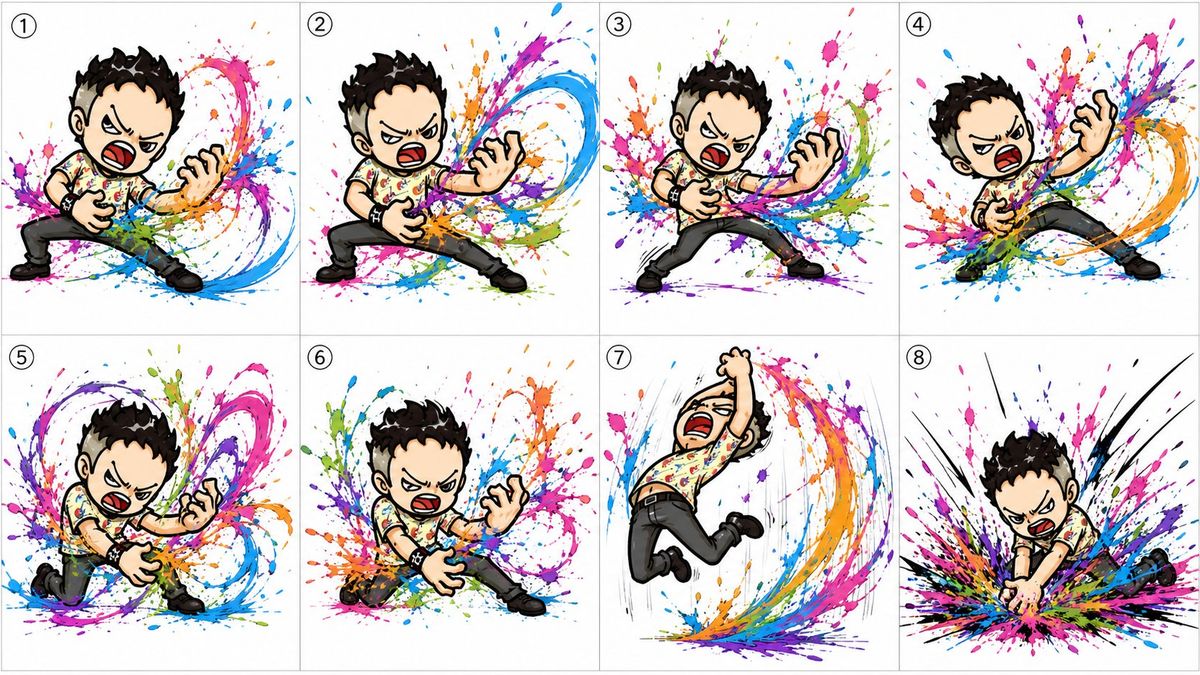
Q 版空气吉他项目
Prompt
Goal: Create a colorful 8-panel storyboard sheet for an animated sequence featuring {argument name="character name" default="Souichirock"}, a chibi punk-rock boy performing an intense invisible air-guitar solo and ending with a dramatic guitar-smash pose.

Canvas: Wide horizontal storyboard image, clean white background, divided into exactly 8 equal rectangular panels arranged in a 2-row by 4-column grid. Use thin light-gray panel borders. Each panel has a small circled black number in the upper-left corner, labeled exactly 1 through 8.

Visual style: Hand-drawn digital illustration with bold black ink outlines, exaggerated manga/chibi proportions, dynamic comic action poses, expressive angry rock-performance face, and high-energy paint-splash effects. Use vivid splashes and sweeping arcs of cyan, magenta, purple, orange, green, blue, and black around the character to visualize the sound and motion of the invisible guitar. Keep the background mostly white and uncluttered.

Character details: The same chibi male character appears in all 8 panels. He has short spiky {argument name="hair color" default="black"} hair, pale skin, thick black eyebrows, an open shouting mouth with red interior, and an intense scowling expression. Outfit: short-sleeve cream shirt covered in colorful paint-like marks, black pants, black shoes, black studded wristbands, and a small punk-rock attitude. He does not hold a visible guitar; his hands mime playing and smashing an air guitar.

Panel-by-panel action sequence: Include exactly 8 numbered panels. Panel 1: wide-legged stance, left hand low as if gripping the neck of an invisible guitar, right hand clawing near the body, shouting, with bright paint bursts behind him and blue-magenta arcs sweeping to the right. Panel 2: deeper lunge, legs spread wider, both hands actively strumming and fretting an invisible guitar, a large blue and magenta sound-wave swirl blasting from his right side. Panel 3: centered rock stance, knees bent, left hand extended like a guitar neck, right hand near the torso, shouting toward the viewer, with dense multicolor splatter behind him. Panel 4: leaning far backward to the right, one hand raised in a claw shape and the other near his waist, legs stretched diagonally, with an orange-blue-magenta spiral sweeping around him. Panel 5: crouched low and leaning forward, one knee near the ground, hands in aggressive air-guitar position, surrounded by looping purple, pink, green, and blue paint trails. Panel 6: low lunging pose, body angled forward, one hand reaching down and the other clawed outward, with explosive colorful paint splashes radiating behind him. Panel 7: airborne jump pose, knees bent, one fist raised overhead, mouth wide open in a scream, with vertical motion lines and a rainbow paint arc curving underneath and behind him. Panel 8: final guitar-crash climax, character bent forward with both hands driving downward as if smashing the invisible guitar into the ground, black impact lines and a huge multicolor splatter explosion spreading outward.

Constraints: Use exactly 8 panels and exactly one character per panel. Preserve the small circled panel numbers 1, 2, 3, 4, 5, 6, 7, and 8. No captions other than the panel numbers. Do not add a real guitar, stage, audience, watermark, logo, or extra characters.- Category
- Brand & Logos
- Model
- GPT Image 2
- Creator
- もんなつ SHOWSHOWMOM
- Source ID
- 26899
- Published
- Jun 26, 2026
Views0