18

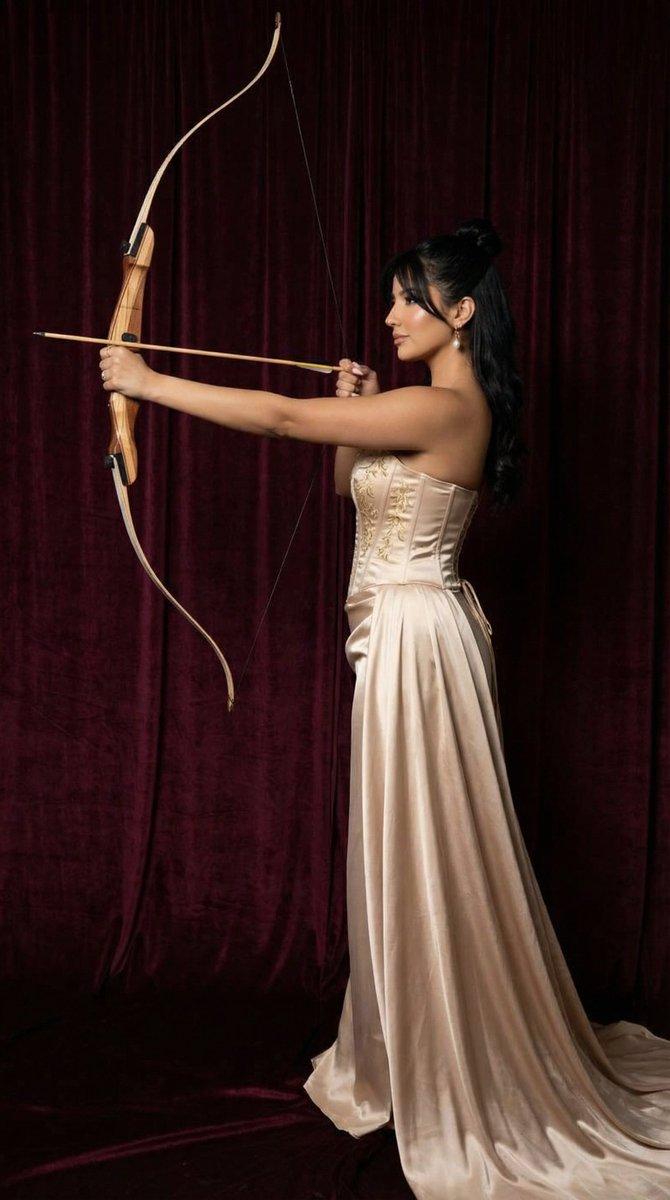
黄金射手女神摄影棚肖像
Enlarge

黄金射手女神摄影棚肖像

Prompt
创建图像 [主体] 图像 1 [签名] 在右下角放置一个小型的 {argument name="platform logo" default="Threads"} 标志,并在其上方用白色小号草书写着“{argument name="signature" default="CHAse"}”作为签名。 [主体的姿势与表情] 令人着迷的上半身姿势,让人联想到神秘的女神或神话中的射手。手持一把精雕细琢的大型金弓,右手轻轻拉动弓弦,平静地注视着手部和弓。专注而冷静优雅的表情最大程度地烘托出古老的神话氛围。 [主体的服装] 身着一件带有丰富立体细节的高定礼服。上身是质感粗犷、闪烁着光泽的重工青铜金金属紧身胸衣,下身是 {argument name="outfit color" default="奶油白"} 的丝绸缎面裙,垂坠感优雅。背部有呈天使翅膀形状的白色织物装饰,结构感十足;长款华丽的金耳环和左手腕纤细的金属袖口手镯增添了神秘感。 [发型与妆容细节] 极长的深棕色发型,发量丰盈且带有浪漫的波浪卷。头发顺滑地垂在一侧肩头并延伸至背部,增添了古典美。妆容以适合柔和摄影棚灯光的透明哑光肤质为基础,深邃的阴影妆容强调了五官,搭配沉稳的干枯玫瑰色裸唇。 [灯光与指导] 精致的摄影棚漫射光从主体左上方柔和地照射下来。这种光线立体地照亮了紧身胸衣复杂的金属质感和璀璨金弓的轮廓,在主体的面部和锁骨线条上营造出柔和、平滑的高光。主体右后方投射出微妙的阴影,增加了深度。 [质感与色彩氛围] 弓和紧身胸衣粗犷、坚硬闪耀的古金金属质感与礼服丝滑、柔软的缎面质感形成奇妙对比。背景沉稳的蓝灰色调与服装的金白色调相协调,营造出一种既精致又神秘、宏大的奇幻画报氛围。 [胶片与相机景深、角度] 使用 85mm 定焦镜头拍摄,参数为 f/2.8, 1/200s, ISO 100。采用正面平视的中景全景构图,旨在精准捕捉主体优美的轮廓和弓的精巧形态。应用浅景深效果,使主体和华丽的道具处于极其清晰的焦点,而背景则平滑、干净地虚化。 [背景元素(可选)] 简约的摄影棚背景,呈现哑光蓝灰色调,带有柔和的渐变。右下角前景处稍微放置了一部分类似中世纪或古希腊神庙的白色大理石柱结构,以增加神话空间感。
Category
UI & Interfaces
Model
GPT Image 2
Creator
CHAse
Views2
Source ID
26957
Published
Jun 27, 2026

Guide

About "黄金射手女神摄影棚肖像"

What is this prompt for?

"黄金射手女神摄影棚肖像" AI image prompt for GPT Image 2 (UI & Interfaces). 一份关于高定时尚、神话射手女神的详细提示词,包含金属紧身胸衣细节和柔和的摄影棚灯光。 Copy it on Picva and recreate the look in one click.

The full copyable prompt and example visuals above are ready for AI image generation or one-click recreate in Picva.

How to use this prompt

  1. Step 1

    Open the prompt detail

    Review the example visuals, category, and full prompt text for "黄金射手女神摄影棚肖像".

  2. Step 2

    Copy the prompt

    Copy the prompt body from this page, or load it directly in Studio.

  3. Step 3

    Pick a model (GPT Image 2)

    Prefer GPT Image 2. If you switch models, keep subject and composition and tweak style terms.

  4. Step 4

    Generate and export

    Recreate the look in Picva, or export into your workflow for editing and publishing.

FAQ

What is the "黄金射手女神摄影棚肖像" prompt?
It is an AI image-generation prompt for GPT Image 2 in the UI & Interfaces category. This page includes the full prompt text, example visuals, and a one-click recreate path in Picva.
How do I use this prompt to generate an image?
Copy the prompt from this page, or use Generate / Studio. Paste it into a compatible image model, or recreate the look in Picva with optional reference images.
Which model is this prompt for?
This page lists GPT Image 2. Most descriptive prompts also transfer to nearby image models such as GPT Image, Flux, or Midjourney with light style tweaks.
Can I use the result commercially?
You can usually copy the prompt for creation, but commercial use of the final image depends on the model terms, reference-image rights, and the generated content. Follow the source author and platform rules.