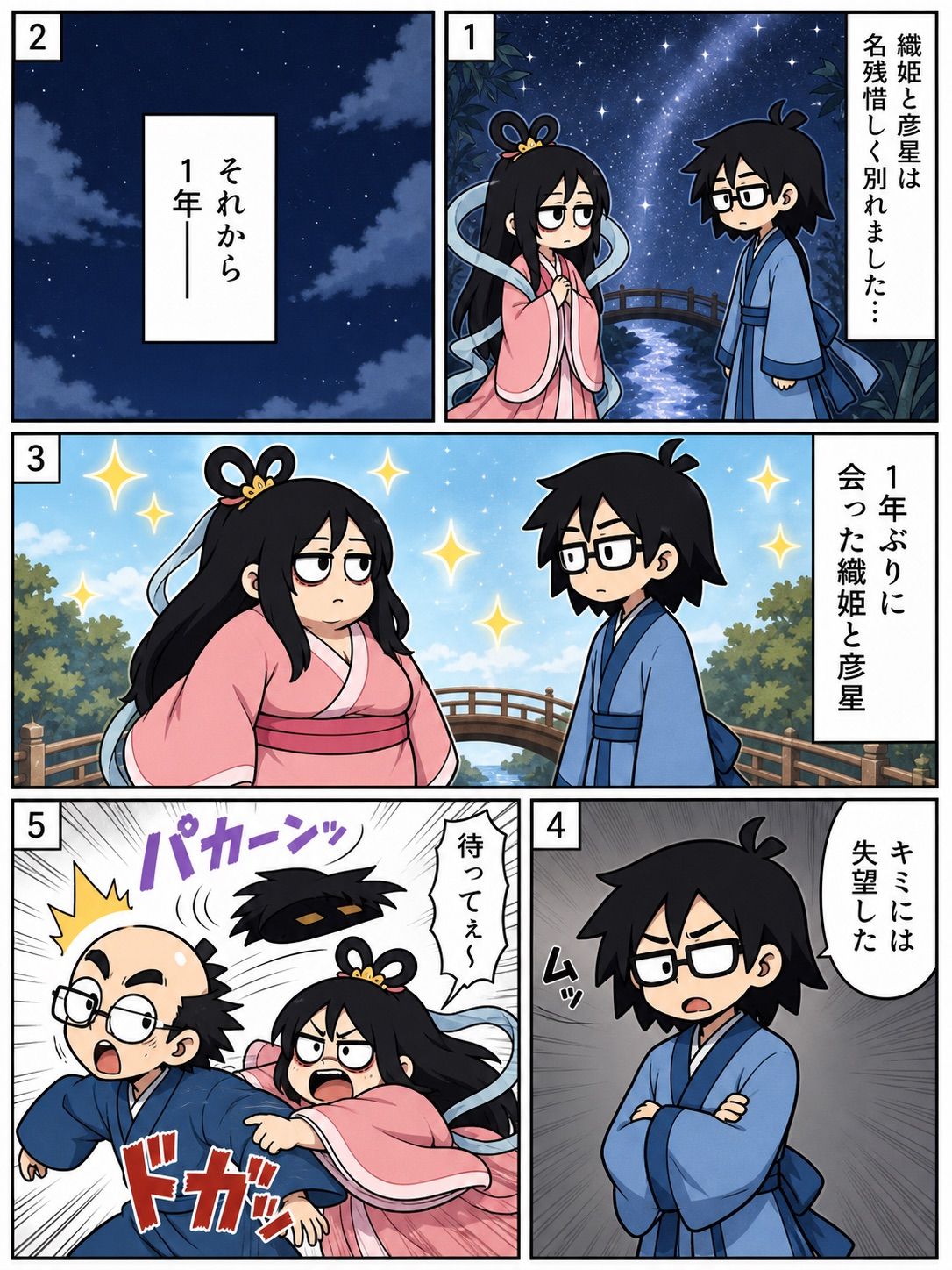
七夕重逢漫画页面
Prompt
Goal: Create a vertical 5-panel Japanese manga page about Tanabata, showing Orihime and Hikoboshi meeting again after one year, with a sudden comedic emotional change.

Canvas: Portrait manga page, roughly 3:4 aspect ratio, thick black outer border, white gutters between panels, clean digital anime line art with soft coloring and dramatic manga effects.

Layout: Use exactly 5 numbered panels with small white square number boxes in the upper-left corner of each panel. Panel 1 is the top-right panel, Panel 2 is the top-left panel, Panel 3 is a wide middle panel spanning the page width, Panel 4 is the bottom-right panel, and Panel 5 is the bottom-left panel.

Characters: Two chibi/anime-style mythological characters. Orihime is a young woman with long black hair, a looped princess hairstyle ornament, sleepy half-lidded eyes, and flowing pale blue ribbons, wearing a pink kimono with a darker pink obi. Hikoboshi is a young man with messy black hair, rectangular black glasses, and a blue kimono with a dark blue sash. In Panel 5 he appears comically transformed into a balding middle-aged version with glasses, side hair, and a startled expression while still wearing blue.

Panel details:
- Panel 1: Nighttime Milky Way scene with stars, a small arched bridge over a glowing river, leafy silhouettes at the edges. Orihime and Hikoboshi stand facing each other sadly after parting. Add one vertical narration box on the right reading {argument name="panel 1 narration" default="Orihime and Hikoboshi parted with regret..."}.
- Panel 2: Quiet dark blue night sky with scattered stars and soft clouds only, no characters. Center a vertical white narration box reading {argument name="panel 2 narration" default="And then, one year later—"}.
- Panel 3: Bright daytime reunion scene on the same bridge with blue sky, trees, sparkles, and both characters facing each other. Orihime looks unimpressed and heavy-lidded; Hikoboshi looks uncertain. Add one vertical narration box on the right reading {argument name="panel 3 narration" default="Orihime and Hikoboshi met for the first time in a year"}. Include several golden star sparkles around them.
- Panel 4: Hikoboshi alone, arms crossed, angry and disappointed, on a gray radial speed-line background. Add a white speech balloon on the upper right reading {argument name="panel 4 speech" default="I’m disappointed in you"}. Add a small black sound effect near him suggesting a tense grunt.
- Panel 5: High-energy slapstick action panel with black-and-white speed lines. Orihime, furious, punches Hikoboshi hard from behind/side, sending his balding comic version lurching forward with glasses askew and a shocked open mouth. Add a purple impact sound effect at the top reading {argument name="impact sound effect" default="PAKAAAN"}, a large red impact sound effect near the bottom, a yellow burst by his head, and a white speech balloon from Orihime reading “Wait a second!”

Visual style: Cute chibi manga characters, expressive faces, bold clean outlines, polished webcomic coloring, dramatic Japanese manga paneling, high contrast between romantic starry Tanabata atmosphere and sudden slapstick violence.

Constraints: Use exactly 5 panels, exactly 2 main characters, exactly 5 panel number labels, exactly 4 white narration/speech boxes or balloons plus the action sound effects described, no watermark, no extra panels, no extra characters.- Category
- Characters & People
- Model
- GPT Image 2
- Creator
- しゅんち(小柴俊太郎)@神戸AI漫画家
- Source ID
- 27958
- Published
- Jul 7, 2026
Views0