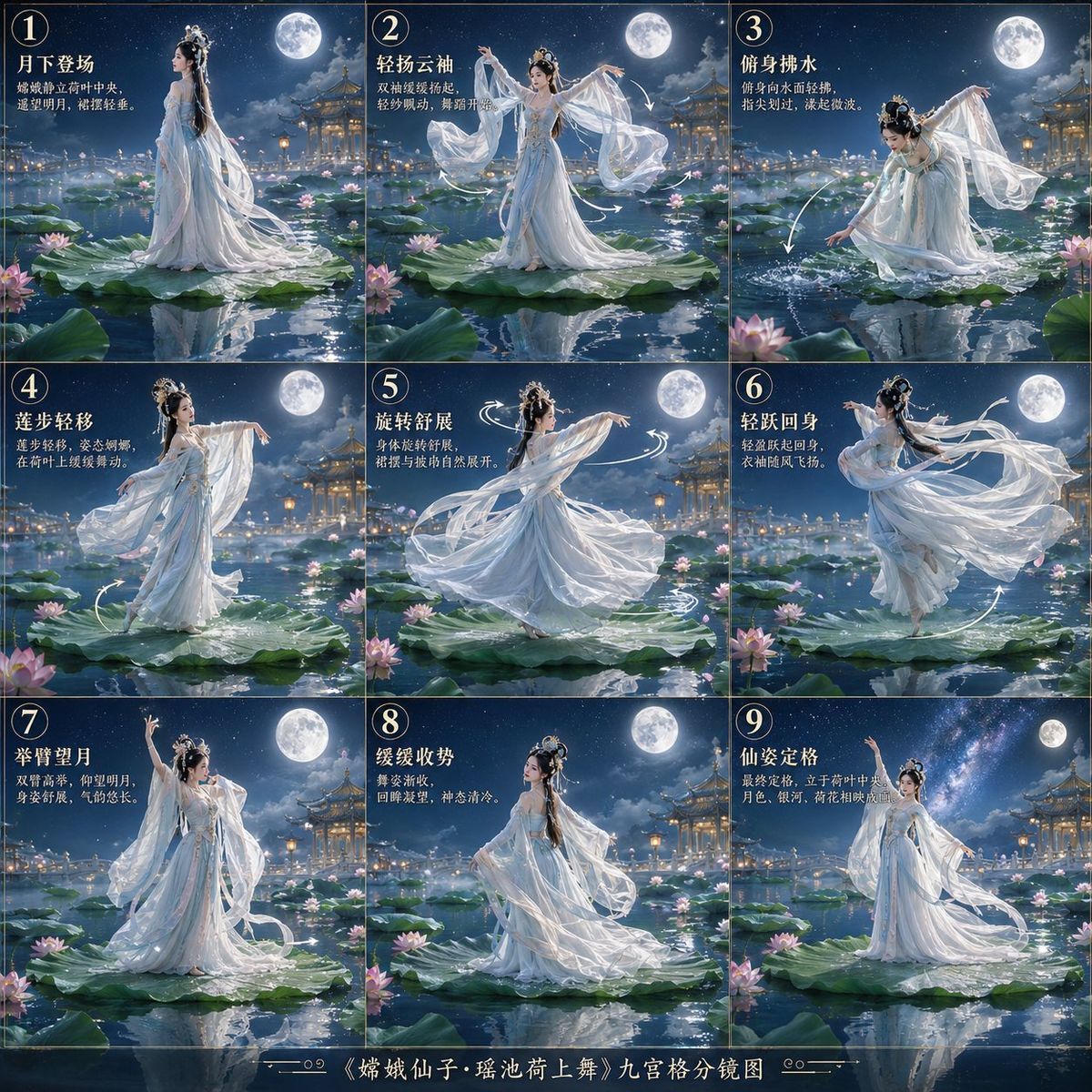
嫦娥荷花舞分镜图
Prompt
Goal: Create a Chinese classical mythology cinematic storyboard poster titled {argument name="poster title" default="《嫦娥仙子·瑶池荷上舞》九宫格分镜图"}, showing Chang'e performing an elegant continuous classical dance on giant lotus leaves in the heavenly Yaochi pond.

Canvas: Square 1:1 poster, arranged as an exact 3×3 grid with thin dark divider lines, like a film director's storyboard contact sheet. Add a narrow decorative bottom title strip with small ornamental flourishes and the centered Chinese title. Each panel should feel like a standalone fantasy painting while also connecting into one complete dance sequence.

Visual style: Ultra-detailed cinematic Chinese myth fantasy, moonlit blue-silver palette, romantic and ethereal, soft mist, sparkling water reflections, luminous full moon, starry night sky, distant golden palace pavilions and lanterns, lotus blossoms and broad lotus leaves across the heavenly lake. Use realistic digital painting with delicate silk textures, high detail, gentle glow, and graceful motion blur in flowing fabric.

Main subject: {argument name="character name" default="Chang'e fairy"}, a beautiful Chinese goddess with long black hair, ornate silver-and-jade hair ornaments, pale luminous skin, serene expression, and a layered flowing {argument name="dress color" default="white and ice-blue"} Hanfu dance costume with translucent gauze sleeves and long ribbons. She dances barefoot or lightly standing on enormous lotus leaves above reflective water.

Layout and panel content: Include exactly 9 numbered panels, each with a circled number in the upper-left corner and Chinese stage directions in white/gold calligraphy-style text. The 9 panels are: 1) “月下登场” — Chang'e enters under the moon, standing side-on on a giant lotus leaf, veil trailing behind her. 2) “轻扬云袖” — she raises both cloud sleeves, arms opening outward, silk sleeves floating in the air. 3) “俯身掬水” — she bends down to touch or scoop water, droplets and ripples sparkling beside the lotus leaf. 4) “莲步轻移” — she steps delicately across the lotus leaves with one arm extended, hem and ribbons sweeping low. 5) “旋转舒展” — central spinning pose, dress and sleeves spread in a circular whirl, add white motion arcs around her. 6) “轻跃回身” — she leaps and turns back, skirt and ribbons flying dramatically to the side. 7) “举臂望月” — she raises one arm toward the full moon and gazes upward, a proud elegant silhouette. 8) “缓缓收势” — she slows and gathers the dance, seated or lowering gracefully on the lotus leaf with relaxed flowing sleeves. 9) “仙姿定格” — final iconic pose, standing tall with one arm lifted, moon and Milky Way behind her, dress settling into a majestic finish.

Text and graphic details: Use the Chinese panel titles exactly as listed, plus short smaller Chinese descriptive lines under each title to mimic a storyboard annotation. Add white hand-drawn curved arrows and motion trails in several panels to show the choreography. Bottom title strip text should read {argument name="bottom title text" default="《嫦娥仙子·瑶池荷上舞》九宫格分镜图"}. Keep the typography elegant and legible, but the image should remain primarily visual.

Constraints: Use exactly 9 panels in a 3×3 arrangement, one goddess figure per panel, consistent costume and face across all panels, consistent moonlit Yaochi setting, no modern objects, no extra panels, no watermark, no logo.- Category
- Posters & Typography
- Model
- GPT Image 2
- Creator
- DeepBlue深藍
- Source ID
- 28624
- Published
- Jul 13, 2026
Views4