18

Minimalist anime woman logo: GPT Image 2 prompt
Enlarge

Minimalist anime woman logo: GPT Image 2 prompt

Prompt
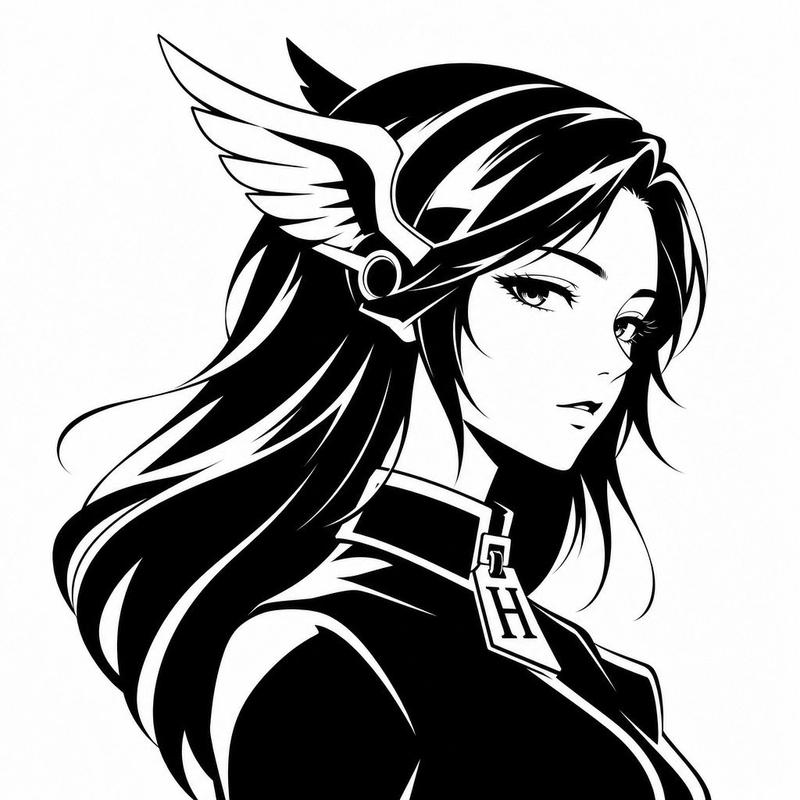
Create a minimalist black-and-white vector avatar logo of a mythic anime woman shown in elegant side profile facing right, cropped from the chest up on a plain white background. Give her long flowing {argument name="hair color" default="black"} hair with bold white highlight streaks and smooth graphic shapes, rendered as high-contrast ink silhouette art with clean sharp edges. She wears a winged headpiece reminiscent of Hermes or a messenger god helmet, with one large white feathered wing visible on the side of her head and a circular metallic earpiece detail. Dress her in a sleek high-collar garment with a luxury-fashion feel, and hang a prominent pendant or zipper pull shaped like the letter {argument name="monogram letter" default="H"} at the center of the collar. The face is intentionally obscured by a centered soft gray rectangular blur block covering most facial features, creating a censored anonymous profile-image effect. Overall style: luxury brand avatar, fashion logo, anime-inspired goddess silhouette, monochrome vector emblem, smooth negative-space highlights, balanced composition, modern and iconic, suitable for a social media profile picture.
Category
Characters & People
Model
GPT Image 2
Views0
Source ID
awesome-portrait-92
Published
Apr 29, 2026

Guide

About "Minimalist anime woman logo: GPT Image 2 prompt"

What is this prompt for?

"Minimalist anime woman logo: GPT Image 2 prompt" AI image prompt for GPT Image 2 (Characters & People). Create a minimalist black-and-white vector avatar logo…

The full copyable prompt and example visuals above are ready for AI image generation or one-click recreate in Picva.

How to use this prompt

  1. Step 1

    Open the prompt detail

    Review the example visuals, category, and full prompt text for "Minimalist anime woman logo: GPT Image 2 prompt".

  2. Step 2

    Copy the prompt

    Copy the prompt body from this page, or load it directly in Studio.

  3. Step 3

    Pick a model (GPT Image 2)

    Prefer GPT Image 2. If you switch models, keep subject and composition and tweak style terms.

  4. Step 4

    Generate and export

    Recreate the look in Picva, or export into your workflow for editing and publishing.

FAQ

What is the "Minimalist anime woman logo: GPT Image 2 prompt" prompt?
It is an AI image-generation prompt for GPT Image 2 in the Characters & People category. This page includes the full prompt text, example visuals, and a one-click recreate path in Picva.
How do I use this prompt to generate an image?
Copy the prompt from this page, or use Generate / Studio. Paste it into a compatible image model, or recreate the look in Picva with optional reference images.
Which model is this prompt for?
This page lists GPT Image 2. Most descriptive prompts also transfer to nearby image models such as GPT Image, Flux, or Midjourney with light style tweaks.
Can I use the result commercially?
You can usually copy the prompt for creation, but commercial use of the final image depends on the model terms, reference-image rights, and the generated content. Follow the source author and platform rules.