18

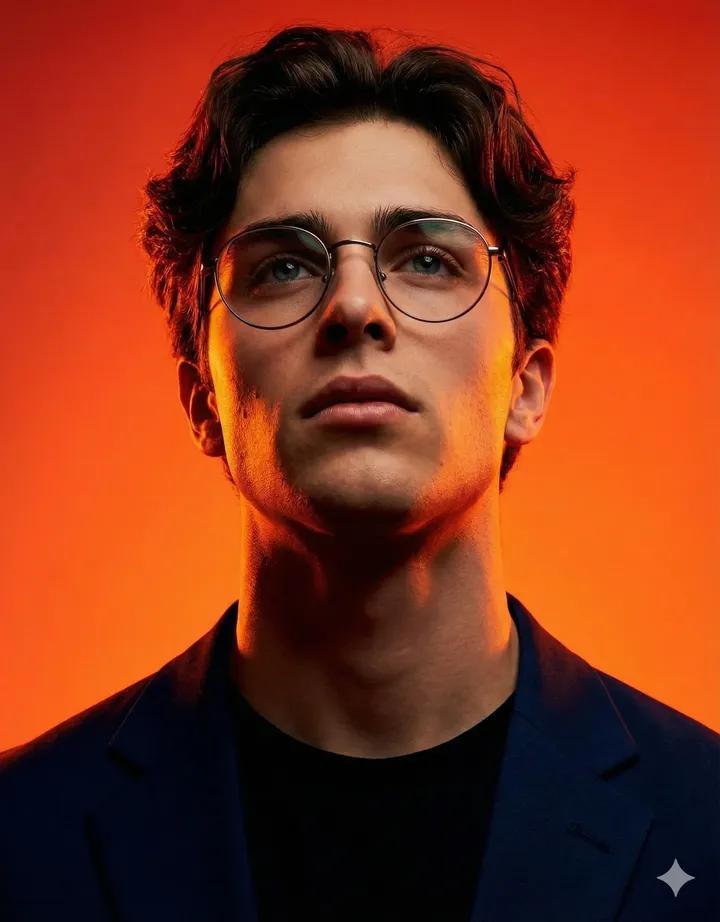
橘红光影下的电影感极简人像
Enlarge

橘红光影下的电影感极简人像

Prompt
4:5 aspect ratio, 2K quality. Photorealistic studio portrait. Use the person from the attached reference photo. Keep the face, skin tone, hairstyle, and likeness exactly the same. The subject wears a fitted black pique polo shirt with visible cotton texture. Deep matte black color. Expression is serious and focused. The subject looks slightly upward and off camera. Low angle shot, medium close up framing of the face and shoulders. Background is a solid orange red color with smooth gradients. No patterns. Dramatic studio lighting with strong shadows on the face. Warm orange and red tones. Strong rim light to separate the subject from the background. High contrast, intense, cinematic mood. Sharp focus on the face, smooth background.
Category
Photography & Realism
Model
Nano Banana Pro
Creator
@harboriis
Views58
Source ID
11644
Published
Apr 23, 2026

Guide

About "橘红光影下的电影感极简人像"

What is this prompt for?

"橘红光影下的电影感极简人像" AI image prompt for Nano Banana Pro (Photography & Realism). 纵横比 4:5,2K 画质。 逼真的影棚肖像。 使用附件参考照片中的人物。保持面部、肤色、发型和相似度完全一致。 主体穿着合身的黑色珠地网眼 Polo 衫,棉质纹理…

The full copyable prompt and example visuals above are ready for AI image generation or one-click recreate in Picva.

How to use this prompt

  1. Step 1

    Open the prompt detail

    Review the example visuals, category, and full prompt text for "橘红光影下的电影感极简人像".

  2. Step 2

    Copy the prompt

    Copy the prompt body from this page, or load it directly in Studio.

  3. Step 3

    Pick a model (Nano Banana Pro)

    Prefer Nano Banana Pro. If you switch models, keep subject and composition and tweak style terms.

  4. Step 4

    Generate and export

    Recreate the look in Picva, or export into your workflow for editing and publishing.

FAQ

What is the "橘红光影下的电影感极简人像" prompt?
It is an AI image-generation prompt for Nano Banana Pro in the Photography & Realism category. This page includes the full prompt text, example visuals, and a one-click recreate path in Picva.
How do I use this prompt to generate an image?
Copy the prompt from this page, or use Generate / Studio. Paste it into a compatible image model, or recreate the look in Picva with optional reference images.
Which model is this prompt for?
This page lists Nano Banana Pro. Most descriptive prompts also transfer to nearby image models such as GPT Image, Flux, or Midjourney with light style tweaks.
Can I use the result commercially?
You can usually copy the prompt for creation, but commercial use of the final image depends on the model terms, reference-image rights, and the generated content. Follow the source author and platform rules.